Tools / Power Tools
Dremel GO 4V Max Cordless Screwdriver User Manual
Quick guide and user manual for the Dremel GO 4V Max Cordless Screwdriver. Learn how to charge, operate, set torque, and maintain your tool safely.
Table of contents
Manual images
Click an image to enlargeQuick guide from the manual
The Dremel GO is a 4V Max cordless screwdriver designed for light-duty fastening tasks. Before using the tool, ensure it is fully charged. To operate, insert a bit into the holder, select the rotation direction, and apply pressure to the bit holder to start the tool. Always store the tool with the rotation switch in the middle (locked) position to prevent accidental activation.
Product description
The Dremel GO features a 1/4" hex shank bit holder, a direction of rotation switch that also acts as a shaft lock, a battery charge indicator, and a torque selector with six positions. It is powered by an internal lithium-ion battery and charged via a micro USB port.
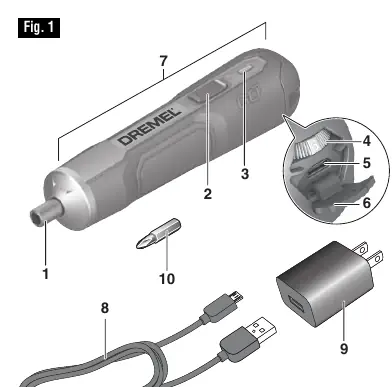
Charging the tool
The tool does not come fully charged from the factory. To charge:
- Insert the USB cable into the power adapter and plug the adapter into a standard outlet.
- Open the micro USB port cover on the tool and plug in the cable.
- The battery charge indicator will flash green during charging and turn solid green when fully charged.
- The tool cannot be used while charging.
- If the tool does not charge, check the outlet, ensure the USB cable is properly connected, and clean the USB terminals if dirty.
Operating instructions
Inserting bits: Push the bit into the bit holder as far as it will go.
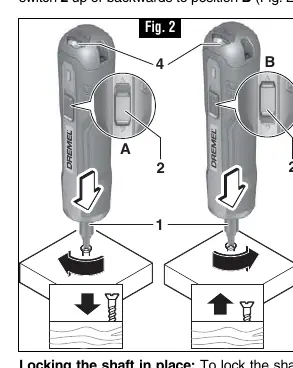
Direction of rotation: Slide the switch down/forward for clockwise (driving screws) or up/backward for counterclockwise (loosening screws). Slide to the middle position to lock the shaft for manual screwing.
Setting torque: Use the torque selector to choose between six positions. Position 1 is for small screws or soft materials; Position 6 is for large screws or hard materials.
Starting and stopping: Apply pressure to the bit holder to start the tool. Stop applying pressure to switch it off.
Maintenance and cleaning
The tool contains no user-serviceable parts. Keep the tool clean by using compressed dry air on the vents. Do not use harsh solvents like gasoline or ammonia, as they can damage plastic parts. If the battery performance drops significantly, contact a Dremel Service Center for replacement.
Safety information
Always wear eye protection. Keep the work area clean and well-lit. Do not operate the tool in explosive atmospheres. When fastening, be aware of hidden wiring. If the tool overheats or the battery is depleted, the electronic protection circuit will automatically switch the tool off.
Manufacturer information
Dremel
Practical help
Common problems
Tool does not charge
Check if the outlet has power, ensure the USB cable is properly connected to both the tool and adapter, and clean the USB terminals with a cotton swab and alcohol if dirty.
Short battery life
The battery pack may be nearing the end of its life. Contact Dremel customer service for replacement.
Before use
- Charge the tool fully before initial use.
- Ensure the switch is in the off-position before connecting to power.
- Wear eye protection.
- Check the battery charger, cable, and plug for damage.
- Ensure the work area is clean and well-lit.
Specs in practice
- 1/4" Hex shank
- The size of the bit holder for screwdriver bits.
Images and diagrams
- Fig 1: Overview of the tool, parts, and charging port.
- Fig 2: Direction of rotation switch (A/B) and shaft lock (C).
- Fig 3: Torque selector and shaft lock.
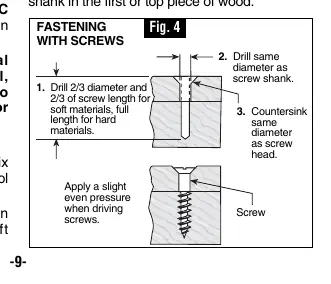
- Fig 4: Fastening with screws procedure.
Model compatibility
- Use only the Dremel GO charger (Model 510).
- Use only specifically designated battery packs.

Manual page author
Emily Carter
User documentation editor
Prepares concise manual descriptions and highlights the most useful setup, operation, and maintenance information for readers.