Tools / Power Tools
User Manual for Dremel 8250 Cordless Rotary Tool
Comprehensive user guide for the Dremel 8250 cordless rotary tool. Includes setup, operation, speed settings, maintenance, and safety instructions.
Table of contents
Manual images
Click an image to enlargeQuick guide from the manual
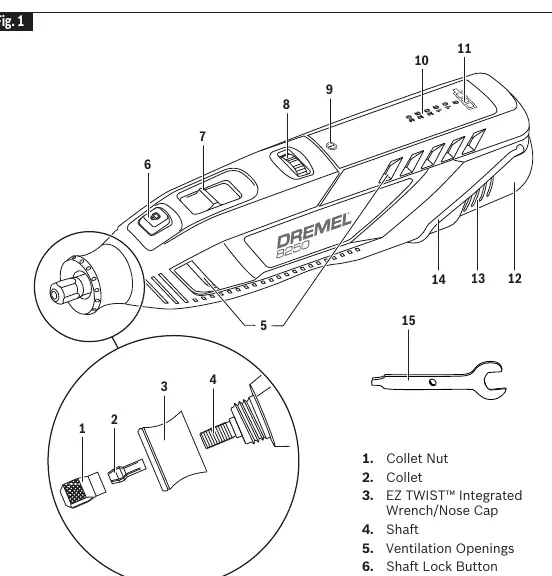
The Dremel 8250 is a cordless rotary tool designed for carving, engraving, routing, grinding, sharpening, cutting, cleaning, polishing, sanding, and drilling. Before using the tool, ensure the battery is charged and the accessory is securely installed. Always wear appropriate personal protective equipment, including eye protection.
Assembly
Inserting and Releasing Battery Pack
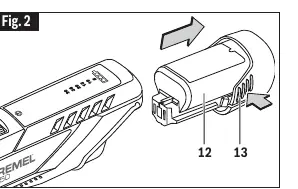
To remove the battery pack, press the release tabs on both sides of the battery and pull it away from the tool housing. To insert, align the battery with the tool and slide it in until it locks into position.
Collet Nut and EZ Twist Nose Cap
The tool uses a collet system to hold accessories. To change an accessory:
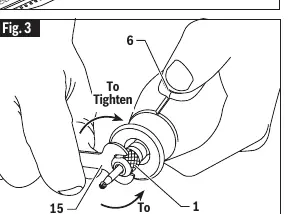
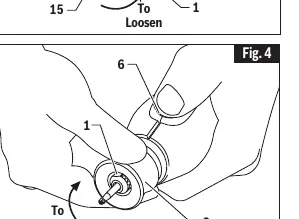
- Press the shaft lock button and rotate the shaft until it engages.
- Use the collet wrench to loosen the collet nut.
- Insert the new accessory shank as far as possible into the collet.
- Tighten the collet nut securely.
- Alternatively, use the EZ Twist integrated wrench on the nose cap to loosen or tighten the collet nut without the standard wrench.
Collets
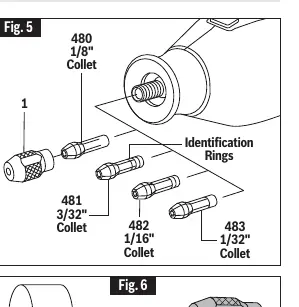
Four different collet sizes are available to accommodate various shank sizes. Collet sizes are identified by the number of rings on the back end: 1/32" (1 ring), 1/16" (2 rings), 3/32" (3 rings), and 1/8" (no rings).
Operation
Switching On/Off
The tool is turned on by sliding the switch button forward and turned off by sliding it backward.
Variable Speed Dial
The speed can be adjusted during operation using the variable speed dial. The speed indicator lights will show the current setting. Refer to the speed settings chart for recommended speeds based on the material and accessory type.
LED Behavior
- Speed LED: Remains illuminated for 5 minutes after turning off the tool to show the last speed setting.
- Warning and Battery Gauge LEDs: Remain illuminated for 30 seconds after turning off the tool.
- To turn off all LEDs immediately, remove the battery pack.
Red Warning LED
The red warning LED illuminates for the following reasons:
- Excessive tool temperature: Turn off, remove accessory, and run tool without load to cool.
- Excessive battery temperature: Turn off, remove battery, and allow it to cool.
- Tool stall/overload: Reduce pressure on the tool.
Maintenance
Keep ventilation openings clean and free of foreign matter. Do not attempt to clean by inserting pointed objects through openings. Periodically examine the motor. If the tool shows decreased performance or shorter run times, the battery pack may need replacement.
Specifications
- Model: 8250
- Voltage: 10.8V/12V MAX
- Rated Speed: 5,000 - 30,000/min
- Collet Capacities: 1/32", 1/16", 3/32", 1/8"
- Charger: GAL12V-20
Manufacturer information
Dremel
Practical help
Common problems
Tool stalls or overload warning
Reduce the pressure being applied to the tool and let the speed do the work.
Battery not charging
Ensure battery temperature is between 32°F (0°C) and 113°F (45°C). Check for dirt on terminals and clean with alcohol if necessary.
Tool won't start
Check if the battery is properly inserted and charged.
Before use
- Ensure the battery pack is fully charged.
- Check that the accessory is in good condition and not damaged.
- Ensure the collet nut is securely tightened.
- Wear eye protection and other necessary personal protective equipment.
- Ensure the work area is clean and well-lit.
Specs in practice
- Collet Capacities
- The range of accessory shank diameters the tool can accept (1/32" to 1/8").
Images and diagrams
- Fig 1: Overview of tool components including collet, switch, speed dial, and battery.
- Fig 2: How to remove and insert the battery pack.
- Fig 3: Using the collet wrench to adjust the collet nut.
- Fig 4: Using the EZ Twist nose cap to adjust the collet nut.
- Fig 5: Identifying collet sizes by the number of rings.
Model compatibility
- Use only Dremel branded accessories.
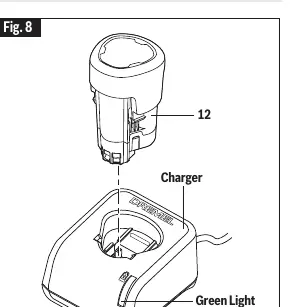
- Use only the specified Dremel GAL12V-20 charger.

Manual page author
David Miller
Documentation analyst
Organizes user manual content into clear summaries, with attention to model details, product context, and everyday usability.