Power / Batteries Chargers
Duracell High Power Inverter 1200W / 3000W User Guide
Quick guide for the Duracell High Power Inverter 1200W/3000W. Learn about installation, wiring, connecting appliances, safety features, and troubleshooting.
Table of contents
Quick guide from the manual
This guide provides essential information for the safe installation and operation of the Duracell High Power Inverter (1200W and 3000W models). Always ensure proper ventilation, use correct wire gauges, and follow all safety precautions to prevent damage to the inverter or connected devices.
Installation
Proper installation is critical for performance and safety. Ensure all connections are clean and tight.
- Wire Selection: Use the thickest gauge possible to minimize voltage drop (ideally under 2%). Refer to the wire gauge chart for your specific model and cable length.
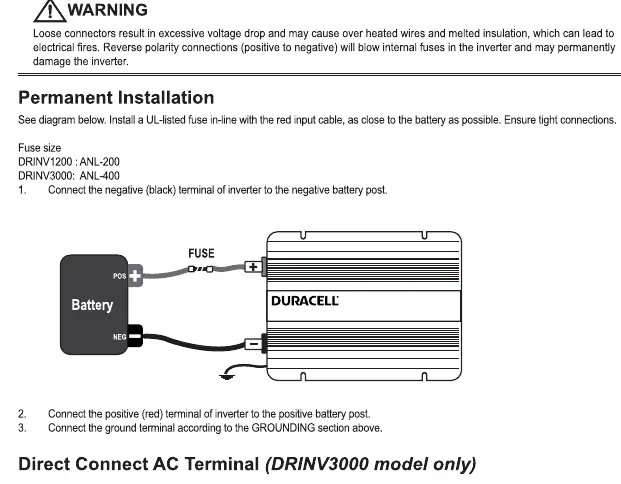
- Permanent Installation: Install a UL-listed fuse in-line with the red input cable, as close to the battery as possible.
- Grounding: Connect the ground terminal to the earth ground (for home use) or the vehicle chassis (for mobile use).
- Connecting to Battery: Follow the specific sequence: Bolt, Washer, Inverter Terminal, Cable, Washer, Locking Washer, Nut.
Using the Inverter
To operate the inverter, ensure all connections are secure and DC power is available. Connect your devices to the AC outlets, then turn the inverter On/Off switch to the ON position. Always turn the switch to OFF when the inverter is not in use to prevent battery discharge.
Safety and Protection
The inverter includes built-in protection features that will trigger an alarm or shut down the unit if necessary:
- Under Voltage: Shuts down at 10.0V to protect the battery.
- Over Voltage: Shuts down if input voltage exceeds 15V (1200W) or 16V (3000W).
- Over Load: Shuts down if continuous power exceeds the rated limit for more than 20 seconds.
- Over Temperature: Shuts down if the unit overheats; ensure cooling fans are not obstructed.
- Short Circuit: The unit will beep and shut down if a short circuit occurs.
Troubleshooting
If you experience issues, check the following:
- No Power: Check if the battery voltage is too low or if fuses/circuit breakers have tripped.
- No Power: Inspect all connections for looseness or corrosion.
- Inverter turns off quickly: Check if the total wattage of connected devices exceeds the rated continuous wattage.
- Alarm/Fault LED: Usually indicates low voltage, overload, or overheating.
Manufacturer information
Duracell
Practical help
Common problems
No power output
Check battery voltage, fuses, circuit breakers, and ensure all cable connections are tight.
Inverter shuts down frequently
Verify that the total wattage of connected appliances does not exceed the inverter's rated continuous power.
Alarm sounds or Fault LED is on
Check for low battery voltage, overload condition, or overheating. Ensure cooling vents are not blocked.
Before use
- Ensure the inverter switch is in the OFF position before connecting to the battery.
- Verify that the battery voltage matches the inverter input requirements (12V).
- Use a UL-listed fuse in-line with the red input cable.
- Ensure at least 6 inches of clearance in front and behind the unit for ventilation.
- Check that all cable connections are clean and tight.
Specs in practice
- Continuous Rated Power
- The maximum power the inverter can supply continuously (1200W or 3000W).
- Peak Surge Power
- The maximum power the inverter can handle for short durations (2400W or 6000W).
- Low Battery Voltage Shutdown
- The voltage level at which the inverter turns off to prevent deep battery discharge.
Images and diagrams
- The wiring diagram shows the correct sequence for connecting the battery cable to the inverter terminal: Bolt, Washer, Inverter Terminal, Cable, Washer, Locking Washer, and Nut.
- The permanent installation diagram illustrates the placement of the in-line fuse on the positive (red) cable between the battery and the inverter.
Model compatibility
- AC extension wires must not be thinner than 10AWG.
- The 3000W model features a remote On/Off switch capability.
- The 3000W model includes a digital display to toggle between Watts and Volts.

Manual page author
David Miller
Documentation analyst
Organizes user manual content into clear summaries, with attention to model details, product context, and everyday usability.