Power / Power Inverters
User Manual for Duracell Powerbank PB1
Quick guide for the Duracell Powerbank PB1 (3350 mAh). Learn how to charge your power bank, charge your devices, understand battery indicators, and follow safety and storage guidelines.
Table of contents
Manual images
Click an image to enlargeQuick Guide
The Duracell Powerbank PB1 is a portable charging device designed for most smartphones. Before use, ensure the device is charged and check that your charging environment is clean and dry. Do not operate the device in closed environments like pockets or bags, and keep it away from extreme temperatures.
Included in the Package
- PowerBank PB1 (3350 mAh / 12.2Wh)
- Micro USB to USB charging cable
- User manual
Charging Instructions
Follow these steps to use your PowerBank:
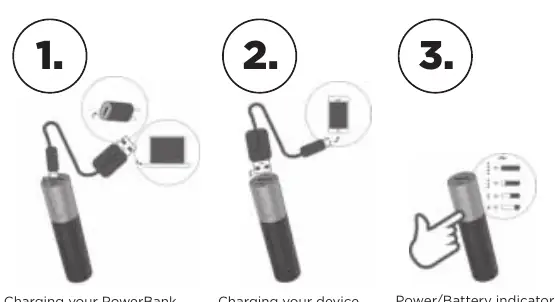
- Charging your PowerBank: Connect the provided Micro USB cable to the PowerBank and a power source.
- Charging your device: Connect your device to the PowerBank using a compatible cable to begin charging.
- Battery Indicator: Observe the LED indicators on the PowerBank to check the remaining battery level.
Battery Safety and Care
To ensure safe operation and longevity of your PowerBank, adhere to the following guidelines:
- Operating Temperature: Use the device within the range of 0°C to 40°C.
- Storage: Store in a cool, dry place at approximately 25°C ± 5°C.
- Handling: Do not disassemble, crush, short-circuit, or expose the battery to fire or temperatures above 60°C.
- Environment: Do not expose to rain, snow, or aerosol sprays.
- Usage: Do not use if the device is damaged or modified. Do not use a faulty charger to charge the PowerBank.
Warranty and Disposal
This product includes a 3-year limited warranty covering defects in manufacture and workmanship under normal use. The warranty does not cover damage from misuse, accidents, unauthorized repairs, or environmental conditions. For service or repair, contact Duracell Consumer Relations. Do not dispose of this device with household waste; follow local requirements for recycling lithium rechargeable devices.
Manufacturer information
Duracell
Practical help
Common problems
PowerBank not charging device
Ensure the charging cable is securely connected and the PowerBank has sufficient charge.
PowerBank overheating
Stop operation immediately. Ensure the device is used within the 0°C to 40°C temperature range and is not in a closed environment.
Device not charging
Verify that the charger used to charge the PowerBank is not faulty, as this can cause fire or injury risks.
Before use
- Ensure the PowerBank is fully charged before first use.
- Check that the charging cable is compatible with your smartphone.
- Verify that the operating surface is clean, dry, and free of solvents.
- Inspect the PowerBank for any signs of damage or modification.
- Ensure the device is not being used in a closed environment like a pocket or bag.
Specs in practice
- Operating Temperature
- 0°C to 40°C
- Storage Temperature
- 25°C ± 5°C
Images and diagrams
- Step 1: Connect the Micro USB cable to the PowerBank to charge it.
- Step 2: Connect your device to the PowerBank to charge your device.
- Step 3: Check the LED indicators to see the battery level.
Model compatibility
- Compatible with most Smart Phones.

Manual page author
Michael Turner
Technical manual editor
Reviews PDF manuals for structure, safety notes, and practical product details so readers can find the right information quickly.