HVAC / Heat Pumps
User Manual for Duracell Pocket Inverter 175W
Quick guide for the Duracell Pocket Inverter 175W. Learn how to connect the inverter using the cigarette lighter plug or battery clips, understand safety warnings, and troubleshoot common issues.
Table of contents
Manual images
Click an image to enlargeQuick guide from the manual
The Duracell Pocket Inverter 175W converts 12V DC power from your vehicle or battery into 120V AC power. It is designed for consumer electronics and small appliances. Use the cigarette lighter plug for loads up to 130W and the provided battery clips for loads greater than 130W.
Important Safety Information
Warnings:
- Keep children away from the inverter; it generates lethal AC power similar to a wall outlet.
- Do not use in the presence of flammable fumes or gases (e.g., boat bilge, near propane tanks).
- Do not use in enclosures containing lead-acid batteries, which may vent explosive hydrogen gas.
- The housing can reach 140°F (60°C) during high-power operation; keep away from heat-sensitive materials.
- Do not expose to water, rain, snow, or spray.
- Do not connect live AC power to the inverter's AC outlets.
Inverter Features
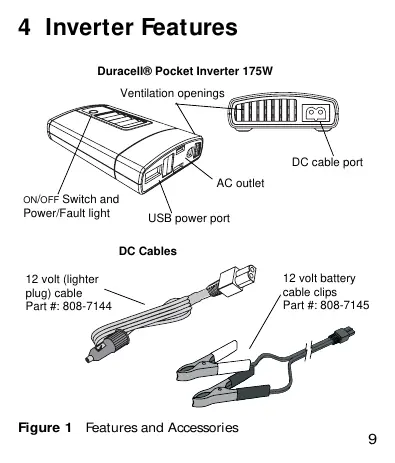
The unit includes an AC outlet, a USB power port, an ON/OFF switch with a power/fault light, and ventilation openings. It comes with two DC cable options: a 12V cigarette lighter plug and 12V battery cable clips.
Using the Inverter
Using the DC Cable with Cigarette Lighter Plug:
- Plug the DC cable into the DC cable port on the inverter, ensuring correct polarity.
- Insert the cigarette lighter plug into the vehicle's 12V outlet.
- Plug your device into the AC outlet or USB port.
- Press the ON/OFF switch.
Using the DC Cable with 12V Cable Clips:
- Attach the red clip to the positive (+) battery terminal.
- Attach the black clip to the negative (-) battery terminal.
- Ensure clips are secure to prevent overheating.
- Plug the DC cable into the inverter port, observing correct polarity.
- Press the ON/OFF switch.
Inverter Operation
When connected and switched ON, the light glows blue to indicate readiness. If the light glows red, a fault has occurred. The inverter will automatically shut down in the event of an overload, low battery voltage (below 10.5V), or overheating.
Troubleshooting
- No lights/AC product not working: Check if the battery is defective or if there are loose connections.
- Measured output too low: The inverter uses a modified sine wave; use a true RMS voltmeter for accurate readings.
- Red fault light ON: The product may exceed the continuous power rating, have a high starting surge, or the battery may be discharged.
- Overheating: Ensure proper ventilation and allow the unit to cool for 15 minutes.
Specifications
- Continuous AC Output Power: 130 W
- Peak AC Output Power: 175 W
- AC Output Voltage: 120 V AC
- AC Output Frequency: 60 ± 1 Hz
- USB Output: 5 V DC, 0.5 A
- DC Input Voltage Range: 10.5–15.5 VDC
- Operating Temperature: 0°C–40°C (32°F–104°F)
Manufacturer information
Duracell
Practical help
Common problems
AC product will not operate, no lights
Check battery condition and ensure all connections are secure.
Measured output voltage is too low
The inverter produces a modified sine wave; use a 'true RMS' voltmeter for accurate measurement.
Red FAULT light is ON
Check for overload (product exceeds 130W continuous), high starting surge, or discharged battery.
Inverter shuts down due to overheating
Unplug from DC source, allow to cool for 15 minutes, remove obstructions, and move to a cooler location.
Before use
- Verify battery voltage is within 10.5–15.5 VDC range.
- Ensure load is 130W or less if using the cigarette lighter plug.
- Use battery clips for loads greater than 130W.
- Check for correct polarity when connecting DC cables.
- Ensure ventilation openings are not blocked.
Specs in practice
- Continuous Power
- The maximum power the inverter can supply indefinitely (130W).
- Low Battery Shutdown
- Automatic shutdown at 10.5V to protect the vehicle battery.
Images and diagrams
- Figure 1 identifies the AC outlet, USB port, ON/OFF switch, and DC cable ports.
- Figure 2 illustrates the correct alignment for inserting the DC cable into the inverter.
Model compatibility
- Not for use with life support systems or medical equipment.
- Not intended for use as an uninterruptible power supply (UPS).
- Some small battery-operated appliances (e.g., rechargeable flashlights) may be damaged by the modified sine wave output.

Manual page author
Michael Turner
Technical manual editor
Reviews PDF manuals for structure, safety notes, and practical product details so readers can find the right information quickly.