Power / Solar Systems
User Manual for Eco-Worthy 100W Portable Solar Panel
Quick guide for the Eco-Worthy 100W Portable Solar Panel. Learn about technical specifications, safety precautions, kickstand adjustment, and connection options for your power station.
Table of contents
Manual images
Click an image to enlargeQuick guide from the manual
The Eco-Worthy 100W Portable Solar Panel is designed for off-grid power generation. It features a foldable design with a built-in adjustable kickstand and comes with an 8-in-1 plug adapter set to ensure compatibility with various power stations. Before use, ensure the panel is not damaged and that your power station is compatible with the 18V output.
Technical Specifications
- Rated Power: 100W
- Solar Cell Type: Monocrystalline
- Maximum/Peak Voltage (Vmp): 18V
- Open Circuit Voltage (Voc): 21.6V
- Short Circuit Current (Isc): 5.9A
- Maximum Current: 5.6A
- Dimensions (Unfolded): 94.5 x 62.5 x 3.0 cm
- Dimensions (Folded): 46.5 x 62.5 x 5.7 cm
- Cable: 3 meters with 5.5*2.1mm connector
Safety Tips
- Do not expose the solar panel to fire or direct heat.
- Do not submerge the panel in water or use it in the rain.
- Do not drop the panel from a height greater than 1 meter.
- Do not pierce the casing with sharp objects, use a hammer on it, or step on it.
- Avoid contact with strong corrosive substances.
What's in the box
- 100W Solar Panel
- Built-in Adjustable Kickstand
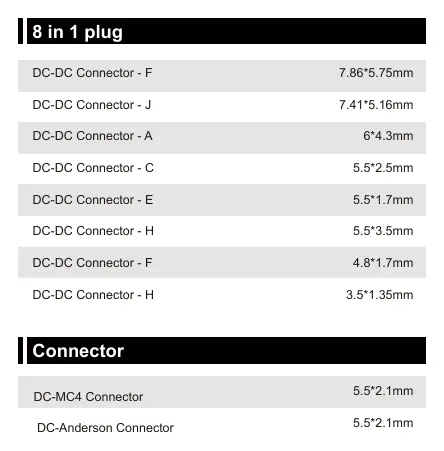
- 8-in-1 Plug Adapter Set
- DC-MC4 Connector
- DC-Anderson Connector
- User Manual
Operation and Setup
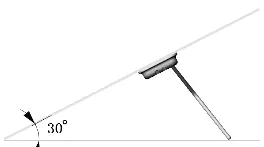
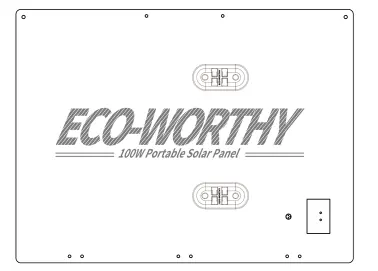
Kickstand Adjustment: The panel features a built-in adjustable bracket. By changing the jack position on the back of the panel, you can set the angle to 30° or 40° to optimize solar charging based on the time of day or latitude. When not in use, the kickstands can be removed and stored on the back of the panel.
Connections: The panel includes an 8-in-1 plug set and DC-MC4/DC-Anderson connectors. Ensure you select the correct adapter for your specific power station input.
Frequently Asked Questions
- Compatible Power Stations: The panel is compatible with brands such as Goal Zero, Flashfish, Jackery, Marbero, and Suaoki.
- Series/Parallel Connection: Yes, multiple panels can be connected in series or parallel using the built-in DC-MC4 connector.
- USB Output: This model does not have a USB output port. Do not attempt to charge smart devices directly from the panel as it may cause damage.
Customer Service
The product includes a 1-year limited warranty and lifetime technical support. For assistance, contact [email protected] or call the support lines: US: 1-866-939-8222, UK: +44 20 7570 0328, GE: +49 693 1090 113.
Manufacturer information
ECO-WORTHY
Practical help
Common problems
No USB output port
The panel does not have a USB port. Do not connect smart devices directly to the panel to avoid potential damage.
Compatibility issues
Ensure your power station is compatible with 18V solar input. The panel works with Goal Zero, Flashfish, Jackery, Marbero, and Suaoki stations.
Connection difficulties
Use the provided 8-in-1 plug set or the DC-MC4/DC-Anderson connectors to match your power station's input port.
Before use
- Inspect the solar panel for physical damage, cracks, or punctures.
- Verify that your power station accepts 18V solar input.
- Select the appropriate adapter from the 8-in-1 set for your device.
- Ensure the kickstand is securely adjusted to 30° or 40° for optimal sun exposure.
Specs in practice
- Rated Power (100W)
- The maximum power output the panel can generate under ideal conditions.
Images and diagrams
- Kickstand adjustment: Change the jack position on the back of the panel to set the angle to 30° or 40°.
- Connector identification: Use the 8-in-1 plug set or DC-MC4 connector to interface with various power stations.
Model compatibility
- The panel can be connected in series or parallel using the built-in DC-MC4 connector.

Manual page author
Michael Turner
Technical manual editor
Reviews PDF manuals for structure, safety notes, and practical product details so readers can find the right information quickly.