Power / Solar Systems
User Manual for Eco-Worthy 100W Portable Solar Panel
Quick guide for the Eco-Worthy 100W Portable Solar Panel. Includes setup instructions, technical specifications, safety warnings, and compatibility information for power stations.
Table of contents
Manual images
Click an image to enlargeQuick guide from the manual
This guide provides essential information for the Eco-Worthy 100W Portable Solar Panel. The panel is designed for portability and features an adjustable kickstand for optimal solar charging angles. It is compatible with various portable power stations using the included DC-MC4 connector.
What is in the box
- 100W Solar panel
- 3*DC adapter
- DC55*25-MC4 adapter
- Built-in adjustable kickstand
- User manual
Technical specifications
- Rated Power: 100W
- Solar Cell: Monocrystalline
- Maximum/Peak Voltage (Vmp): 18V
- Open Circuit Voltage (Voc): 21.6V
- Short Circuit Current (Isc): 5.9A
- Maximum Current: 5.6A
- Extension Cable: 3 meters with 5.5*2.1mm connector
- Dimensions (Unfolded): 94.5 x 62.5 x 3.0 cm
- Dimensions (Folded): 46.5 x 62.5 x 5.7 cm
Safety tips
To ensure safety and longevity of the product, follow these guidelines:
- Do not expose the solar panel to fire or direct heat.
- Do not use the panel in rain or submerge it in water.
- Do not drop the panel from a height greater than 1 meter.
- Do not pierce the casing with nails or sharp objects, break it with a hammer, or step on it.
- Avoid contact with strong corrosive objects.
Using the solar panel
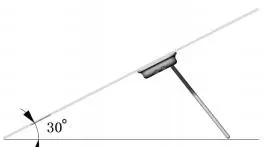
The panel features a built-in adjustable bracket. By changing the jack position on the back of the solar panel, you can adjust the angle to 30° or 40°. This allows you to optimize the angle for solar charging based on the time of day or latitude. When not in use, the kickstands can be removed and stored on the back of the panel.
Compatibility and FAQ
The solar panel can be used in series or parallel by connecting them through the built-in DC-MC4 connector. It is compatible with power stations from brands such as Goal Zero, Flashfish, Jackery, Marbero, and Suaoki. Please note that this panel does not have a USB output port; do not attempt to charge smart devices directly from the panel as it may damage your device.
Customer service
For support, contact Eco-Worthy via email at [email protected] or call 1-866-939-8222. The product includes a 1-year limited warranty and lifetime technical support.
Manufacturer information
ECO-WORTHY
Practical help
Common problems
No USB output port
This panel does not have a USB port. Do not attempt to charge smart devices directly as it may cause negative effects on your device.
Compatibility
The panel is compatible with power stations from Goal Zero, Flashfish, Jackery, Marbero, and Suaoki.
Connection
Panels can be connected in series or parallel using the built-in DC-MC4 connector.
Before use
- Ensure the panel is not exposed to rain or water.
- Check that the panel is not near corrosive objects.
- Verify the connection type (DC-MC4) matches your power station.
- Adjust the kickstand angle (30° or 40°) for optimal sun exposure.
Specs in practice
- Vmp (Maximum Voltage)
- 18V - The voltage at which the panel produces maximum power.
- Voc (Open Circuit Voltage)
- 21.6V - The maximum voltage the panel can output when not connected to a load.
- Isc (Short Circuit Current)
- 5.9A - The maximum current the panel can output when the terminals are shorted.
Images and diagrams
- The kickstand adjustment diagram shows how to change the jack position on the back of the panel to achieve a 30° or 40° tilt angle.
Model compatibility
- Compatible with Goal Zero, Flashfish, Jackery, Marbero, and Suaoki power stations.
- Not suitable for direct charging of smart devices (no USB port).

Manual page author
Emily Carter
User documentation editor
Prepares concise manual descriptions and highlights the most useful setup, operation, and maintenance information for readers.