Industrial / Cleaning Systems
User Guide for Ecolab 0617631A Advanced Main Station/Satellite
Quick guide for the Ecolab 0617631A Advanced Main Station/Satellite. Learn how to operate, rinse, foam, change cleaning agents, and perform disinfection safely.
Table of contents
Manual images
Click an image to enlargeQuick guide from the manual
This document provides essential operating instructions for the Ecolab Advanced Main Station/Satellite. It covers safety precautions, daily operation, and maintenance procedures such as changing cleaning agents and system flushing.
Safety Precautions
- Instructed Personnel Only: The machine must only be operated by trained personnel.
- Protective Gear: Always wear suitable clothing and footwear.
- Water Jet Safety: Never direct the water jet towards people, pets, or electric installations.
- Spray Handle: Never block the release of the spray handle. Always activate the locking device on the spray handle when replacing nozzles.
- Usage: Only use water from the system for cleaning purposes.
Start/Preparing: Rinsing
To begin the rinsing process:
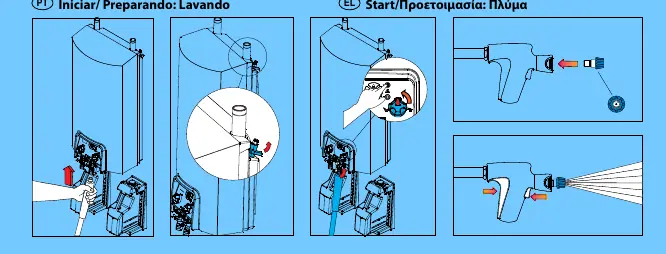
- Ensure the system is connected to the water supply.
- Activate the spray handle to release the water jet.
- Direct the jet safely at the surfaces to be cleaned.
Preparing: Foaming
To use the foaming function:
- Select the foaming mode on the main station control panel.
- Activate the spray handle to apply foam to the desired surfaces.
Changing Cleaning Agent
Follow these steps to change the cleaning agent container:
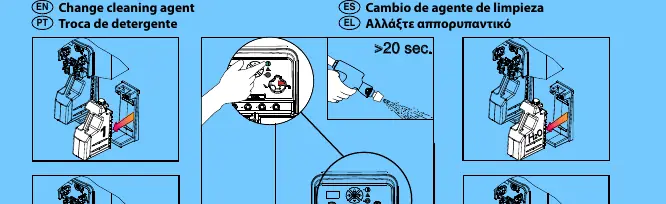
- Remove the empty container from the station.
- Insert the new cleaning agent container into the designated slot.
- Flush the system for at least 20 seconds to ensure the new agent is primed and the lines are clear.
Disinfection using P3-User Pack
To perform disinfection:
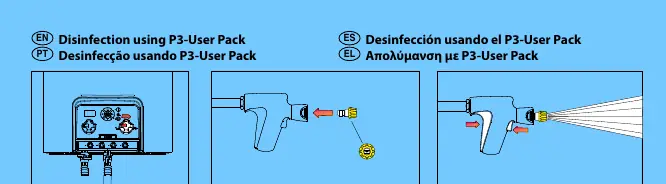
- Attach the P3-User Pack to the system.
- Ensure the system is set to the correct mode for disinfection.
- Activate the spray handle to apply the disinfectant.
Stop Procedure
To safely stop the system:
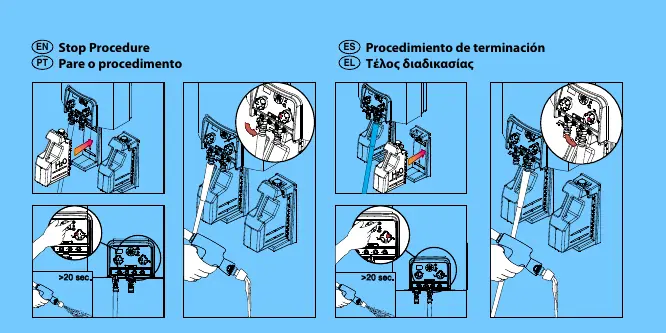
- Remove the cleaning agent container.
- Flush the system thoroughly for at least 20 seconds to remove any residual chemicals from the lines.
Manufacturer information
Ecolab Inc.
Practical help
Common problems
System not dispensing foam or cleaning agent
Ensure the correct mode is selected on the station control panel and that the cleaning agent container is properly inserted.
Chemical residue in lines
Always perform the stop procedure by flushing the system for at least 20 seconds after removing the cleaning agent.
Before use
- Verify you are trained personnel.
- Wear appropriate protective clothing and footwear.
- Check that the water supply is connected.
- Ensure the spray handle is in good working condition.
- Check that the cleaning agent container is correctly seated.
Specs in practice
- >20 sec. flushing
- Required duration for flushing the system when changing cleaning agents or stopping the machine to prevent cross-contamination and line blockage.
Images and diagrams
- The manual provides visual steps for rinsing, foaming, changing cleaning agents, and disinfection.
- Diagrams illustrate the insertion of containers and the operation of the spray handle.
Model compatibility
- Designed for use with P3-User Packs for disinfection procedures.

Manual page author
David Miller
Documentation analyst
Organizes user manual content into clear summaries, with attention to model details, product context, and everyday usability.