Documents / Warranty Safety
Ecosmart 16.4ft RGBWIC Dynamic Color 360° Outdoor Rope Light
Comprehensive user guide for the Ecosmart 16.4ft RGBWIC Dynamic Color 360° Outdoor Rope Light, covering installation, app setup, maintenance, and troubleshooting.
Table of contents
Product Overview
The Ecosmart 16.4ft RGBWIC Dynamic Color 360° Outdoor Rope Light is a versatile lighting solution designed for outdoor environments. It features dynamic color capabilities and a 360-degree light output, controlled via the Hubspace app.
Safety Information
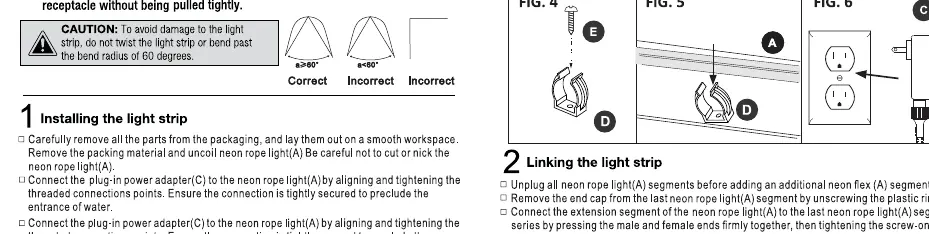
Read all instructions before use. Failure to follow these guidelines may result in fire, electric shock, or injury. Ensure the product is used with a GFCI-protected outlet when installed outdoors. Do not submerge the rope light in liquids, do not cut the rope light, and avoid bending it beyond a 60-degree radius. Ensure all connections are securely tightened to prevent water ingress.
Installation
Plan your layout before installation, ensuring the power adapter is within reach of an outlet. Use the provided mounting clips and screws to secure the rope light to a sturdy surface, maintaining a maximum spacing of 0.9m (2.95ft) between clips. Connect the rope light to the in-line controller and the power adapter, ensuring all threaded connections are fully tightened.
Operation and App Setup
To control the light, download the Hubspace app and follow the on-screen instructions to register and connect your device. The system requires a 2.4GHz Wi-Fi network. Once connected, you can use the app to select colors, manage presets, and integrate with voice assistants. The in-line controller remembers the last setting used when the light is turned on.
Care and Maintenance
Always unplug the device from the power outlet before cleaning. Use a clean, dry, or slightly damp cloth to wipe the surface. Do not use chemical cleaners, solvents, or abrasive materials, as these may damage the light strip.
Troubleshooting
- Light does not turn on: Check if the power adapter is plugged into a live outlet and that all connections are secure.
- Wi-Fi connection issues: Ensure your router is broadcasting a 2.4GHz signal and that your mobile device is connected to the same network.
- Device not found: If the device is not discovered, toggle the power switch off and on five times to reset the device into discovery mode.
Related manuals
Related manuals from the same brand or category.
Documents / Warranty Safety
EcoSmart Adjustable White A21 Motion Sensor Bulb User Guide
EcosmartElectronics / Televisions
ECOSMART BR30 Motion and Dusk to Dawn Sensor Bulb User Guide
EcosmartDocuments / Warranty Safety
EcoSmart Adjustable White A21 Motion Sensor Bulb User Guide
EcosmartDocuments / Warranty Safety
EcoSmart Adjustable White A19 Motion Sensor Bulb User Guide
EcosmartDocuments / Warranty Safety
EcoSmart 12MR161050RGB01 Wireless Controlled MR16 Smart Bulb
EcosmartDocuments / Warranty Safety
EcoSmart B11 Smart Bulb User Guide
EcosmartGarden / Outdoor
EDEN 16039EDAMZ 6-Pattern Rotary Gear Drive Sprinkler Head
EDENGarden / Outdoor
EDEN 16030EDAMZ 5 Pattern Rotary Sprinkler Head
EDENGarden / Outdoor
APEX 15W LED 3LT Spotlight Owner’s Manual
APEX
Manual page author
David Miller
Documentation analyst
Organizes user manual content into clear summaries, with attention to model details, product context, and everyday usability.