Documents / Warranty Safety
User Guide for Ecosmart 12MR161050RGB01 Wireless Controlled MR16 Smart Bulb
Quick start guide for the Ecosmart 12MR161050RGB01 MR16 Smart Bulb. Includes setup instructions for the Hubspace app, troubleshooting for Wi-Fi and QR code issues, and technical specifications.
Table of contents
Manual images
Jump to the sectionQuick guide from the manual
This document provides instructions for setting up and operating the Ecosmart 12MR161050RGB01 Wireless Controlled MR16 Smart Bulb. The primary method for control is the Hubspace app, which requires a 2.4GHz Wi-Fi network and Bluetooth enabled on your mobile device during setup.
Safety Information
- Turn off power before inspection, installation, or removal.
- Do not open the device; there are no user-serviceable parts inside.
- Not for use in totally enclosed fixtures.
- Not intended for use with emergency exits.
- Do not use with standard incandescent dimmers or dimming controls.
Operation
To set up the bulb:
- Download the Hubspace app from the App Store or Google Play Store.
- Sign in or register for a Hubspace account.
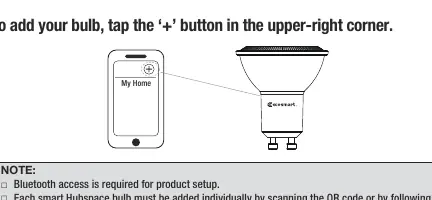
- Tap the + button in the upper-right corner to add a device.
- Scan the QR code located on the bulb housing or the Quick Start Guide.
- Connect the bulb to power and follow the in-app prompts.
If you cannot scan the QR code, you can enter the code manually or use the search function within the app to find the device.
Control and Features
Once connected, you can use the Hubspace app to:
- Adjust brightness (dimming).
- Change colors (shades of white or full color spectrum).
- Create groups for simultaneous control.
- Set up schedules for automatic operation.
- Connect to voice assistants like Google Assistant or Alexa.
Technical Specifications
- Model: 12MR161050RGB01
- Input: 120V AC, 60Hz
- Power: 5.5W
- Brightness: 450 Lumens
- Efficacy: 82 LM/W
- CRI: 90
Manufacturer information
EcoSmart
Practical help
Common problems
Bulb not connecting to Wi-Fi
Ensure the bulb is powered on and you are using a 2.4GHz Wi-Fi network within range.
QR code will not scan
Ensure you are scanning from inside the Hubspace app. If it fails, use the manual setup option by tapping the Search button in the app.
Product is offline
Check Wi-Fi signal strength; consider moving the router closer or using a Wi-Fi extender.
Cannot find QR code
The QR code is printed on the bulb housing and also included in the product documentation.
Before use
- Ensure you have a 2.4GHz Wi-Fi network available.
- Download the Hubspace app on your smartphone.
- Enable Bluetooth on your smartphone for the initial setup.
- Verify the fixture is not totally enclosed.
- Ensure the power is turned off before installing the bulb.
Specs in practice
- Input Watts (5.5W)
- The power consumption of the bulb during operation.
- Lumens (450 LM)
- The total light output of the bulb.
Images and diagrams
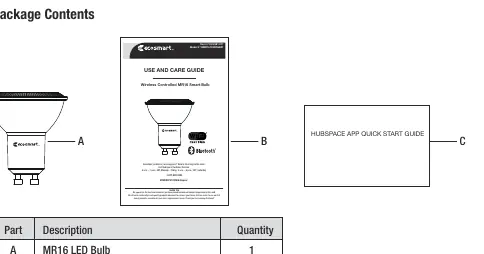
- The manual includes a package contents diagram showing the bulb (A), User Guide (B), and Quick Start Guide (C).
- Operation steps illustrate the Hubspace app interface, specifically the '+' button for adding devices and the QR code scanning process.
Model compatibility
- Requires a 2.4GHz Wi-Fi network.
- Not compatible with standard incandescent dimmers.
- Compatible with Google Assistant and Amazon Alexa.

Manual page author
Emily Carter
User documentation editor
Prepares concise manual descriptions and highlights the most useful setup, operation, and maintenance information for readers.