Furniture / Media Furniture
User Manual for allen + roth 1935FM-23-348 Electric Fireplace Media Mantel
Quick guide for the allen + roth 1935FM-23-348 electric fireplace media mantel. Includes assembly steps, operating instructions, troubleshooting for error codes, and maintenance tips.
Table of contents
Manual images
Click an image to enlargeQuick guide from the manual
This document provides assembly, operation, and maintenance instructions for the allen + roth 1935FM-23-348 Electric Fireplace Media Mantel. Before beginning, ensure all parts are present and you have a Phillips screwdriver. The unit requires a 15-Amp, 120-volt, 60 Hz grounded outlet. Do not use extension cords.
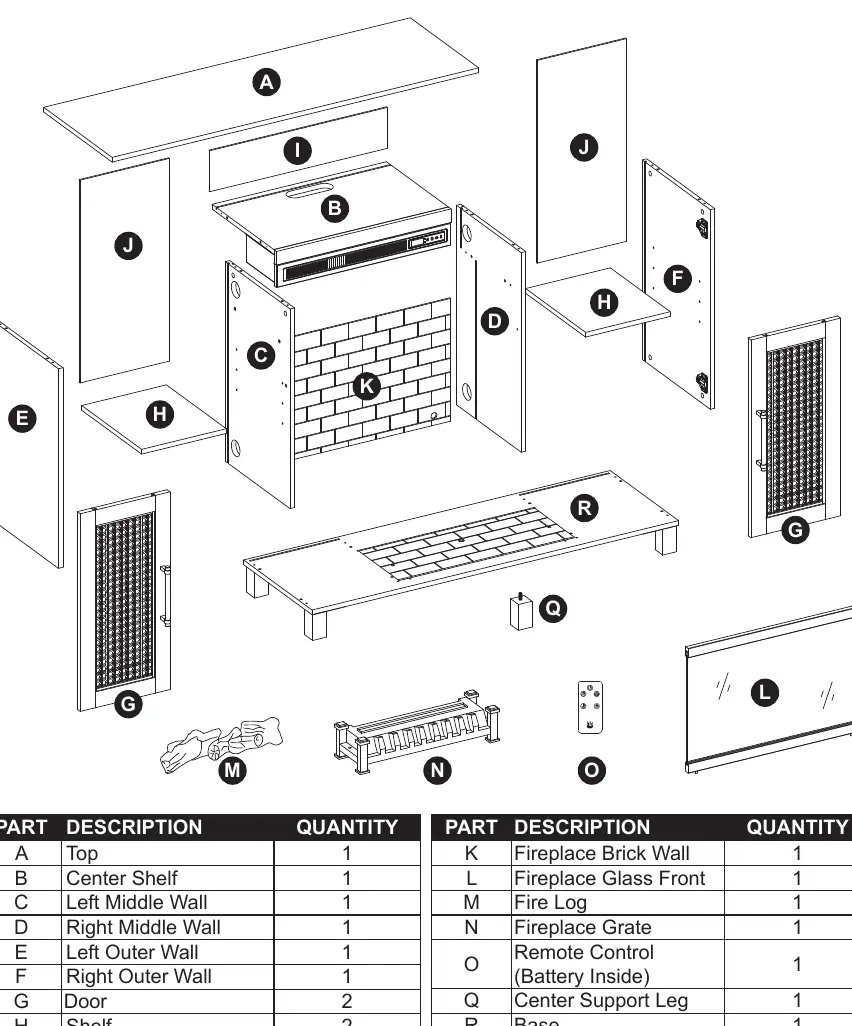
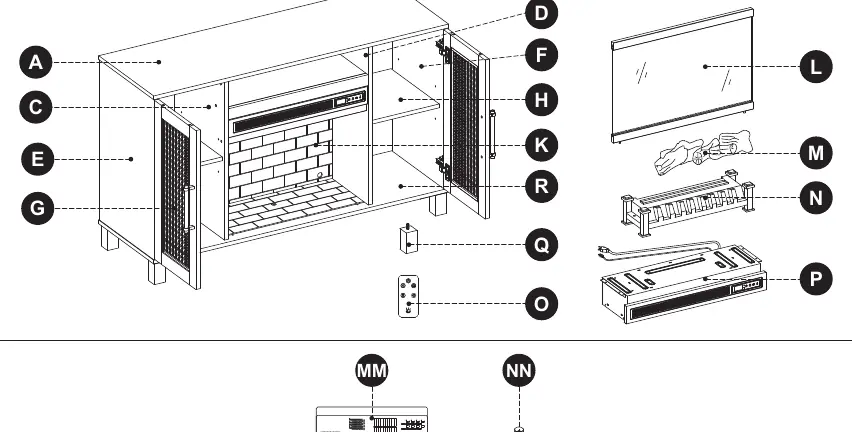
Assembly Instructions
Assembly takes approximately 50 minutes. Follow these steps:
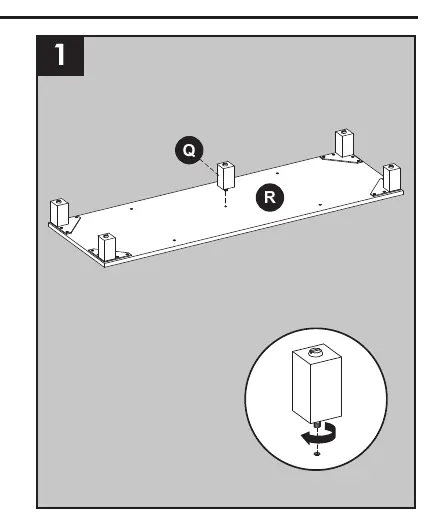
- Base Assembly: Attach the center support leg (Q) to the base (R).
- Middle Walls: Attach the center shelf (B) to the left and right middle walls (C, D) using wooden dowels (CC) and long screws (BB).
- Fireplace Integration: Insert the fireplace brick wall (K) into the grooves of the middle walls. Attach the assembly to the base (R) using wooden dowels and long screws.
- Outer Walls: Install connecting rods (DD) into the base. Attach the left and right outer walls (E, F) using wooden dowels and locknuts (EE).
- Back Panels: Slide the center back panel (I) and back panels (J) into the grooves.
- Top Assembly: Attach the top (A) using connecting rods, wooden dowels, and locknuts. Secure the back panels using the provided mounting hardware (FF).
- Fireplace Grate: Connect the USB cable from the heater to the grate (N). Secure the grate to the base using small bolts (GG).
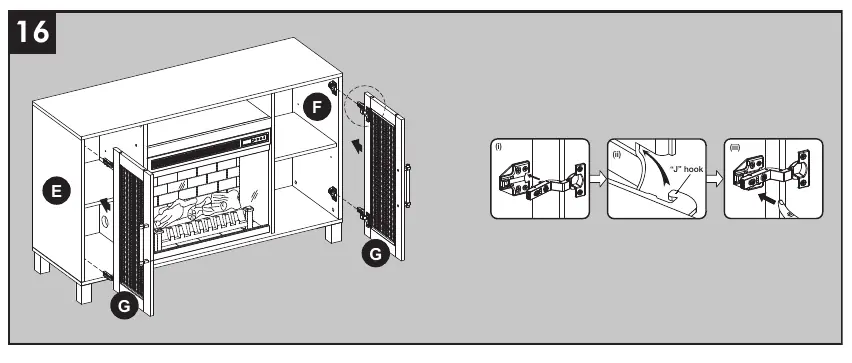
- Finishing: Place the fire log (M) on the grate. Install the glass front (L) and secure with bolts (JJ). Install shelves (H) using shelf pins (HH). Attach doors (G) using hinges (KK) and door pulls (II).
Operating Instructions
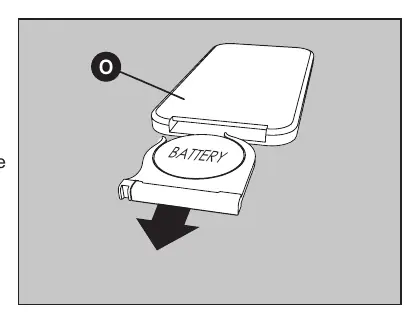
The fireplace can be controlled via the control panel or the included remote control. To use the remote, remove the plastic battery tab.
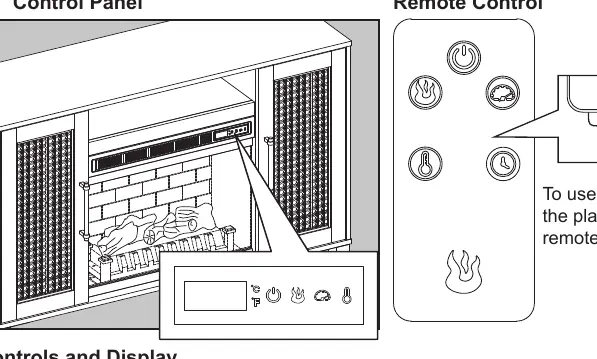
- Power: Press the POWER ICON to turn the unit ON or OFF. The fan will run for 40 seconds after powering off to cool down.
- Flame Settings: Adjust brightness and speed using the respective icons.
- Heater: Press the HEATER ICON to cycle through settings. Set to "HI" for continuous heat or "OF" to use flame effects without heat. The thermostat range is 65°F to 90°F.
- Timer: Use the remote to set a sleep timer from 30 minutes to 9 hours.
- Heater Override: To prevent accidental activation, turn the unit off, then press and hold the POWER ICON for 20 seconds. The E3 symbol will appear. Repeat to re-engage.
Care and Maintenance
Always turn off and unplug the unit before cleaning. Clean metal trim with a water-dampened soft cloth; do not use brass polish. Periodically vacuum the fan/heater and air vents. If the remote stops working, replace the CR2025 battery.
Troubleshooting
If you encounter issues, check the following:
- Error E1: Overheat sensor engaged. Unplug for 15-20 minutes to reset.
- Error E2: Thermostat sensor issue. Unplug for 15-20 minutes to reset.
- Error E3: Heater override is active. See the Heater Override section.
- No Power: Ensure the unit is plugged into a standard 120V outlet and powered on.
- Remote Issues: Replace the battery or ensure you are within 20 feet and 45 degrees of the unit.
Practical help
Common problems
Error E1 displayed
Overheat sensor engaged. Unplug the unit for 15-20 minutes to allow the sensor to reset.
Error E2 displayed
Thermostat sensor issue. Unplug the unit for 15-20 minutes to allow the sensor to reset.
Error E3 displayed
Heater override function is engaged. See the Heater Override section on page 20 to disable.
Remote control not working
Replace the CR2025 battery. Ensure you are within 20 feet and 45 degrees of the fireplace.
Before use
- Verify all parts are present against the package contents list.
- Ensure you have a Phillips screwdriver for assembly.
- Assemble on a scratch-free surface (e.g., foam sheet).
- Remove the plastic tab from the remote control.
- Ensure the outlet is a 15-Amp, 120-volt, 60 Hz grounded circuit.
Specs in practice
- Max TV Weight
- 39 lbs (17.69 kg) maximum load for the top surface.
- Thermostat Range
- 65°F to 90°F (18°C to 43°C).
- Remote Range
- Up to 20 feet and 45 degrees to either side.
Images and diagrams
- Assembly steps 1-17 illustrate the step-by-step construction of the media mantel.
- Page 19 details the control panel and remote button functions.
- Page 24 provides an exploded view of all parts for identification.
Model compatibility
- Designed for flat panel TVs up to 50 inches.
- Do not use with extension cords or power strips.
- Not intended for use in bathrooms or laundry areas.

Manual page author
Emily Carter
User documentation editor
Prepares concise manual descriptions and highlights the most useful setup, operation, and maintenance information for readers.