Optics / Telescope Accessories
Explore Scientific 134mm Equatorial Newtonian Telescope User Manual
Quick guide for the Explore Scientific 134mm Equatorial Newtonian Telescope. Learn how to assemble, balance, align the finderscope, perform polar alignment, and collimate the optics for clear viewing.
Table of contents
Manual images
Click an image to enlargeQuick guide from the manual
This manual provides instructions for the Explore Scientific 134mm Equatorial Newtonian Telescope. Safety Warning: Never look directly at the sun with this device, as it will cause instant and irreversible eye damage or blindness. Always use adult supervision for children. The telescope is designed for astronomical use; terrestrial objects may appear inverted or rotated, which is normal for this optical design.
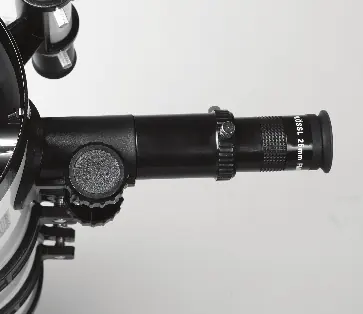
Assembly
1. Open the tripod legs and extend them to the desired height, ensuring the top remains level. Attach the accessory tray to the center leg braces.
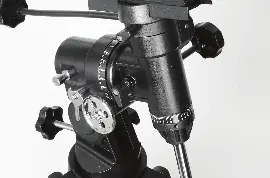
2. Place the equatorial mount head onto the top of the tripod and tighten the attachment knob from underneath.
3. Screw the counterweight shaft into the mount. Slide the counterweight onto the shaft and tighten the lock knob.
4. Attach the slow-motion controls to the shafts on the mount head. The longer control attaches to the declination (Dec) shaft, and the shorter one attaches to the right ascension (RA) shaft.
5. Secure the telescope tube to the mount using the cradle rings and dovetail plate. Ensure the saddle lock knob is tightened securely.
Attach and Align the 6x30 Finderscope
1. Remove the two thumb nuts near the focuser, place the finderscope base over the bolts, and reinstall the nuts.
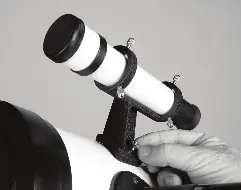
2. To align, point the main telescope at a distant object (at least 1/4 mile away) and center it in the eyepiece.
3. Look through the finderscope. If the target is not centered, adjust the alignment thumbscrews on the finderscope rings until the target is centered in both the main telescope and the finderscope.
Balancing the Telescope
1. Loosen the RA lock and rotate the telescope so the counterweight shaft is horizontal. Slide the counterweight until the telescope remains in position without drifting.
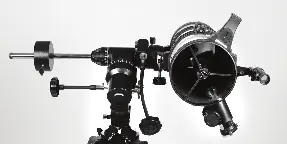
2. Unlock the Dec axis. Loosen the cradle ring locks and slide the telescope tube back or forth until it is balanced on the Dec axis.
Collimating the Optics
1. Collimation ensures the mirrors are aligned for the best image quality. This is done by adjusting the secondary mirror (using the three collimation screws) and the primary mirror (using the spring-loaded knobs).
2. The goal is to have the reflection of your eye, the secondary mirror, and the primary mirror center mark appear concentric when looking through the focuser draw tube.
3. Perform fine collimation on a star (like Polaris) at high magnification, adjusting the primary mirror knobs until the star image is symmetrical.
Specifications
Primary Mirror Diameter: 134mmFocal Length: 650mmFocal Ratio: f/4.8Eyepieces: 1.25-inch 25mm and 10mm PlosslFinderscope: 6x30 achromaticMount: German equatorial
Practical help
Common problems
Image is blurry
Ensure the telescope has cooled to ambient temperature, check focus, or perform collimation.
Target drifts out of view
Ensure proper polar alignment and use slow-motion controls to track the object.
Everything is upside-down
This is normal for a Newtonian reflector telescope; it does not affect astronomical viewing.
Before use
- Check all parts against the parts list
- Ensure tripod is level
- Align finderscope with main telescope
- Balance the telescope on both axes
- Check collimation
Specs in practice
- Focal Length
- 650mm - determines magnification when divided by eyepiece focal length.
Images and diagrams
- Figure 2.9: Features of the equatorial mount and tripod
- Figure 11.1: Mirror alignment path
- Figure 11.2: Collimation target view
Model compatibility
- Accepts 1.25-inch accessories

Manual page author
Michael Turner
Technical manual editor
Reviews PDF manuals for structure, safety notes, and practical product details so readers can find the right information quickly.