Automotive / Tyre Inflators
User Manual for Extol Premium 8796901 160A Inverter Welder
Quick guide for the Extol Premium 8796901 160A Inverter Welder. Includes setup, operation, welding parameters, maintenance, and troubleshooting.
Table of contents
Manual images
Click an image to enlargeQuick Guide
This manual provides essential safety, operation, and maintenance instructions for the Extol Premium 8796901 160A Inverter Welder. Before using the equipment, ensure you have read the safety section thoroughly. Always wear dry, hole-free gloves and protective clothing to insulate yourself from electrical shock. Ensure the welding area is well-ventilated and free from flammable materials.
Product Overview
The Extol Premium 8796901 is an inverter welder utilizing pulse width modulation (PWM) and insulated gate bipolar transistor (IGBT) technology. It is designed for both TIG (Tungsten Inert Gas) and MMA (Manual Metal Arc) welding. The machine features digital control and a digital display for precise parameter adjustments.
Installation and Adjustment
Power Supply Connection: Ensure the power supply voltage matches the machine requirements. If the voltage exceeds the safe range, the machine will cut output to protect internal components.
Polarity Connection (MMA): Choose the connection (DCEN or DCEP) based on the specific electrode type being used. Refer to the electrode manufacturer's manual for guidance.
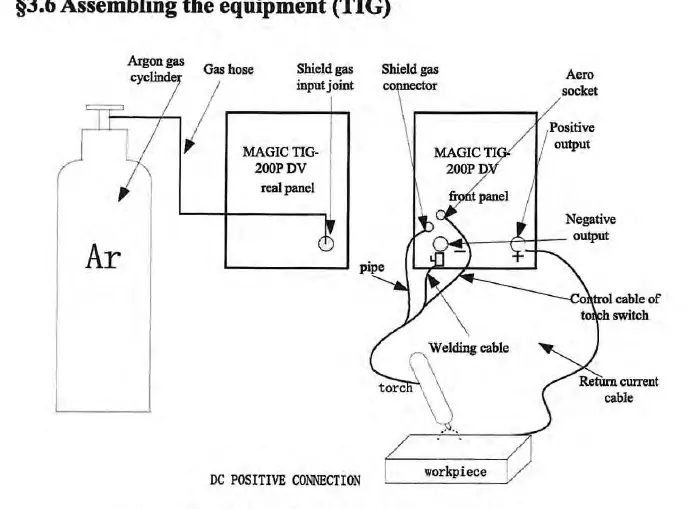
Assembling for TIG: Connect the gas cylinder to the gas input joint on the rear panel. Connect the welding torch to the negative output and the return current cable to the positive output (for DC positive connection). Ensure all connections are secure and gas-tight.
Operation
Panel Layout: The front panel features the welding mode selection switch, a functional selection knob, and a digital display. Use the selection knob to navigate through parameters like pre-flow time, welding current, pulse frequency, and post-flow time.
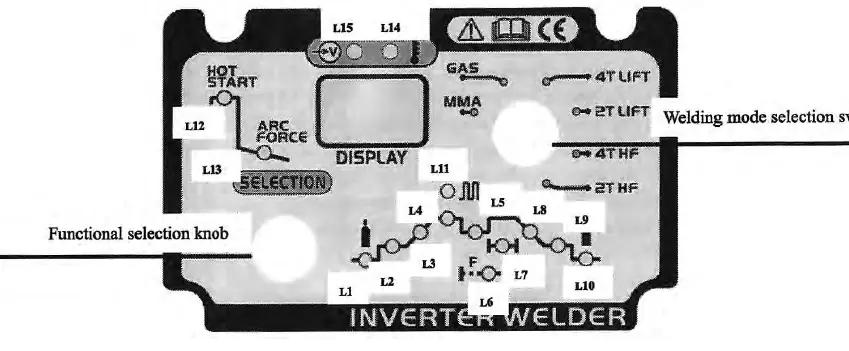
Welding Modes: The machine supports various modes, including 4T (long welding) and 2T (short welding) for TIG, as well as standard MMA mode. Use the 'welding mode selection switch' to toggle between these functions.
Parameter Adjustment: To adjust parameters, press the 'selection knob' to select the desired parameter (indicated by the blinking LED). Adjust the value using the knob, then press the knob again to confirm or wait for the system to auto-confirm after 3 seconds.
Maintenance and Troubleshooting
Maintenance: Regularly inspect the machine for loose connections, damaged cables, or blocked fans. Use compressed air to clear dust from the inside of the machine, particularly around the radiator and PCB, on a monthly basis. Always disconnect power and wait 5 minutes before performing maintenance.
Troubleshooting: If the machine fails to operate, check the following:
- Arc cannot be ignited (TIG): Check if the welding cable is connected, ensure the workpiece is clean, or reduce the distance between the electrode and the workpiece.
- No gas flow (TIG): Verify the gas cylinder is open, check for valve issues, or ensure the electromagnetic valve is functioning.
- Alarm lamp is on: This may indicate overheating (reduce duty cycle), voltage fluctuations (use a stable power supply), or over-current.
Manufacturer information
Extol
Practical help
Common problems
Arc cannot be ignited (TIG)
Check if the welding cable is connected, check for dirt on the workpiece, or reduce the distance between the electrode and workpiece.
No gas flow (TIG)
Check if the gas cylinder is open, check for valve issues, or check the electromagnetic valve.
Alarm lamp on
Check for over-heat (reduce duty cycle), over-voltage/low-voltage (use stable power supply), or over-current.
Before use
- Ensure the work cable makes a good electrical connection.
- Wear dry, hole-free gloves and protective clothing.
- Check that the gas cylinder is connected (for TIG).
- Verify the power supply voltage matches the machine requirements.
- Ensure the welding area is well-ventilated.
Specs in practice
- Pre-flow time
- Time gas flows before the arc starts.
- Post-flow time
- Time gas flows after the arc stops to protect the weld.
Images and diagrams
- Panel Layout: Shows the location of the gas connector, power switch, and control knobs.
- TIG Connection: Illustrates the connection of the gas cylinder, torch, and workpiece.
Model compatibility
- The machine supports both MMA and TIG welding modes.
- Ensure the power supply is stable; voltage fluctuations can trigger protection.

Manual page author
Michael Turner
Technical manual editor
Reviews PDF manuals for structure, safety notes, and practical product details so readers can find the right information quickly.