Plumbing / Sinks Faucets
User Manual for Extol Industrial 18V Cordless Drill and Impact Wrench
Quick guide for the Extol Industrial 18V cordless drill (8791115) and impact wrench (8791255). Includes setup, operation, torque settings, and maintenance instructions.
Table of contents
Manual images
Jump to the sectionQuick Guide from the Manual
This manual covers the Extol Industrial 18V cordless drill (8791115) and the 18V cordless impact wrench (8791255). Both tools are powered by the same 18V Li-ion battery system (4Ah or 6Ah). Before first use, ensure the battery is fully charged using the provided fast charger. The battery is protected against deep discharge; if the tool stops during operation, recharge the battery.
Drill Operation
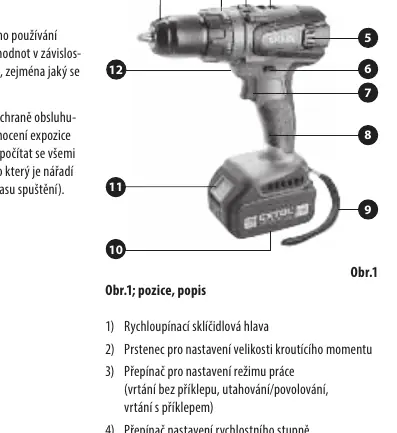
The cordless drill features a Jacobs quick-release chuck and a Spinlock function for easy tool changes. To change a tool, rotate the chuck to open it, insert the bit, and tighten by rotating in the opposite direction. The Spinlock automatically locks the spindle when tightening or loosening the chuck by hand.
Modes and Settings
- Working Modes: Use the mode selector to switch between drilling (drill symbol), hammer drilling (hammer symbol), and screwdriving (screw symbol). Do not change modes while the tool is running.
- Torque Settings: Use the adjustment ring (1-23) to set the torque for screwdriving. Start low and increase if necessary to prevent damaging the screw or material.
- Speed Gear: Use the gear selector (1 or 2) to adjust speed and power. Gear 1 provides lower speed and higher torque (for screwdriving), while Gear 2 provides higher speed and lower torque (for drilling).
Impact Wrench Operation
The impact wrench is designed for loosening and tightening bolts and nuts using a 1/2" square drive. It features a brushless motor for higher efficiency and longer lifespan.
Autostop Function
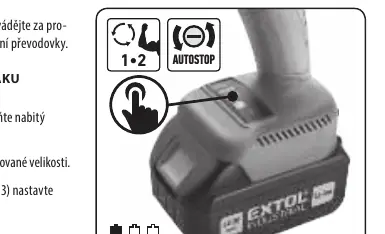
The Autostop function is available for the loosening mode. When active, it helps prevent the bolt from falling out after it is loosened. To activate, set the rotation to left, press the trigger to light up the battery indicator, and press the Autostop button. A green indicator will confirm the function is active.
Maintenance and Safety
The tools do not require special maintenance or lubrication. Clean the tool with a damp cloth and detergent; avoid organic solvents like acetone. Always remove the battery before performing maintenance. Store the tool in a dry place, away from children, at temperatures below 45°C.
Manufacturer information
Extol
Practical help
Common problems
Tool stops suddenly during operation
The battery protection against deep discharge has been activated. Recharge the battery.
Chuck is difficult to loosen or tighten
Use the Spinlock function to lock the spindle and manually adjust the chuck.
Bit slips in the chuck
Ensure the bit is inserted deep enough and the chuck is tightened securely.
Before use
- Check the battery charge level.
- Ensure the correct tool (bit or socket) is securely attached.
- Set the correct rotation direction.
- Select the appropriate speed gear (1 or 2).
- Verify the working mode (drill, hammer, or screw).
Images and diagrams
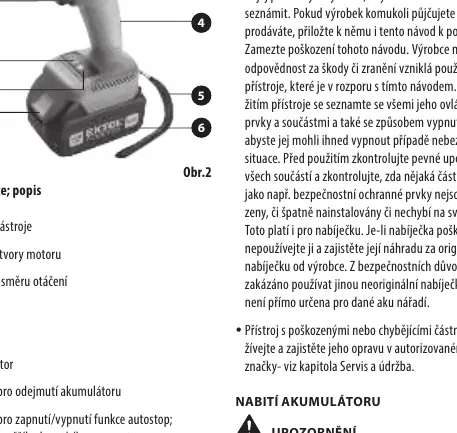
- Obr. 1/Obr. 2: Shows the main components including the chuck/drive, speed selector, direction switch, battery, and LED indicators.
Model compatibility
- Compatible with Extol Industrial 18V 4Ah and 6Ah batteries.

Manual page author
Michael Turner
Technical manual editor
Reviews PDF manuals for structure, safety notes, and practical product details so readers can find the right information quickly.