Music / Guitar Amplifiers
User Manual for Fender Frontman 20G Guitar Amplifier
Quick guide for the Fender Frontman 20G guitar amplifier. Learn about the control panel, channel settings, technical specifications, and connection options.
PDF source: polski · summary: English
Quick answers from the manual
Quick answer
- The Fender Frontman 20G is a 20-watt, two-channel guitar amplifier featuring a clean channel and a switchable drive channel, an 8-inch Special Design speaker, and auxiliary input/headphone output capabilities. p. 2
Key actions
- Activate the drive channel p. 2
- Connect external audio p. 2
First start
- Connect instrument to INPUT, set volume low, and turn on POWER switch. p. 2
Show 3 more answers Show less
Problems and fixes
No sound from speaker
Ensure headphones are not plugged into the 1/8-inch jack.
p. 2Technical specifications
| Parameter | Value | Meaning | Pages |
|---|---|---|---|
| Power Output | 20 watts | Amplifier output power | p. 2 |
| Speaker | 8-inch Special Design (8 ohm) | Internal speaker type | p. 2 |
Where to find it in the PDF
- Control Panel p. 2
- Specifications p. 2
Table of contents
Manual images
Click an image to enlargeQuick guide from the manual
The Fender Frontman 20G is a two-channel guitar amplifier designed for practice and small settings. It features a clean channel with independent volume and EQ controls, and a switchable drive channel for overdriven tones. The amplifier is equipped with an 8-inch Special Design speaker and includes an auxiliary input for external audio devices and a headphone output for silent practice.
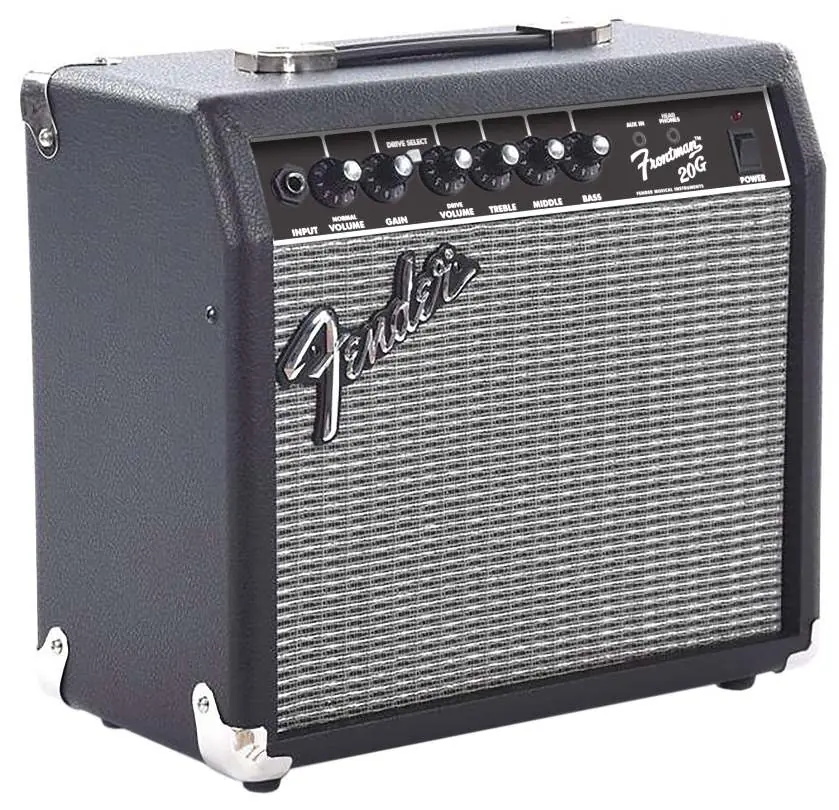
Control Panel
The control panel allows you to shape your sound and manage connections:

- INPUT: Connect your guitar here.
- NORMAL VOLUME: Adjusts the volume of the clean channel.
- GAIN: Adjusts the gain and overdrive level for the drive channel.
- DRIVE SELECT: Press to activate the drive channel.
- DRIVE VOLUME: Adjusts the volume of the drive channel.
- TREBLE, MIDDLE, BASS: Adjust the high, mid, and low-frequency tonal characteristics.
- AUX IN: 1/8-inch input for connecting external audio sources (e.g., music players). Adjust volume on the external device.
- HEADPHONES: 1/8-inch stereo output. Plugging in headphones automatically mutes the internal speaker. This jack can also function as an unbalanced line output.
- POWER: Turns the amplifier on and off. The indicator light illuminates when the unit is powered.
Technical Specifications
The following specifications apply to the Frontman 20G:
- Power Output: 20 watts
- Power Requirement: 38 watts
- Speaker: One 8-inch Special Design (8 ohm)
- Input Impedance: 1M ohm
- Dimensions: 13.25 inches (33.7 cm) width, 12.4 inches (31.4 cm) height, 7.13 inches (18.1 cm) depth
- Weight: 15 lbs. (6.8 kg)
Support
For questions and troubleshooting, contact a Fender specialist at 1-800-856-9801 (U.S. toll-free) or 1-480-596-7195 (International).
Manufacturer information
Fender Musical Instruments Corporation
Practical help
Common problems
No sound from the speaker
Check if headphones are plugged into the 1/8-inch jack, as this automatically mutes the internal speaker.
External audio source volume is too low or high
Adjust the volume directly on the external audio device connected to the AUX IN jack; the amplifier does not control this volume.
Before use
- Ensure the power switch is in the OFF position before connecting your instrument.
- Connect your guitar to the INPUT jack.
- Set volume controls to a low level before turning on the amplifier to avoid sudden loud sounds.
Show more Show less
Specs in practice
- Power Output
- 20 watts, suitable for practice and small settings.
- Input Impedance
- 1M ohm, standard for electric guitars to ensure proper signal transfer.
Images and diagrams
- The control panel features knobs for Normal Volume, Gain, Drive Volume, Treble, Middle, and Bass.
- The Drive Select button is used to toggle between the clean and drive channels.
Model compatibility
- AUX IN accepts 1/8-inch stereo plugs for external audio devices.
- Headphone jack accepts 1/8-inch stereo plugs and can function as an unbalanced line output.

Manual page author
David Miller
Documentation analyst