Music / Instruments
Fender Champion II 25 and 50 Guitar Amplifier Owner's Manual
Quick guide for the Fender Champion II 25 and 50 guitar amplifiers. Learn how to use control panels, select amp voices, apply effects, and update firmware.
Table of contents
Manual images
Click an image to enlargeQuick Guide
The Fender Champion II 25 and 50 are versatile guitar amplifiers designed for practice and performance. To get started, connect your instrument to the INPUT jack, ensure the power switch on the rear panel is set to ON, and adjust the volume levels. Use the VOICE knob to select from 12 different amplifier types and the FX SELECT knob to choose from 12 built-in effects.
Control Panel Functions
The control panel allows you to shape your sound:
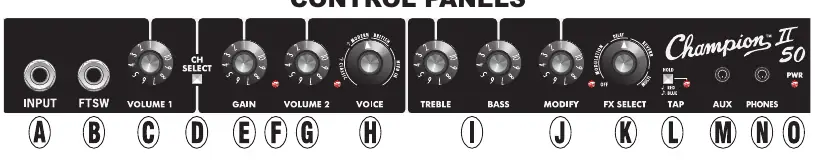
- INPUT: Connect your guitar here.
- GAIN: Adjusts the distortion level of the selected channel.
- VOLUME 1 / VOLUME 2: Adjusts the volume level for the respective channels.
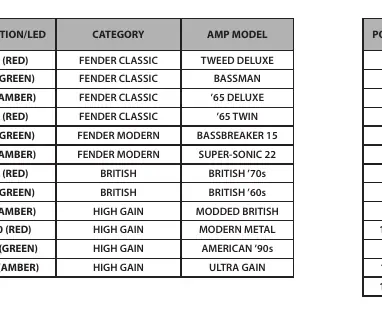
- VOICE: Selects from 12 amp types (Fender Classic, Modern, British, Hi Gain). The LED color indicates the selected voice.
- TREBLE/BASS: Adjusts high and low-end tone characteristics.
- MODIFY: Controls parameters for the selected effect (e.g., depth, level).
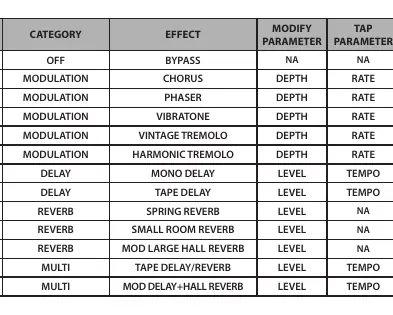
- FX SELECT: Selects from 12 effects (Modulation, Filter, Delay, Reverb, Multi).
- TAP: Sets the tempo for time-based effects. Press multiple times to match the song tempo.
- AUX: 1/8-inch input for external audio devices.
- PHONES: 1/8-inch output for headphones (mutes the speaker).
Rear Panel Connections
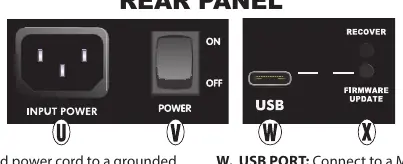
- INPUT POWER: Connect the included power cord to a grounded outlet.
- POWER SWITCH: Turns the amplifier on and off.
- USB PORT: Connect to a Mac or PC via USB-C for firmware updates.
- RECOVER/FIRMWARE UPDATE: Buttons for service and firmware updates.
Amp Voices and Effects
The amplifier features 12 distinct amp voices and 12 effects. The VOICE knob allows you to switch between classic Fender tones, British distortion, and modern high-gain sounds. The FX SELECT knob, combined with the MODIFY knob, allows you to customize modulation, delay, and reverb effects. Use the TAP button to sync delay and tremolo speeds to your music.
Technical Specifications
The Champion II 25 provides 25W of power with an 8-inch speaker, while the Champion II 50 provides 50W with a 12-inch speaker. Both models feature 1MΩ instrument input impedance and 10kΩ auxiliary input impedance.
Support
For questions or troubleshooting, contact Fender specialists at 1-800-856-9801 (U.S. toll-free) or 1-480-596-7195 (International). Additional information is available at support.fender.com.
Official resources from the manual
Manufacturer information
Fender Musical Instruments Corporation
Practical help
Common problems
No sound from the amplifier
Check that the instrument cable is securely connected, the volume knobs are turned up, and the power switch is in the ON position.
Effects are not audible
Ensure the FX SELECT knob is not in the OFF position and adjust the MODIFY knob to increase the effect intensity.
Delay or tremolo speed is incorrect
Use the TAP button to press at the desired tempo to sync the effect speed to your song.
Before use
- Verify the power outlet voltage matches the amplifier requirements.
- Connect your guitar to the INPUT jack.
- Set volume knobs to a low level before turning on the amplifier.
- Connect an optional two-button footswitch if channel selection and effects switching are needed.
- Ensure the amplifier is placed on a stable surface.
Specs in practice
- Power Output
- 25W for Champion II 25, 50W for Champion II 50 into 8Ω.
- Input Impedance
- 1MΩ for instrument input, 10kΩ for auxiliary input.
- Headphone Output
- 120mW per channel; mutes the main speaker when connected.
Images and diagrams
- The control panel layout shows the signal chain from INPUT through GAIN, VOICE, and FX SELECT.
- The rear panel includes the power inlet, power switch, and USB-C port for firmware updates.
Model compatibility
- Optional two-button footswitch (PN 0097298000) is compatible with both models.

Manual page author
Michael Turner
Technical manual editor
Reviews PDF manuals for structure, safety notes, and practical product details so readers can find the right information quickly.