Tools / Drills
Bosch GSB 12V-15 Professional Combination Drill Instruction Manual
Quick guide for the Bosch GSB 12V-15 Professional combination drill, covering assembly, operation, battery management, and safety instructions.
Table of contents
Manual images
Jump to the sectionQuick guide from the manual
This manual provides essential information for the safe and efficient operation of the Bosch GSB 12V-15 Professional combination drill. Key tasks include battery installation, tool changing, and mode selection.
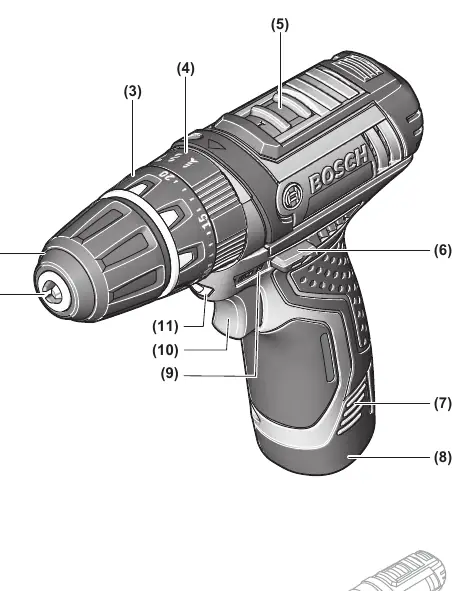
Device Description
The GSB 12V-15 is a cordless impact drill/driver designed for tightening/loosening screws, drilling in wood, metal, ceramic, and plastic, and impact drilling in brick, masonry, and stone.
Assembly
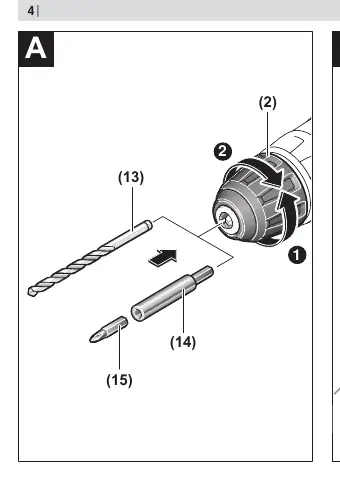
Always remove the battery before performing any maintenance or tool changes to prevent accidental activation. To change a tool, open the keyless chuck (2) by turning it in the rotation direction ➊, insert the tool, and tighten the chuck sleeve (2) firmly by hand in the rotation direction ➋.

Operation
Setting the rotational direction: Use the rotational direction switch (6) only when the tool is at a standstill. Press to the left for right rotation (drilling/screwing) and to the right for left rotation (loosening).
Setting the operating mode: Use the operating mode presetting ring (4) to select between drilling, screwdriving, or impact drilling. For screwdriving, use the torque presetting ring (3) to select the required torque in 20 stages.
Mechanical gear selection: Use the gear selector (5) only when the tool is at a standstill. Position 1 provides high torque for heavy-duty applications, while position 2 provides high speed for light-duty applications.
Battery Management
Use only the chargers listed in the technical data. The battery charge indicator (9) shows the charge level when the on/off switch (10) is pressed halfway. Protect the battery from moisture and water, and store it only within the temperature range of -20 °C to 50 °C.
Safety
Always wear ear protection when impact drilling. Hold the tool by insulated gripping surfaces when performing operations where the cutting accessory may contact hidden wiring. Ensure the work area is clean and well-lit.
Manufacturer information
Bosch
Practical help
Common problems
Tool does not start
Check if the battery is charged and correctly inserted, and ensure the rotational direction switch is not in the center position.
Battery life is significantly reduced
The battery has reached the end of its service life and must be replaced.
Tool stops during operation
The tool may be overloaded or the accessory may be jammed. Switch off immediately and clear the obstruction.
Before use
- Ensure the battery is fully charged.
- Check that the correct tool bit is inserted and the chuck is tightened.
- Verify the rotational direction switch is set correctly.
- Select the appropriate operating mode (drilling, screwdriving, or impact drilling).
- Select the appropriate gear (1 or 2) for the task.
Specs in practice
- Rated voltage
- 12V, indicating the battery system compatibility.
- No-load speed (1st/2nd gear)
- 0-380 / 0-1300 min-1, determining the rotational speed range.
- Max. torque (hard/soft)
- 30/15 Nm, indicating the maximum tightening force.
Images and diagrams
- The diagram on page 3 identifies the tool holder (1), keyless chuck (2), torque ring (3), mode ring (4), gear selector (5), rotational direction switch (6), battery release (7), battery (8), charge indicator (9), on/off switch (10)...
- Figure A on page 4 illustrates the tool change procedure using the keyless chuck.
- Figure B on page 4 illustrates the rotational direction switch settings.
Model compatibility
- Use only GBA 12V series batteries.
- Use only GAL 12... or GAX 18... series chargers.

Manual page author
Michael Turner
Technical manual editor
Reviews PDF manuals for structure, safety notes, and practical product details so readers can find the right information quickly.