Industrial / Electrical
Reprogramming Instructions for Finder 12 Series Time Switches
Essential guide for correcting date misalignment on Finder 12 series time switches. Includes step-by-step procedures for manual adjustment and app-based updates.
Table of contents
Manual images
Jump to the sectionQuick guide from the manual
This document provides specific instructions for correcting a date misalignment issue affecting Finder 12 series time switches (Types 12.51, 12.6x, and 12.Ax) configured in weekly programming mode. If no action is taken, the date will automatically align on April 1st, 2024. Note that this condition will not repeat every leap year.
Reprogramming via Finder Toolbox App
To update the device using the Finder Toolbox app:
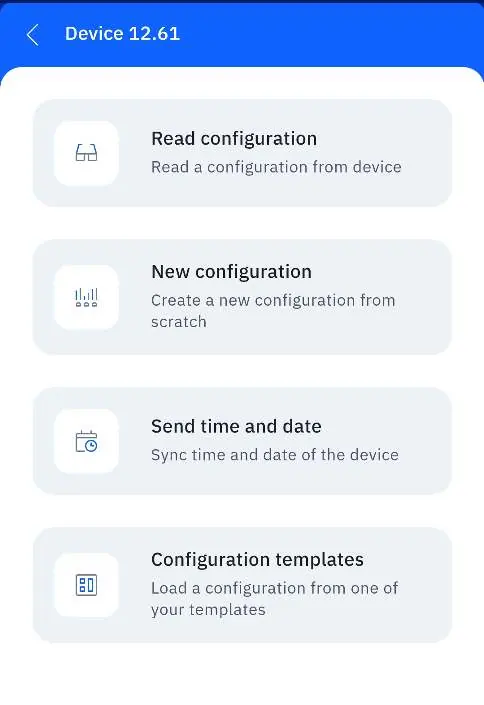
- Ensure the app is updated to the latest version.
- Connect to the device and select the option to send date and time.
- Set the year to 2019.
- From April 1st to December 31st, 2024, repeat the process to set the year back to the current year (2024).
Manual Reprogramming
For manual adjustment, follow the sequence for your specific model:


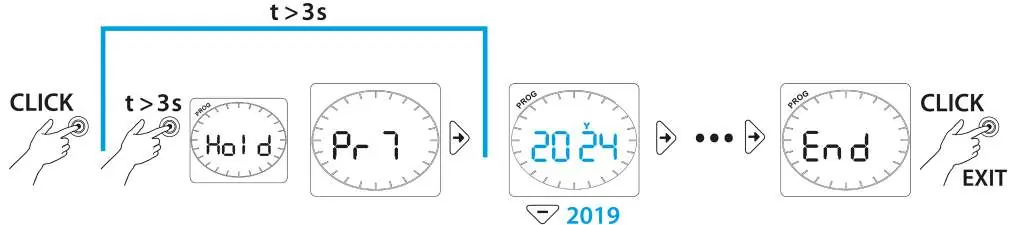
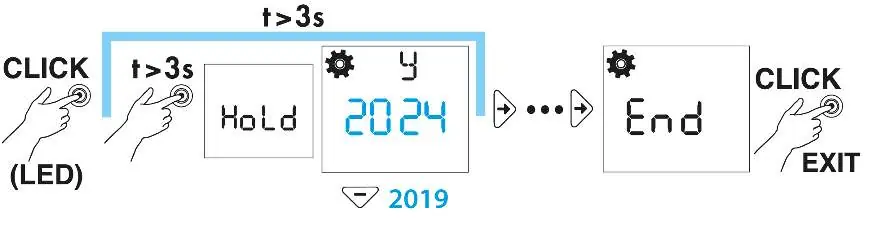
- Types 12.A1, 12.A2, 12.A4: Hold the button for >3s to enter the menu, navigate to the year setting (y), change it to 2019, and exit.
- Type 12.51: Click to wake, hold for >3s to enter programming, navigate to the year setting, change to 2019, and exit.
- Types 12.61, 12.62: Hold the button for >3s to enter the menu, navigate to the year setting (y), change to 2019, and exit.
After April 1st, 2024, you must perform these steps again to set the year back to 2024.
Manufacturer information
Finder S.p.A.
Practical help
Common problems
Date misalignment on 12 series time switches
Reprogram the device year to 2019 during March 2024, then update to 2024 starting April 1st, 2024.
Before use
- Verify your device model (12.51, 12.6x, or 12.Ax).
- Confirm the device is configured in weekly programming mode.
- Check if you have access to the Finder Toolbox app or can perform manual button operations.
Images and diagrams
- The diagrams illustrate the button press sequences required to navigate the menu and modify the year setting.
- The 'Hold' icon indicates the duration required to enter the programming mode.
Model compatibility
- Applicable only to Finder 12 series time switches (Types 12.51, 12.6x, 12.Ax).
- Requires weekly programming configuration.

Manual page author
Michael Turner
Technical manual editor
Reviews PDF manuals for structure, safety notes, and practical product details so readers can find the right information quickly.