Industrial / Electrical
Finder 12.A1/A2 Digital Astro Time Switch User Guide
Quick guide for the Finder 12.A1/A2 digital astro time switch, covering NFC programming, settings, manual overrides, and program management.
Table of contents
Manual images
Jump to the sectionQuick guide from the manual
The Finder 12.A1/A2 is a digital astro time switch programmable via NFC using the Finder Toolbox app. It supports Astro ON/OFF, standard ON/OFF, and Pulse functions. The device features a backlit display (when powered) and is powered by a CR 2032 battery for memory backup.
Device Overview
The display indicates the current time, day of the week, active channel functions (ON, OFF, Astro, Pulse), and program status. The 12.A1 model features one channel (SPDT), while the 12.A2 model features two channels (DPDT).
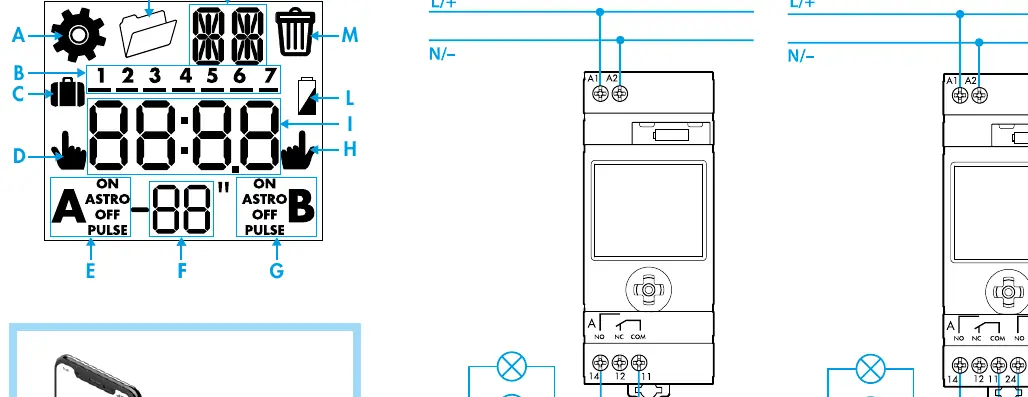
Settings
To enter settings, hold the button for over 3 seconds. You can configure the country, postal code (CP), year, date, time, and daylight saving settings. Geographic coordinates (Latitude/Longitude) and time zone can also be set manually if required.

Programming
Programming is performed by selecting a new program (NP) and choosing the desired function:
- Astro ON/OFF: Automatically adjusts based on sunrise/sunset times with optional advanced/retarded offsets.
- ON/OFF: Standard timed switching.
- Pulse: Momentary switching (1 second to 59 minutes).
Manual Mode
You can manually override the current state of the channels. Short presses toggle the state, while holding the button for over 2 seconds activates a permanent manual override.
Maintenance and Deletion
Programs can be deleted individually or all at once via the menu. The internal CR 2032 battery should be replaced according to local regulations when the low battery indicator appears.
Technical Specifications
- Supply Voltage: 110-230V AC/DC or 24V AC/DC versions available.
- Switching Capacity: 16A 250V AC.
- Operating Temperature: -20 to +50 degrees Celsius.
- Protection Rating: IP20.
Manufacturer information
Finder S.p.A.
Practical help
Common problems
Low battery indicator
Replace the internal CR 2032 battery.
Display is not backlit
The backlight only functions when the device is connected to the main power supply.
Before use
- Ensure the supply voltage matches the device rating (110-230V or 24V).
- Download the Finder Toolbox app for NFC configuration.
- Check that the CR 2032 battery is installed for backup.
- Verify wiring according to the 12.A1 (1 channel) or 12.A2 (2 channel) diagram.
Specs in practice
- Astro ON/OFF
- Switching times that automatically adjust throughout the year based on geographic location.
- Pulse function
- Output is active for a set duration (1s to 59min) before turning off automatically.
Images and diagrams
- 12.A1: Single channel output (14-12-11).
- 12.A2: Dual channel output (14-12-11 and 24-22-21).
- Joystick: Used for navigating menus and adjusting values.
Model compatibility
- NFC programming requires a smartphone with the Finder Toolbox app.
- 12.A1 is SPDT (Single Pole Double Throw).
- 12.A2 is DPDT (Double Pole Double Throw).

Manual page author
David Miller
Documentation analyst
Organizes user manual content into clear summaries, with attention to model details, product context, and everyday usability.