Home Appliances / Ovens
Flama 1888FL Microwave Oven User Manual
Quick guide for the Flama 1888FL microwave oven, covering installation, safety precautions, operation modes, cleaning, and troubleshooting.
Table of contents
Quick guide from the manual
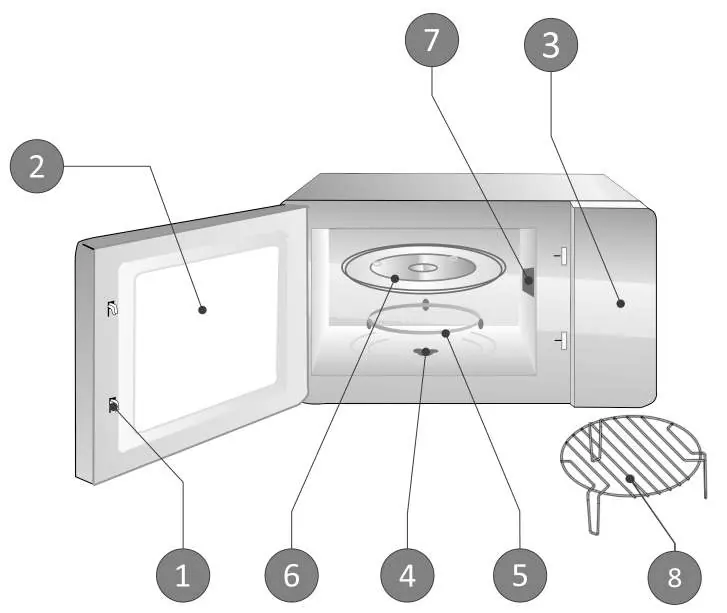
This document provides essential instructions for the safe and efficient use of the Flama 1888FL microwave oven. Key safety measures include never operating the microwave while empty, ensuring proper grounding, and maintaining adequate ventilation (30 cm above, 20 cm behind and on sides). Do not remove the mica plate (7) located inside the oven, as it protects the magnetron.
Device description
The microwave consists of the following components: 1. Door latch with safety system, 2. Viewing window, 3. Control panel, 4. Rotating plate mechanism, 5. Rotating plate support, 6. Rotating plate, 7. Mica plate, 8. Grid for grilling and gratin.
Installation
Ensure the microwave is placed on a level surface at a minimum height of 85 cm. Maintain the required clearance for ventilation. Do not install the unit near heat sources or cooktops. Connect to a properly grounded wall socket.
Operation
To cook, place food on the rotating plate, close the door, select the power level using the power selector, and set the cooking time with the timer. The microwave starts automatically when the timer is set and the door is closed. To interrupt cooking, open the door or turn the timer to zero.
Cleaning and maintenance
Always unplug the appliance before cleaning. Keep the interior clean by wiping spills with a damp cloth. Do not use harsh sprays. The glass plate and rotating support can be washed in warm water with mild detergent or in a dishwasher. If the light bulb needs replacement, contact an authorized Flama Technical Assistance Service.
Troubleshooting
If the microwave does not turn on, check the power cable connection, fuse, or circuit breaker. If it does not heat, ensure the door is closed properly. If the rotating plate makes noise, clean the support and base.
Manufacturer information
FLAMA, SA
Practical help
Common problems
Microwave does not turn on
Check power cable connection, test the wall socket with another appliance, or check if a fuse/breaker has tripped.
Microwave does not heat
Ensure the door is closed properly.
Rotating plate makes noise
Clean the rotating support and the base of the microwave.
Before use
- Ensure the surface is level and at least 85 cm high.
- Maintain 30 cm clearance above and 20 cm on sides/back.
- Verify the mica plate (7) is in place.
- Check that the power supply matches the rating plate.
- Ensure the appliance is properly grounded.
Specs in practice
- Power levels
- Various settings from 17% (Low) to 100% (Maximum/Grill) for different cooking needs.
Images and diagrams
- 1. Door latch with safety system
- 2. Viewing window
- 3. Control panel
- 4. Rotating plate mechanism
- 5. Rotating plate support
Model compatibility
- Use only microwave-safe utensils.
- Avoid metal containers, aluminum trays, or items with metallic trim.
- Do not use wooden utensils as they may crack.

Manual page author
Michael Turner
Technical manual editor
Reviews PDF manuals for structure, safety notes, and practical product details so readers can find the right information quickly.