Music / Instruments
Flama 1221FL Express Coffee Machine User Manual
Quick guide for the Flama 1221FL express coffee machine, covering setup, coffee preparation, milk frothing, cleaning, and descaling procedures.
Table of contents
Manual images
Jump to the sectionQuick guide from the manual
This manual provides instructions for the Flama 1221FL express coffee machine. Key operations include priming the water circuit before first use, brewing espresso (1 or 2 cups), and using the steam wand for milk frothing. Regular maintenance, including cleaning the filter holder and descaling every 6 weeks, is essential for optimal performance.
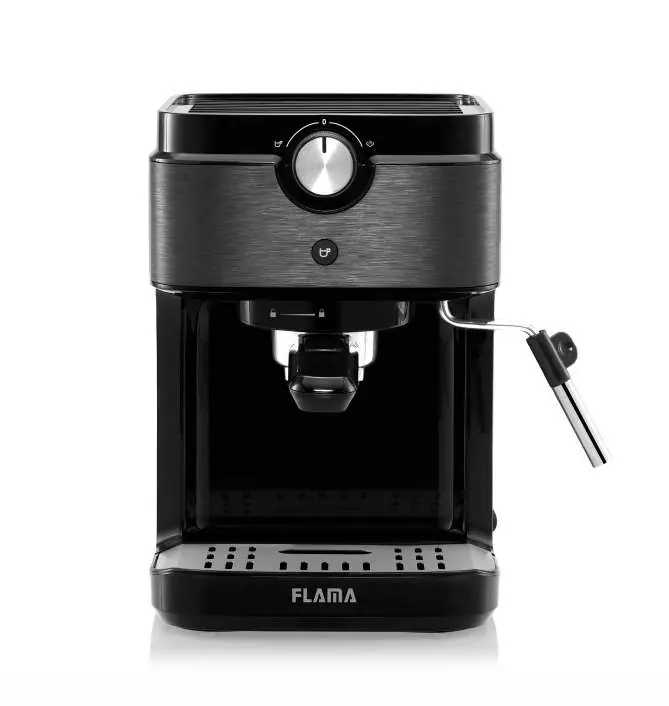
Device description
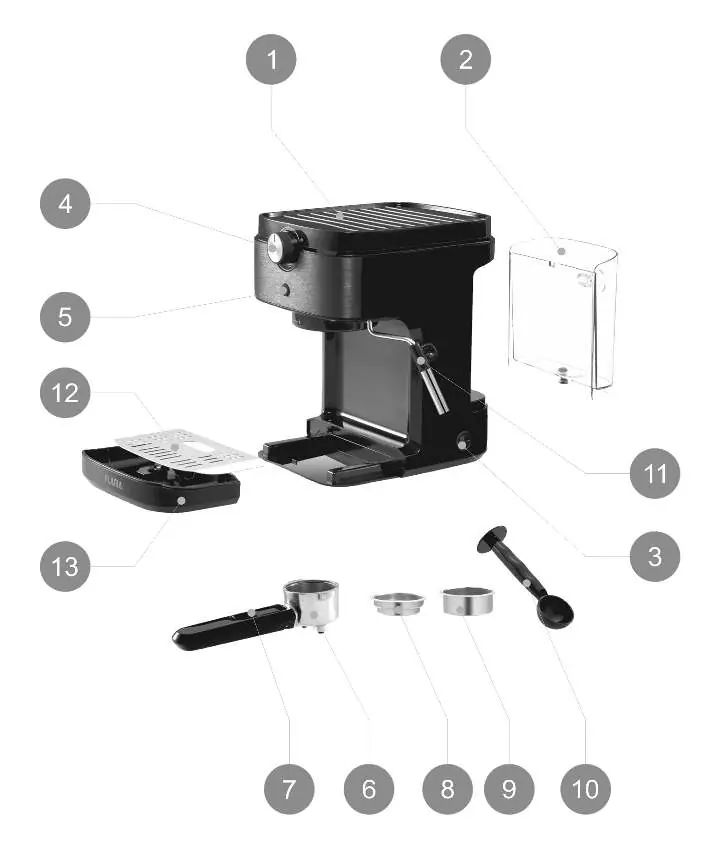
- 1. Cup heating surface
- 2. Water tank
- 3. ON/OFF switch
- 4. Coffee/steam selector
- 5. START button
- 6. Filter holder
- 7. Locking lever
- 8. 1 coffee filter
- 9. 2 coffees filter
- 10. Measure spoon/presser
- 11. Steam tube
- 12. Grid
- 13. Drip tray
First use and setup
Remove all packaging and labels. Wash the water tank and ensure all components are present. Before the first use, or if the machine has been unused for 1-2 weeks, you must prime the water circuit:
- Fill the water tank (do not exceed MAX).
- Turn on the machine (ON/OFF switch).
- Set the selector to the coffee position.
- Place a container under the coffee outlet (do not insert the filter holder).
- Press the START button to pump water. Repeat 2-3 times if necessary.
- Wait for the machine to finish preheating.
Coffee preparation
- Select the desired filter (1 or 2 cups) and place it in the filter holder.
- Measure coffee powder using the spoon and press it evenly with the presser.
- Insert the filter holder into the machine from left to right until locked.
- Place a cup on the grid.
- Turn the selector to the coffee position and press START.
- The machine will perform a pre-infusion before dispensing. Press START again to stop if desired.
Steam and milk foam
- Pour cold milk into a heat-resistant container.
- Place the container under the steam tube and submerge the tube.
- Turn the selector to the steam position and press START.
- Move the container slowly from bottom to top.
- When finished, turn the selector back to 0.
- Clean the steam tube immediately with a damp cloth.
Cleaning and maintenance
Cleaning: Disconnect the machine and let it cool. Do not submerge the main body. The filter holder is not dishwasher safe; clean it under running water. Regularly wash the tank, drip tray, and grid.
Descaling: Recommended every 6 weeks. Fill the tank with descaling solution. Place a container under the coffee outlet and steam tube. Use the selector and START button to run the descaling cycles for the steam and coffee systems as described in the manual.
Manufacturer information
FLAMA, SA
Practical help
Common problems
No water comes out during first use
Repeat the priming process 2-3 times.
Steam tube is clogged
Use a needle to unclog the tube.
Coffee dispensing is uneven
Clean the interior of the filter holder thoroughly under running water.
Before use
- Remove all packaging and stickers.
- Check that all components are included.
- Fill the water tank between Min and Max marks.
- Prime the water circuit before the first coffee.
Specs in practice
- Pre-infusion
- Soaking ground coffee with a small amount of water for a few seconds before full extraction.
- Maximum dispensing time
- The machine stops automatically after 45 seconds to prevent drip tray overflow.
Images and diagrams
- The machine features a selector (4) for switching between coffee and steam modes.
- The START button (5) indicates status via blinking or solid lights.
- The filter holder (6) must be locked into place by turning from left to right.
Model compatibility
- The filter holder is not suitable for dishwashers.
- Use only accessories recommended by FLAMA.

Manual page author
David Miller
Documentation analyst
Organizes user manual content into clear summaries, with attention to model details, product context, and everyday usability.