General / Other Manuals
FNIRSI-1013D Two Channel Plate Oscilloscope
Comprehensive user guide for the FNIRSI-1013D dual-channel flat-panel oscilloscope, covering setup, operation, waveform analysis, and troubleshooting.
Table of contents
Product Overview
The FNIRSI-1013D is a high-performance, dual-channel flat-panel oscilloscope designed for maintenance and R&D applications. It features a 100MHz analog bandwidth and a 1GSa/s real-time sampling rate. The device is equipped with a 7-inch 800x480 high-definition touchscreen, allowing for intuitive gesture-based operation. It includes a built-in high-voltage protection module capable of handling up to 400V, ensuring safety during various testing scenarios.
Key Features and Operation
The oscilloscope offers a one-key AUTO function for quick waveform display without tedious adjustments. Users can perform cursor measurements to easily read amplitude and frequency parameters. The device features 1GB of internal storage, allowing for the saving of up to 1000 screenshots and 1000 sets of waveform data. Captured data can be managed via thumbnail browsing or transferred to a computer via the USB interface for secondary analysis. The built-in 6000mAh lithium battery provides up to 4 hours of continuous operation and supports charging during use.
Safety and Probe Usage
Proper probe usage is critical for accurate measurements. The 1X probe setting has a 5MHz bandwidth, while the 10X setting provides the full 100MHz bandwidth. When measuring signals above 5MHz, the probe must be set to the 10X position, and the oscilloscope settings must match this to prevent signal attenuation caused by probe capacitance. Always ensure the probe is properly grounded and connected to the signal source.
Maintenance and Calibration
To maintain accuracy, perform horizontal baseline calibration if the baseline position shifts. This is done through the System Settings menu. Ensure all probes are disconnected and the device is unplugged from USB power before starting the calibration process. Regularly check the battery status and use the original 5V/2A charger to ensure the battery reaches a full charge.
Troubleshooting
If the device fails to power on, charge it using a dedicated charger for at least 30 minutes. If no waveform appears, verify that the pause function is not active and that the probe is not short-circuited. For frequency or voltage data reading zero, adjust the vertical sensitivity and time base, or use the AUTOSET function to capture a stable, periodic waveform. Ensure the trigger mode is set to Auto for most periodic signals.
Manufacturer information
Shenzhen FNIRSI Technology Co., Ltd.
Practical help
Common problems
Device does not turn on
Charge for at least 30 minutes using an original 5V/2A charger.
No waveform displayed
Check if the system is paused; press AUTOSET to detect the signal.
Voltage or frequency reads 0
Adjust vertical sensitivity and time base until a clear waveform is visible.
Waveform shakes side to side
Adjust the trigger voltage using the green arrow on the right side of the screen.
Signal above 5MHz is attenuated
Switch both the probe and the oscilloscope input setting to 10X.
Before use
- Ensure the battery is charged.
- Verify probe connection and integrity.
- Select appropriate probe attenuation (1X/10X).
- Set correct input coupling (AC/DC).
- Check trigger mode settings.
- Ensure the signal source is active.
- Calibrate baseline if necessary.
Specs in practice
- Sampling Rate
- The speed at which the device captures signal data (1GSa/s).
- Trigger Mode
- Determines when the scope starts capturing; Auto is best for periodic signals.
Images and diagrams
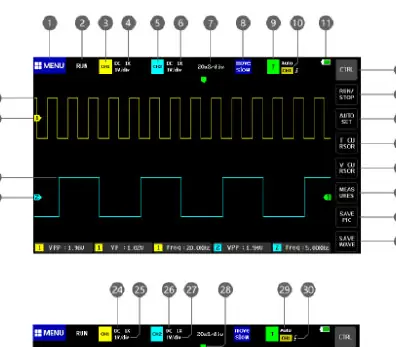
- 1: Function menu for system settings and file management.
- 7: Time base adjustment area.
- 14: One-button automatic waveform adjustment.
- 18: Screenshot capture button.
- 20/22: Baseline position indicators for channels.
Model compatibility
- Use only probes with 100MHz bandwidth or higher.
- Do not use computer USB ports for charging; use a 5V/2A wall charger.
- Standard Android USB data cable is used for PC connection.
- 100X probes are required for voltages exceeding 400V peak-to-peak.

Manual page author
Emily Carter
User documentation editor
Prepares concise manual descriptions and highlights the most useful setup, operation, and maintenance information for readers.