Automotive / Jump Starters
User Manual for Forney FRONTLINE 1750 Lithium Jump Starter
Quick start guide and user manual for the Forney FRONTLINE 1750 Lithium Jump Starter. Includes jump-starting instructions, error code explanations, charging procedures, and safety warnings for smart and forced jump-start modes.
Table of contents
Manual images
Click an image to enlargeQuick Guide
The Forney FRONTLINE 1750 is a lithium jump starter designed for 12V lead-acid batteries. It comes partially charged and must be fully charged before first use. The device features a Smart Jump Start mode for standard batteries and a Forced Jump Start mode for batteries with less than 1V of charge. It also functions as a power bank via USB-A and USB-C ports and includes an integrated LED flashlight.
Charging the Device
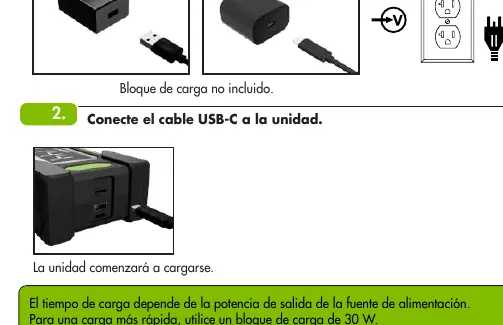
To charge the unit, connect the USB-C cable to the device and plug it into a powered USB port. For the fastest charging, use a 30W power block. Charging time is less than 2 hours with a 30W charger.
Smart Jump Start
Use this mode for standard 12V lead-acid batteries (AGM, GEL, wet cell). Ensure all vehicle electrical systems (lights, AC, radio) are turned off before starting.
- Connect the clamp cable to the 12V JUMP START OUTPUT port on the unit.
- Connect the clamps to the battery terminals: Red to positive (+), Black to negative (-).
- Turn on the unit.
- Press the power button when connected to the battery to initiate the jump start. The "START" icon will illuminate.
- Start the vehicle.
- Turn off the unit by holding the power button for 3 seconds.
Forced Jump Start
Warning: This mode is for batteries with less than 1V of charge. Spark prevention and reverse polarity protection are disabled in this mode. Use with extreme caution.
- Connect the clamp cable to the 12V JUMP START OUTPUT port.
- Connect the clamps to the battery terminals (Red to +, Black to -).
- Turn on the unit.
- Activate Forced Jump Start mode by holding the power button and the flashlight button simultaneously for 5 seconds.
- The color light bar will flash rapidly and the "Start" icon will remain solid, indicating the mode is active.
- Start the vehicle.
- Turn off the unit by holding the power button for 3 seconds.
Power Bank and Flashlight
To charge personal devices, plug the charging cable into any port marked USB OUT. To use the flashlight, press the flashlight button to cycle through modes: Solid White, Solid Red, and Flashing Red.
LED Display Error Codes
The unit displays error codes to help troubleshoot issues:
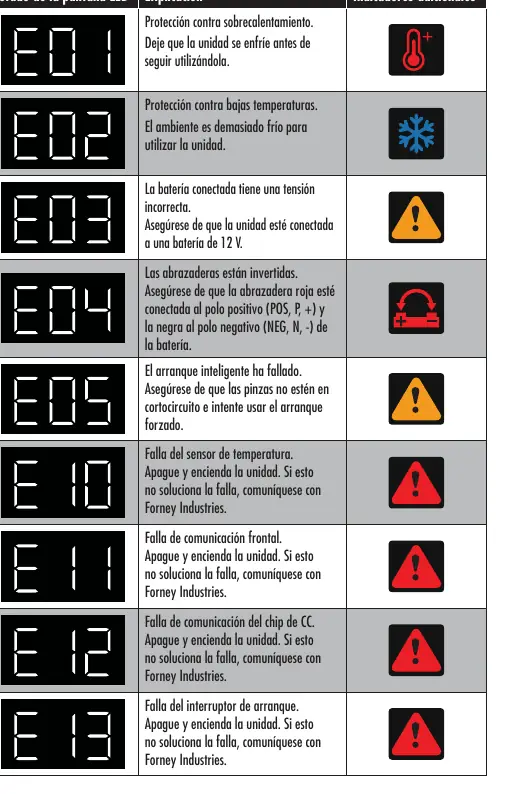
- E01: Overheating. Allow the unit to cool down.
- E02: Low temperature. The environment is too cold.
- E03: Incorrect voltage. Ensure the battery is 12V.
- E04: Clamps reversed. Check polarity (Red to +, Black to -).
- E05: Smart jump start failed. Ensure clamps are not shorted and try forced mode.
- E10-E13: Internal failure. Turn the unit off and on; if the error persists, contact Forney Industries.
Manufacturer information
Forney Industries
Practical help
Common problems
E01 Error Code
The unit is overheating. Allow it to cool down before further use.
E02 Error Code
The environment is too cold to operate the unit.
E04 Error Code
Clamps are reversed. Ensure the red clamp is on the positive (+) terminal and the black clamp is on the negative (-) terminal.
E05 Error Code
Smart jump start failed. Check that clamps are not shorted together and consider using Forced Jump Start mode.
Before use
- Ensure all vehicle electrical systems (lights, AC, radio) are turned off.
- Verify the battery is a 12V lead-acid type (AGM, GEL, or wet cell).
- Charge the unit fully before the first use.
- Use a 30W power block for the fastest charging time (under 2 hours).
Specs in practice
- Peak Current
- 1750A, suitable for gasoline engines up to 7.5L and diesel engines up to 5.0L.
- Battery Capacity
- 51.8 Wh internal battery.
Images and diagrams
- Smart Jump Start: Connect clamps to the unit, then to the battery terminals, then power on and press the start button.
- Forced Jump Start: Requires holding both power and flashlight buttons for 5 seconds to activate.
Model compatibility
- Compatible only with 12V lead-acid batteries.
- Includes support for AGM, GEL, and deep-cycle batteries.

Manual page author
David Miller
Documentation analyst
Organizes user manual content into clear summaries, with attention to model details, product context, and everyday usability.