Electronics / Cameras
Owner's Manual for Fujifilm Fujinon XF16-55mmF2.8 R LM WR II Lens
Quick guide and owner's manual for the Fujifilm Fujinon XF16-55mmF2.8 R LM WR II lens. Includes setup, aperture and zoom operation, maintenance, and safety instructions.
Table of contents
Manual images
Click an image to enlargeQuick guide from the manual
This manual provides essential information for the safe and correct operation of your Fujifilm Fujinon XF16-55mmF2.8 R LM WR II lens. Before using the lens, ensure your camera and lens firmware are updated to the latest versions to ensure full functionality. You can check for updates at the official Fujifilm support website.
Parts of the lens
The lens features several key components for operation:
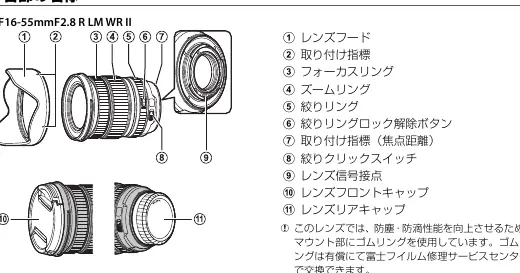
- Lens hood: Helps reduce glare and protects the front element.
- Focus ring: Used for manual focusing.
- Zoom ring: Adjusts the focal length.
- Aperture ring: Sets the aperture (f-number).
- Aperture ring lock release: Used to switch between 'A' (automatic) and manual aperture settings.
- Aperture click switch: Toggles the clicking sound of the aperture ring.
- Lens signal contacts: Ensure proper communication between the lens and camera.
Operation
Aperture
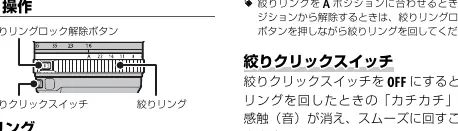
Rotate the aperture ring to select the desired f-number. To set the aperture automatically, rotate the ring to the A position. To select a specific value, rotate the ring to the desired number. To switch between 'A' and manual values, press the aperture ring lock release while rotating the ring.
Use the aperture click switch to turn off the clicking sound for smoother, silent aperture adjustments.
Zoom
Rotate the zoom ring to adjust the focal length. Rotating left zooms out (wider angle), while rotating right zooms in (telephoto).
Maintenance and care
- Cleaning: Use a blower to remove dust and lint. For smudges or fingerprints, apply a small amount of lens cleaner to a soft, clean cloth or lens-cleaning tissue. Clean in a circular motion from the center outwards. Never use organic solvents like paint thinner or benzene.
- Storage: Always attach the front and rear caps when the lens is not in use. Store in a cool, dry place to prevent mold and rust. Avoid direct sunlight and storage with mothballs.
- Moisture: Keep the lens dry. Wipe off any rain or water droplets immediately.
Safety precautions
Warning: Do not immerse in or expose to water, as this can cause fire or electric shock. Do not disassemble the lens. If the lens case breaks open due to a fall or accident, do not touch the exposed internal parts; remove the camera battery and consult your dealer.
Caution: Keep out of reach of small children. Do not handle with wet hands. When shooting backlit subjects, keep the sun out of the frame to prevent focused sunlight from causing fire or burns.
Manufacturer information
Fujifilm Corporation
Practical help
Common problems
Lens not performing as expected or features unavailable
Ensure both the lens and camera firmware are updated to the latest versions.
Audible sound or vibration when camera is off or in playback mode
This is normal. It is caused by the linear motor magnets disengaging and does not affect performance.
Before use
- Update camera and lens firmware to the latest version.
- Ensure lens signal contacts are clean.
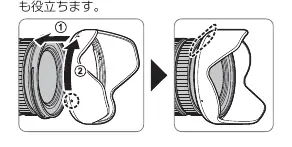
- Attach the lens hood to reduce glare.
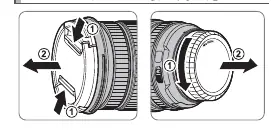
- Keep lens caps attached when not in use.
- Store in a cool, dry place.
Specs in practice
- Focal length
- 16-55mm (35mm equivalent: 24-84mm).
- Max. aperture
- f/2.8 (constant throughout the zoom range).
- Minimum focus distance
- 0.3m from the focal plane.
Images and diagrams
- The lens features a dedicated aperture ring with a lock release and click switch.
- The lens mount includes a rubber ring for dust and splash resistance.
- The zoom ring is used to adjust magnification.
Model compatibility
- Designed exclusively for the Fujifilm X mount.
- Not compatible with G mount or X mount film cameras.

Manual page author
Emily Carter
User documentation editor
Prepares concise manual descriptions and highlights the most useful setup, operation, and maintenance information for readers.