Electronics / Cameras
Fujifilm GFX 100S II Digital Camera Owner's Manual
Comprehensive owner's manual for the Fujifilm GFX 100S II digital camera, covering setup, photography, movie recording, playback, and network settings.
Table of contents
Manual images
Jump to the sectionProduct Overview
The Fujifilm GFX 100S II is a high-performance digital camera designed for professional-grade still photography and movie recording. This manual provides detailed instructions on the camera's operation, menu settings, and maintenance to ensure optimal performance.

Getting Started
Before using the camera, ensure the battery is fully charged using the supplied AC-5VJ power adapter. Insert the battery and a compatible SD memory card into the designated slots. Attach a lens by aligning the marks on the lens and camera body, then rotating until it clicks into place. The camera features a tilting LCD monitor and an electronic viewfinder (EVF) for flexible framing.
Basic Operation
The camera offers various shooting modes, including Program AE (P), Shutter-Priority AE (S), Aperture-Priority AE (A), and Manual (M). Use the mode dial to select your preferred mode. The focus stick (focus lever) allows for quick selection of the focus area, while the command dials provide intuitive control over shutter speed and aperture settings.
Photography and Movie Recording
The GFX 100S II supports advanced autofocus features, including face and eye detection, and subject detection for animals and vehicles. For movie recording, the camera offers specialized settings to optimize audio and video quality. Users can also utilize the touch screen for focus area selection and touch-function gestures for quick access to frequently used features.
Playback and Connectivity
Review your captured images and movies directly on the camera's LCD monitor or EVF. The playback menu allows for basic editing, such as cropping, resizing, and rotating images. The camera supports wireless connectivity for transferring images to smartphones via Bluetooth or Wi-Fi, as well as tethered photography via USB or wireless LAN.
Maintenance and Troubleshooting
Keep the camera and lens clean by using a blower to remove dust. If you encounter issues, consult the troubleshooting section of this manual, which covers common problems related to power, battery, shooting, and connectivity. Always ensure the camera firmware is up to date for the latest features and improvements.
Manufacturer information
Fujifilm Corporation
Practical help
Common problems
The camera does not turn on.
Ensure the battery is charged, inserted correctly, and the battery-chamber cover is latched.
The battery runs down quickly.
Set PRE-AF to OFF, adjust display brightness, or change power management settings.
No picture is taken when the shutter button is pressed.
Check storage media, ensure the write-protect switch is off, and verify focus if RELEASE/FOCUS PRIORITY is set to FOCUS.
The camera turns off suddenly.
Check battery level, ensure the camera is not overheating, or check the auto power off settings.
Charging does not start (USB).
Ensure the camera is turned off and the USB cable is securely connected to a powered computer or adapter.
Before use
- Charge the battery fully.
- Insert a compatible memory card.
- Attach a lens correctly.
- Set the camera clock and language.
- Format the memory card before first use.
Specs in practice
- Effective pixels
- Approximately 102 million pixels for high-resolution imaging.
- Image sensor
- 43.8 mm x 32.9 mm Bayer array with primary color filter.
- Storage media
- Supports two SD/SDHC/SDXC memory card slots (UHS-II compliant).
- Shutter speed
- Varies by shutter type (mechanical/electronic) and mode (P, A, S, M, Bulb).
Images and diagrams
- The manual includes detailed diagrams of the camera body, identifying all buttons, dials, and ports.
- Diagrams illustrate the correct method for attaching the strap and lens.
- Battery and memory card insertion procedures are clearly depicted.
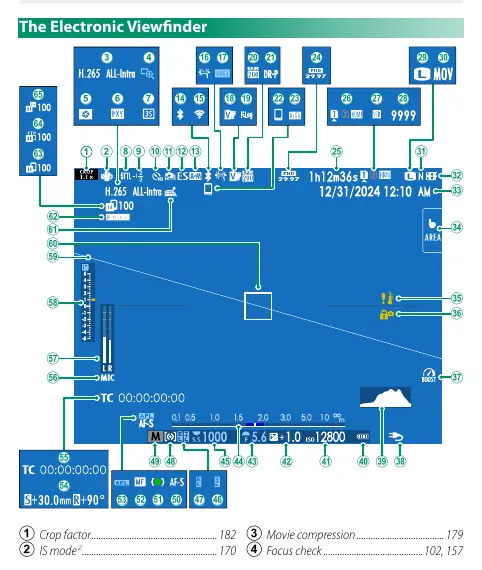
- The electronic viewfinder and LCD monitor displays are explained with numbered indicators.
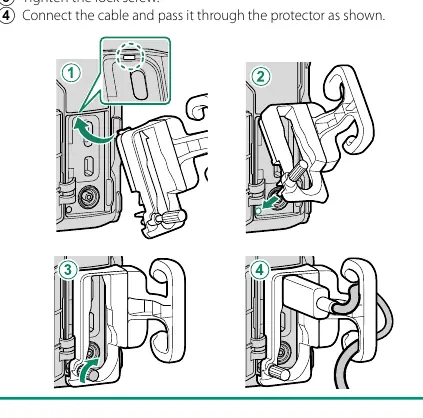
- Diagrams show the correct use of the cable protector to prevent accidental disconnection.
Model compatibility
- Compatible with FUJIFILM G-mount lenses.
- Supports optional external flash units and XLR microphone adapters.
- Compatible with various software including FUJIFILM X Acquire and Capture One.
- Supports connection to smartphones via Bluetooth and Wi-Fi.

Manual page author
Emily Carter
User documentation editor
Prepares concise manual descriptions and highlights the most useful setup, operation, and maintenance information for readers.