Power / Batteries Chargers
Gadnic 12V/24V Automatic Smart Battery Charger User Guide
Quick guide for the Gadnic CBAT-150 smart battery charger. Learn about charging modes, LCD display indicators, technical specifications, and troubleshooting steps for AGM, GEL, SLA, and wet batteries.
Table of contents
Manual images
Jump to the sectionQuick guide from the manual
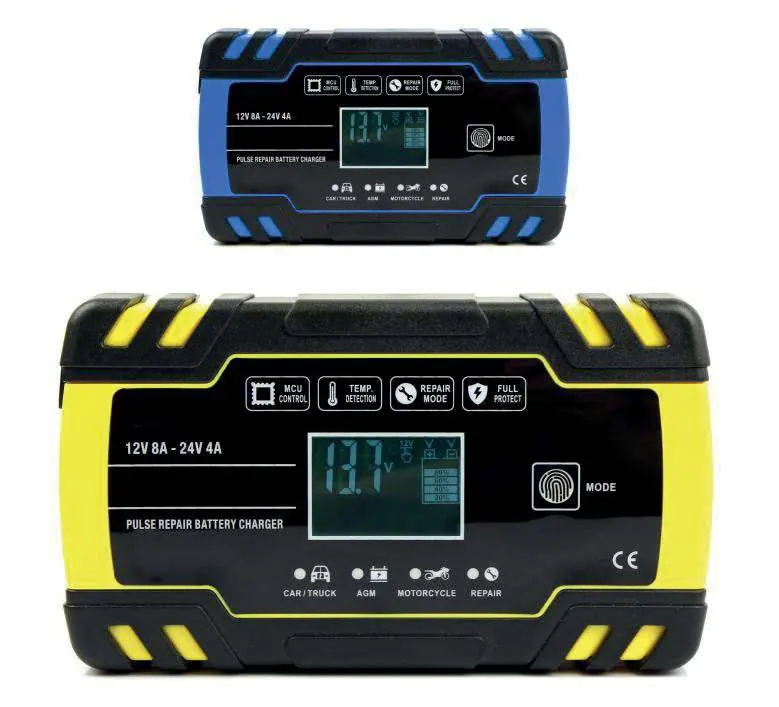
The Gadnic CBAT-150 is a multi-stage, microprocessor-controlled smart battery charger designed for 12V and 24V batteries, including AGM, GEL, SLA, and wet types. It features automatic voltage adaptation based on ambient temperature and a pulse repair mode for recovering heavily sulfated or discharged batteries.
Device description
The charger features an LCD screen that displays real-time charging status, including voltage, current, and internal temperature. It is equipped with a mode selection button to toggle between different charging profiles.
Charging modes
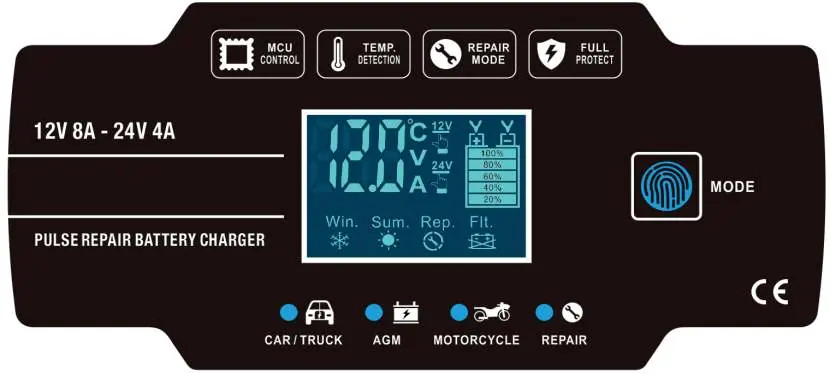
- CAR/TRUCK: Fast charge mode for large batteries. 12V max 8A, 24V max 4A.
- AGM: Specialized mode for AGM and calcium batteries.
- MOTORCYCLE: Slow charge mode for small batteries. Max 1.5A.
- REPAIR: A 24-hour advanced recovery mode for old, idle, damaged, or sulfated batteries. Note that not all batteries can be recovered.
LCD display indicators
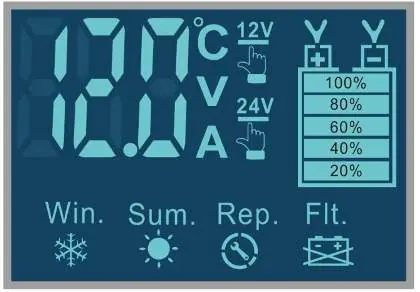
- Win. (Winter): Activated when ambient temperature is below +10°C; increases charge voltage.
- Sum. (Summer): Activated when ambient temperature is above +28°C; reduces charge voltage.
- Flt.: Indicates a fault. Check for incorrect polarity, defective battery, or poor connection.
- FUL: Battery is fully charged.
Technical specifications
- Input: 240V ~ 50Hz
- Output: 12V / 24V Auto
- Output Current: 12V 8A / 24V 4A
- Minimum Start Voltage: >2.0V
- Cooling: Integrated fan
- Dimensions: 170 x 98 x 58 mm
- Weight: 560g
Troubleshooting
If the display shows a fault (Flt.), perform the following checks:
- Verify the connection between the charger and the battery.
- Check for correct polarity; swap the clamp connections if necessary.
- If the fault persists, have the battery tested by a professional, as it may be defective.
Support
For technical assistance, contact the official service center at www.servitech.com.ar or via WhatsApp at 11 6260 1114 (text only). Email: [email protected].
Official resources from the manual
Manufacturer information
Gadnic
Practical help
Common problems
Flt. indicator on LCD
Check for incorrect polarity, poor connection between charger and battery, or a defective battery.
Battery not recovering in Repair mode
The repair mode is advanced, but not all damaged or sulfated batteries can be recovered.
Before use
- Ensure the battery voltage is at least 2.0V to start the charger.
- Verify the battery type (AGM, GEL, SLA, or wet) is compatible.
- Check that the ambient temperature is within the operating range for the automatic Winter/Summer modes.
- Ensure the clamps are securely connected to the correct terminals.
Specs in practice
- 12V 8A / 24V 4A
- Maximum output current depending on the battery voltage detected.
Images and diagrams
- The LCD screen displays current voltage, amperage, battery capacity percentage, and active mode icons.
- The Mode button cycles through Car/Truck, AGM, Motorcycle, and Repair settings.
Model compatibility
- Compatible with 12V and 24V systems.
- Suitable for AGM, GEL, SLA, and wet batteries.

Manual page author
Michael Turner
Technical manual editor
Reviews PDF manuals for structure, safety notes, and practical product details so readers can find the right information quickly.