Electronics / Monitors
Garmin Alpha 100F with TT15F/TT15F Mini Owner's Manual
Comprehensive owner's manual for the Garmin Alpha 100F handheld and TT15F/TT15F Mini dog collar devices, covering setup, tracking, training, and maintenance.
Table of contents
Getting Started with Alpha 100F
The Alpha 100F system is designed for tracking and training dogs. Before first use, ensure the battery is installed in the handheld device and both the handheld and the collar are fully charged. The system requires a clear line of sight for optimal communication; for best results, operate from high elevation points. To begin, turn on both devices, acquire satellite signals outdoors, and pair the collar with the handheld using the wireless pairing method or by entering track and train codes.
Dog Tracking and Training
The handheld device allows you to track your dog's location and status on a map or via the tracking compass. You can add up to 20 dog collar devices to a single handheld. The system supports various training methods, including momentary and continuous stimulation, tone, and vibration. Always start training on a leash to ensure the dog understands basic commands before introducing collar stimulation. Adjust the intensity level based on your dog's reaction, aiming for the lowest level that produces a recognizable response.
Device Customization and Navigation
You can customize the main menu, data fields, and map settings to suit your hunting needs. The device features advanced navigation tools, including waypoints, routes, and tracks. You can mark locations, create routes for navigation, and record track logs. The built-in compass and barometric altimeter can be calibrated for increased accuracy. Additionally, the device supports location alerts, such as geofences and radius alerts, to notify you when a dog enters or exits a specific area.
Maintenance and Care
Proper maintenance is essential for device longevity. Always dry the USB port and charging contacts thoroughly before connecting to a power source to prevent corrosion. If the device will not be used for several months, remove the battery from the handheld and charge the collar battery to approximately 50% for storage. The collar strap, VHF antenna, and battery are user-replaceable. Refer to the appendix for detailed instructions on replacing these components using the appropriate tools.
Safety and Troubleshooting
The device is water-rated (IPX7) and designed for outdoor use. Avoid exposing the device to extreme temperatures or harsh chemicals. If you experience interference from other collars, you may need to change the dog ID or contact ID. For software updates and support, use Garmin Express to keep your device firmware current.
Manufacturer information
Garmin Ltd.
Practical help
Common problems
Device not charging
Ensure the USB port or charging contacts are clean and dry. Check the fuse in the vehicle power cable if applicable.
Poor communication signal
Ensure an unobstructed line of sight between the handheld and collar. Move to a higher elevation point.
Interference from other devices
Change the dog ID or contact ID in the device settings.
Collar not responding to training keys
Ensure the collar is properly fitted with contact points touching the skin and that the device is paired correctly.
Before use
- Install the battery in the handheld device.
- Fully charge the handheld device.
- Fully charge the dog collar device.
- Turn on both devices.
- Acquire satellite signals in an open area.
- Pair the collar with the handheld if necessary.
- Fit the collar properly on the dog.
Specs in practice
- VHF Wireless Range
- The maximum distance for radio communication between the handheld and collar (up to 9 miles).
- Water Rating (IPX7)
- The device withstands incidental exposure to water of up to 1 meter for up to 30 minutes.
- Battery Life (Handheld)
- Up to 20 hours of typical use on a single charge.
- Operating Temperature
- The range in which the device functions safely (-20° to 60°C).
Images and diagrams
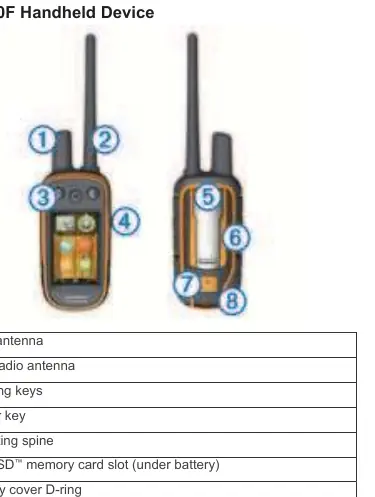
- The handheld device diagram identifies the GPS and VHF antennas, training keys, power key, and charging port.
- The collar device diagram highlights the VHF/GPS antennas, power key, contact points, and status LEDs.
- The communication diagram illustrates the importance of line-of-sight for signal strength.
- The battery replacement diagram shows the back plate, connectors, and battery orientation for the TT15F.
Model compatibility
- Compatible with BaseCamp for real-time tracking and data management.
- Supports ANT+ sensors like heart rate monitors and tempe temperature sensors.
- Compatible with VIRB action cameras for remote control.
- Not compatible with older Windows versions (95, 98, Me, NT) or Mac OS 10.3 and earlier.

Manual page author
David Miller
Documentation analyst
Organizes user manual content into clear summaries, with attention to model details, product context, and everyday usability.