Automotive / Navigation
Garmin GPSMAP 12x3, 9x3, 7x3 Owner's Manual
Comprehensive owner's manual for Garmin GPSMAP 12x3, 9x3, and 7x3 series chartplotters, covering device setup, navigation, sonar, radar, autopilot, and ActiveCaptain integration.
Table of contents
Manual images
Jump to the sectionQuick guide from the manual
This manual provides instructions for the Garmin GPSMAP 12x3, 9x3, and 7x3 series chartplotters. It covers device operation, navigation, sonar, radar, autopilot, and wireless connectivity. Users should refer to the Important Safety and Product Information guide for safety warnings. For the latest updates and support, visit support.garmin.com.
Device Overview
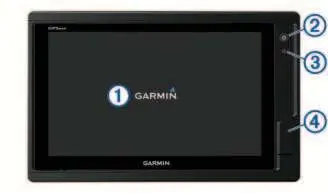
The chartplotter features a touchscreen, power key, automatic backlight sensor, and two microSD memory card slots (max 32 GB) located on the back of the device. The connector view varies by model, providing ports for power, NMEA 0183/2000 networks, Ethernet, sonar, and video input/output.
Customizing the Chartplotter
The home screen provides access to all features. Users can pin feature buttons, rearrange category items, and customize the menu bar. The device supports SmartMode layouts for specific activities like cruising or docking. Data overlays can be customized on any screen.
Navigation
The chartplotter supports navigation using the Navigation Chart, Fishing Chart, and 3D chart views. Users can create waypoints, routes, and use Auto Guidance for path planning. The device also supports AIS and MARPA for tracking other vessels and collision avoidance.
Sonar Fishfinder
When connected to a compatible transducer, the device functions as a fishfinder. Supported views include Traditional, Garmin ClearVü, Garmin SideVü, and Panoptix sonar. Users can adjust gain, range, and scroll speed, and set sonar alarms for shallow or deep water.
Radar
The chartplotter supports optional Garmin marine radar. Features include radar overlay on charts, MotionScope Doppler technology for highlighting moving targets, and guard zones for collision alerts.
Autopilot
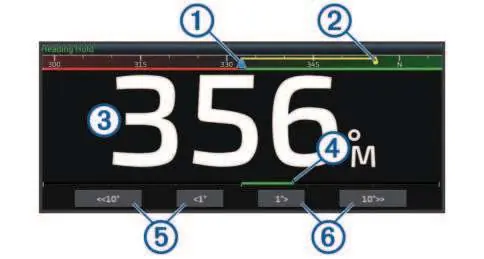
When connected to a compatible Garmin or Yamaha autopilot system, the chartplotter allows for full control of steering, including heading hold, steering patterns (U-turn, circles, zigzag, etc.), and wind hold for sailboats.
ActiveCaptain App
The ActiveCaptain app allows users to register the device, update software and charts, and receive smart notifications on the chartplotter display. It also provides access to the Garmin Quickdraw Community for sharing contour maps.
Maintenance and Troubleshooting
The screen should be cleaned with an eyeglass lens cleaner safe for anti-reflective coatings. Troubleshooting sections cover issues with GPS signal acquisition, power problems, and waypoint location errors.
Official resources from the manual
Manufacturer information
Garmin Ltd.
Practical help
Common problems
Device will not acquire GPS signals
Ensure the device has a clear view of the sky. If mounted inside a cabin, it should be near a window. Update to the latest software.
Device will not turn on or keeps turning off
Check the power source, ensure the fuse in the power cable is intact, and verify the device is receiving at least 12 Vdc.
Waypoints created in the wrong location
Verify that the map datum and position format settings on the device match those used to create the original waypoint.
Before use
- Ensure the device is installed and configured by a qualified marine installer.
- Check that the power source is generating at least 12 Vdc.
- Insert a microSD memory card (up to 32 GB, FAT32 formatted) for map data and software updates.
- Ensure the transducer is properly connected and the correct type is selected in settings.
- If using an autopilot, ensure a dedicated control display is installed at each helm.
Specs in practice
- NMEA 2000 LEN
- Load Equivalency Number; indicates the power draw of the device on the NMEA 2000 network.
- Water rating (IPX7)
- The device withstands incidental exposure to water of up to 1 meter for up to 30 minutes.
- Compass-safe distance
- The minimum distance the device must be from a magnetic compass to avoid interference.
Images and diagrams
- The device overview shows the touchscreen, power key, automatic backlight sensor, and microSD card slots.
- Connector views illustrate the location of power, NMEA, Ethernet, sonar, and video ports.
- The autopilot screen diagram identifies the actual heading, intended heading, rudder position, and step turn controls.
- The trolling motor control bar diagram shows battery status, propeller control, speed adjustment, and anchor lock.
Model compatibility
- Not all features are available on all models.
- Auto Guidance and 3D chart views require premium charts.
- Sonar features depend on the connected transducer.
- Radar features require a compatible Garmin marine radar.

Manual page author
Emily Carter
User documentation editor
Prepares concise manual descriptions and highlights the most useful setup, operation, and maintenance information for readers.