Automotive / Navigation
User Manual for Garmin GPSMAP 10X2/12X2 Chartplotter
Comprehensive user guide for the Garmin GPSMAP 10X2 and 12X2 series chartplotters, covering device operation, navigation, sonar, radar, and system settings.
Table of contents
Manual images
Jump to the sectionOverview
The Garmin GPSMAP 10X2 and 12X2 series are advanced marine chartplotters designed for navigation, sonar, and radar integration. This manual provides detailed instructions on device setup, interface navigation, and advanced features.
Getting Started
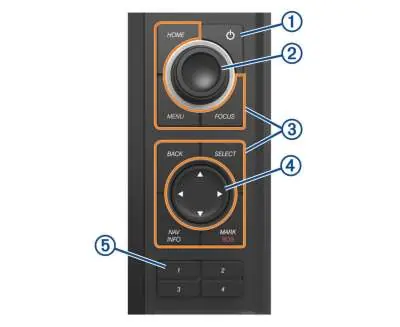
The device features a physical knob for zooming and menu navigation, along with dedicated keys for Home, Menu, and Focus. Users can customize the home screen, add favorite pages, and configure SmartMode layouts for specific activities like cruising or fishing.
Navigation
The chartplotter supports various navigation methods, including manual waypoint creation, route planning, and Auto Guidance. It integrates with AIS and MARPA for collision avoidance and target tracking. Users can also utilize Garmin Quickdraw Contours to create custom maps with depth contours.
Sonar and Radar
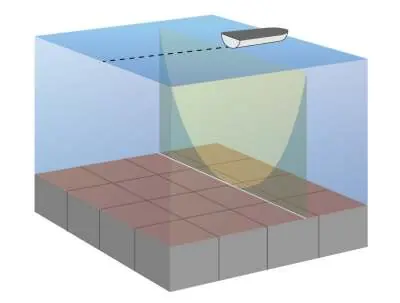
The device supports traditional, ClearVü, SideVü, and Panoptix sonar technologies. Detailed settings allow for frequency adjustment, gain control, and noise reduction. Radar integration provides situational awareness with features like MotionScope Doppler technology and guard zones.
Connectivity and Maintenance
The ActiveCaptain app allows for wireless updates, smart notifications, and data synchronization. The device supports NMEA 2000 and Garmin Marine Network for connecting additional sensors and displays. Regular maintenance includes keeping the screen clean and ensuring memory card slots are properly sealed.
Support
For further assistance, software updates, and FAQs, visit support.garmin.com.
Official resources from the manual
Manufacturer information
Garmin Ltd.
Practical help
Common problems
Device does not acquire GPS signals
Ensure the device has a clear view of the sky. If it has been off for a long time, it may take 30-60 seconds to acquire satellites.
Device does not turn on or keeps shutting down
Check the power cable fuse and ensure the device is receiving at least 12V DC.
Waypoint created in wrong location
Verify that the map datum and position format settings match those used when the original waypoint was created.
Before use
- Ensure the memory card, gasket, and door are dry before closing.
- Verify that the device has a clear view of the sky for GPS acquisition.
- Connect a compatible transducer for sonar features.
- Configure the vessel type for accurate navigation settings.
- Ensure the latest software is installed via ActiveCaptain or Garmin Express.
Specs in practice
- Auto Guidance
- Calculates the best route to a destination based on vessel and map data.
Images and diagrams
- The device features a power button, knob, device keys, arrow keys, and shortcut keys for quick access.
- The connector panel includes ports for the transducer, power, video input, Ethernet, and NMEA 2000.
Model compatibility
- Not all features are available on all models.
- Auto Guidance and premium 3D views require compatible premium maps.
- Panoptix and SideVü features require specific compatible transducers.

Manual page author
Michael Turner
Technical manual editor
Reviews PDF manuals for structure, safety notes, and practical product details so readers can find the right information quickly.