Power / Batteries Chargers
Cobra 1350E BlueBound Marine VHF Radio User Guide
Quick guide for the Cobra 1350E BlueBound marine VHF radio, covering DSC distress operations, call waiting logs, menu navigation, GPS settings, and channel configuration.
Table of contents
Manual images
Jump to the sectionQuick guide from the manual
This document provides functional specifications and operational instructions for the Cobra 1350E BlueBound marine VHF radio. It covers essential tasks such as managing DSC distress calls, using the call waiting log, configuring GPS settings, and adjusting radio parameters.
Distress Key Operation
Before accessing DSC features, a valid MMSI number must be entered. To initiate a distress call:
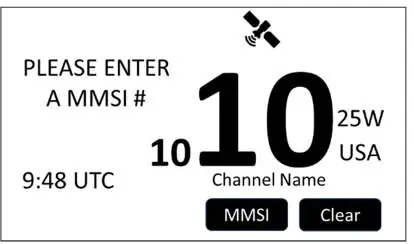
- Press and release the red DISTRESS key.
- Use the UP/DOWN arrow keys to select the nature of the distress (e.g., Fire, Flooding, Collision).
- Press SELECT or ENT to confirm.
- Press and hold the DISTRESS key for 3 seconds to transmit the alert at 25W.
To cancel a distress alert before acknowledgement, press the CANCEL button and follow the on-screen instructions for a voice cancellation broadcast.
Call Waiting
The radio stores incoming calls in a log. An envelope icon on the idle screen indicates saved messages. The menu allows you to view distress calls, received calls, or delete logs. The radio stores up to 20 entries per category; older entries are overwritten when the log is full.
Radio Main Menu
Access the main menu by pressing the MENU button. Key sections include:
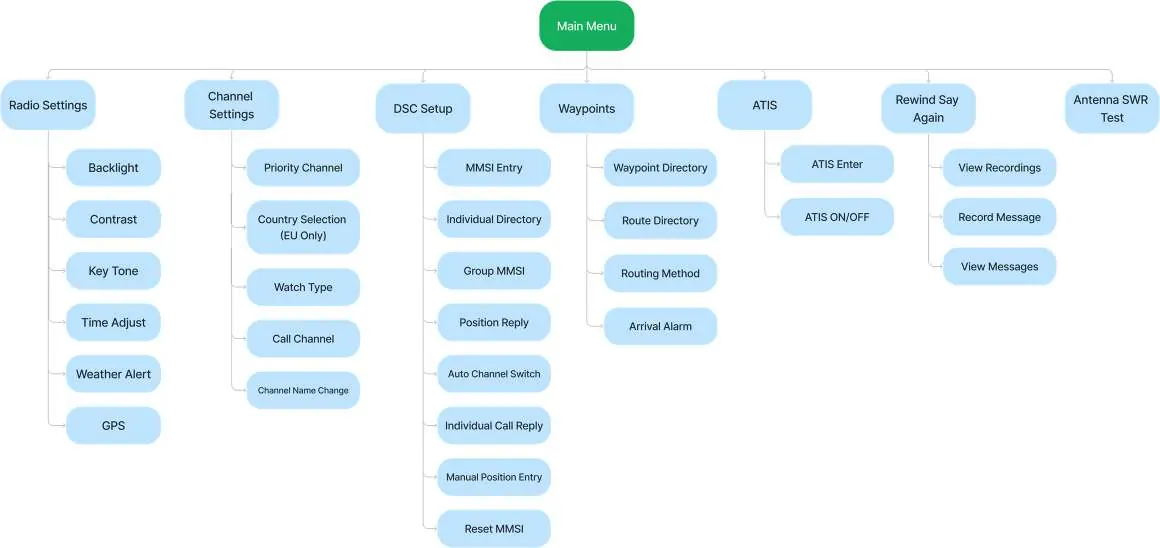
- Radio Settings: Adjust backlight, contrast, key tones, time offsets, weather alerts, and GPS configuration.
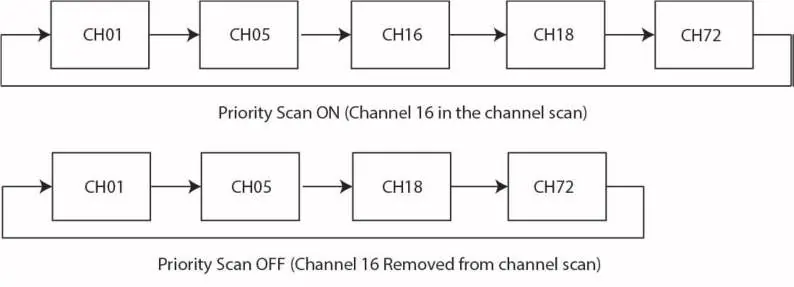
- Channel Settings: Manage priority channels, channel maps (USA/Canada/International), and country-specific channel lists for EU models.
- DSC Setup: Configure MMSI, directories, and call replies.
- Waypoints: Manage navigation waypoints and routes.
GPS Configuration
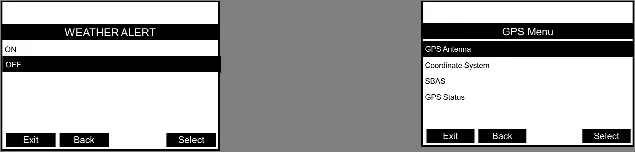
The radio supports internal and external GPS antennas. You can configure the coordinate system (DD, DMM, DMS), enable/disable SBAS, and choose units for speed and distance measurements.
Weather Alert
When activated, the radio monitors for NOAA 1050Hz weather alert tones. If detected, the radio sounds an alarm and switches to the weather channel to broadcast the alert. The alert tone is suppressed for 60 seconds after playing.
Manufacturer information
Cobra Electronics
Practical help
Common problems
DSC features are inaccessible.
Ensure a valid MMSI number has been entered into the radio.
GPS coordinates are not displaying.
Check the GPS Info Display setting in the GPS menu and ensure it is set to ON.
External GPS antenna not working.
Manually change the GPS setting in the menu from Internal GPS to External GPS.
Backlight is too dim or off.
Adjust the backlight level (0-3) in the Radio Settings menu. Note that level 0 still activates briefly during operations.
Before use
- Enter your vessel's MMSI number.
- Select the appropriate channel map (USA, Canada, or International).
- Configure the coordinate system (DD, DMM, or DMS) if using GPS.
- Set the correct time offset for your location.
- Verify GPS antenna selection (Internal vs. External).
Images and diagrams
- The main menu tree shows the hierarchy of Radio Settings, Channel Settings, DSC Setup, and Waypoints.
- The priority scan diagram illustrates how channel 16 is included or excluded from the scan list based on the Priority Channel setting.
- The weather alert timeline shows the sequence of detecting the 1050Hz tone, the 8-second alert tone, and the subsequent voice broadcast.
Model compatibility
- Weather Alert feature is for US models only.
- Country selection for extra channels is for EU models only.
- Radio cannot edit channel 16's name or edit names during Scan, Dual-Watch, or Tri-Watch.

Manual page author
Emily Carter
User documentation editor
Prepares concise manual descriptions and highlights the most useful setup, operation, and maintenance information for readers.