Electronics / Speakers & Soundbars
User Manual for Genelec 1234AC Smart Active Monitor
Comprehensive user guide for the Genelec 1234AC Smart Active Monitor. Includes installation instructions, flush mounting, GLM software setup, cable connections, and maintenance tips.
Table of contents
Manual images
Click an image to enlargeQuick Guide from the Manual
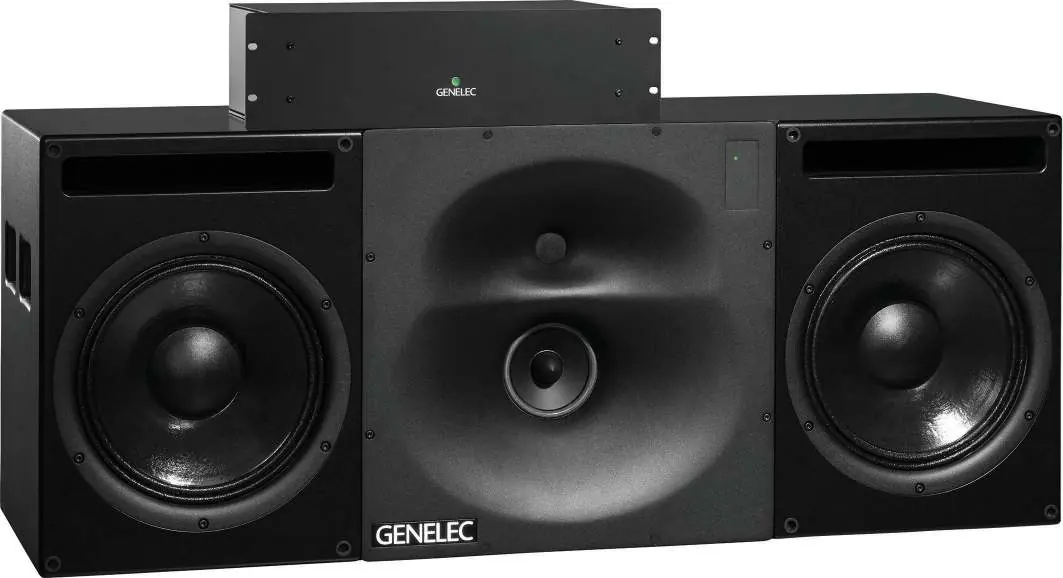
The Genelec 1234AC is a high-performance Smart Active Monitor designed for large control rooms. This system consists of a monitor enclosure and a separate RAM-XL amplifier unit. Before installation, ensure you have all components: the enclosure, the individually calibrated RAM-XL amplifier, mains cable, RJ45 cable, and an Allen key. The system is designed for indoor use only, with an operating temperature range of 15-35°C (50-95°F) and relative humidity between 20% and 80%.
Installation and Mounting
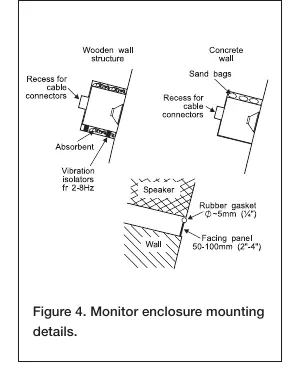
The 1234AC is designed for flush mounting, which is strongly recommended for optimal acoustical performance. The Directivity Control Waveguide (DCW) can be rotated ±90° to accommodate vertical or horizontal orientation. To rotate the DCW, unscrew the eight M5 fixing screws using a 4 mm Allen key, rotate the plate, and remount. When flush mounting, ensure the enclosure is flush with the wall surface. Use vibration isolators for non-solid walls (e.g., wooden) to prevent vibration transmission. Leave a 50-100 mm space around the enclosure and fill gaps with absorbent material like mineral wool.
Connections and Cabling
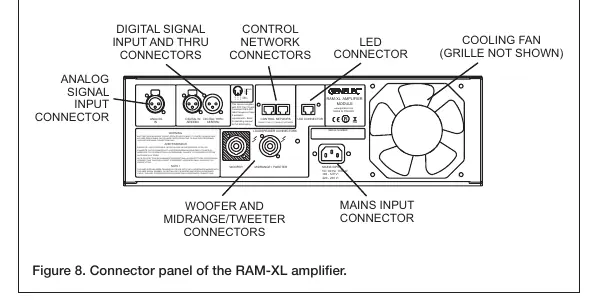
The RAM-XL amplifier must be positioned with sufficient ventilation space (100 mm behind the rear panel). Connect the monitor to the amplifier using the provided 4-pole Speakon cables. Important: Each RAM-XL amplifier is individually calibrated for its specific enclosure; do not mix amplifier/enclosure pairs. The system supports both analog (XLR) and digital (AES/EBU) inputs. The digital input is selected automatically when a valid signal is detected.
GLM Software Setup
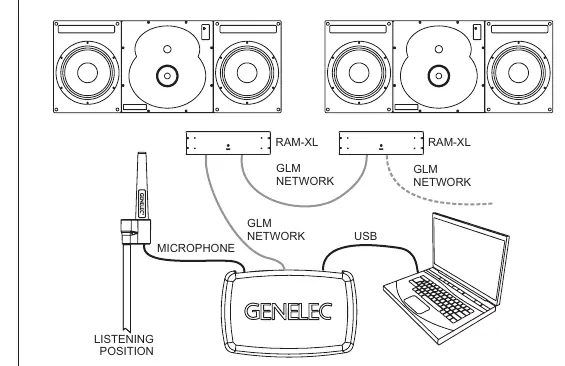
The 1234AC is configured using Genelec Loudspeaker Manager (GLM) software. Connect all monitors and subwoofers in a daisy-chain using CAT5 (RJ45) network cables from the Network Adaptor to the "CONTROL NETWORK" connectors. Connect the GLM Adapter to your computer via USB. Place the measurement microphone at the listening position, run the GLM software, and follow the on-screen instructions to measure and calibrate your system.
Maintenance and Safety
Periodically check the cooling fan on the back of the RAM-XL amplifier for blockages and clean with a vacuum cleaner if necessary. The "Woofer" and "Midrange/Tweeter" connectors carry high voltages; wiring must be installed by qualified personnel. Do not open the amplifier or enclosure. If the front panel light turns red, it indicates an overload condition (e.g., input overload, clipping, or data error); reduce the source level immediately.
Technical Specifications
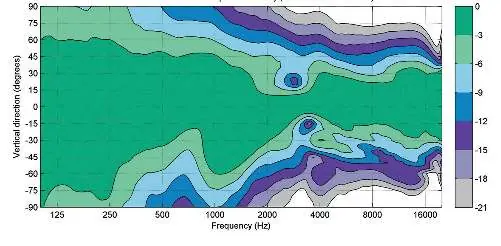
The system features a frequency response extending down to 29 Hz (-6 dB) and up to 21 kHz (-6 dB). The RAM-XL amplifier provides 2 x 750 W (bass), 400 W (midrange), and 250 W (treble) short-term power. It is compatible with mains voltages of 100-120 VAC and 220-240 VAC (50/60 Hz).
Manufacturer information
Genelec Oy
Practical help
Common problems
Front panel light turns red
Indicates overload. Reduce the source level. Check for digital input clipping or AES/EBU data errors.
System overheating
Ensure sufficient ventilation space around the amplifier. Check the cooling fan for blockages.
No sound or incorrect channel assignment
Verify GLM software settings and ensure all network cables are properly connected.
Before use
- Check all items for damage upon delivery.
- Ensure mains voltage matches local supply (100-120V or 220-240V).
- Verify ventilation space (100mm behind amplifier).
- Ensure qualified personnel perform speaker wiring.
- Download and install the latest GLM software.
Specs in practice
- Lower cut-off frequency
- < 29 Hz (-6 dB), indicating deep bass capability.
- Amplifier Power
- 2x750W (Bass), 400W (Mid), 250W (Treble) short-term power.
- Operating Temperature
- 15-35°C (50-95°F). Do not operate outside this range.
Images and diagrams
- Figure 1: Shows the acoustic axis location for horizontal and vertical configurations.
- Figure 4: Details mounting requirements, including vibration isolators and wall filling.
- Figure 6: Illustrates the GLM network daisy-chain cabling.
- Figure 8: Identifies the connector panel on the RAM-XL amplifier.
Model compatibility
- RAM-XL amplifier is calibrated to a specific enclosure; do not mix pairs.
- Requires GLM software for system calibration and setup.
- AES/EBU digital input supports Single Wire or Dual Wire modes.

Manual page author
Michael Turner
Technical manual editor
Reviews PDF manuals for structure, safety notes, and practical product details so readers can find the right information quickly.