HVAC / Heat Pumps
User Manual for Global Industrial 1/2HP Axial Air Mover 641765
Quick guide for the Global Industrial 1/2HP Axial Air Mover 641765. Includes operating procedures, safety instructions, maintenance tips, and troubleshooting steps.
Table of contents
Manual images
Click an image to enlargeQuick guide from the manual
The Global Industrial 1/2HP Axial Air Mover (Model 641765) is designed for efficient air circulation and ventilation. Before use, ensure the unit is on a stable, level surface and that all safety screens are in place. The unit features a 2-speed switch and a built-in GFCI outlet for daisy-chaining multiple units. Always inspect the power cord and fasteners before operation.
Safety Instructions
- Do not operate the fan with a damaged cord or plug.
- Keep the unit out of the reach of children.
- Do not move or adjust the blower while it is in operation.
- Always operate on a flat, level surface to prevent slipping or falling.
- Never operate without the factory-installed safety screens.
- Do not use near combustible gas or flammable materials.
- Do not allow water near or inside the unit during use.
- Do not attempt to disassemble or repair the unit yourself; contact a certified repair center.
Operating Procedures
Follow these steps for safe operation:
- Ensure the unit is placed on a stable, level surface.
- Plug the blower into a grounded outlet with the correct voltage and amperage. Use a circuit protected by a ground fault circuit interrupter (GFCI) for maximum protection.
- Ensure the dial is set to the desired speed before turning the unit on.
Controls & GFCI
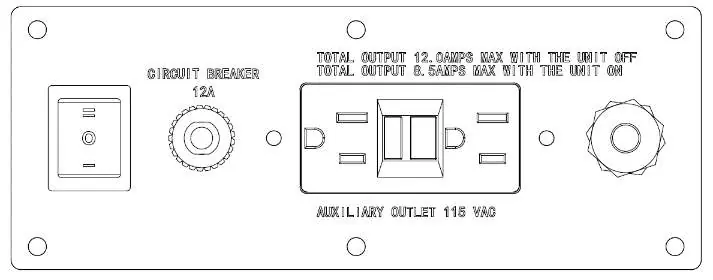
The blower is equipped with a 2-speed switch:
- II: High speed
- 0: Off
- 1: Low speed
The unit includes a built-in GFCI outlet for daisy-chaining multiple units. A total of 12 amps can be connected when the unit is OFF. If an outlet stops working, press the reset button on the unit to reset the breaker.
Maintenance
- Inspect the electrical cord and wiring for damage or discoloration before each use.
- Check for loose fasteners.
- Clean safety screens before each use.
- Use compressed air or a vacuum to remove lint and debris from the motor, inlet, or fan blade.
- Do not use a pressure washer or water hose to clean the unit. Ensure it is completely dry before use.
- The blower has sealed bearings and does not require lubrication.
Troubleshooting
If the blower does not turn on, ensure the knob is in the correct position, check if the circuit breaker or GFCI has tripped, and inspect the cord for damage. If the blower vibrates, check for excessive dirt on the fan blade or a bent motor shaft. If the blower makes scraping noises, inspect the housing for warps or dents.
Specifications
- Power Input: 115Volt/60hz
- Power: 1/2hp
- Current: 3.6amps
- Motor Speed: 1550rpm
- Air Volume: 4000cfm
- Size: 21x12.5x21.8 inch
- Weight: 35lbs
Optional Bracket
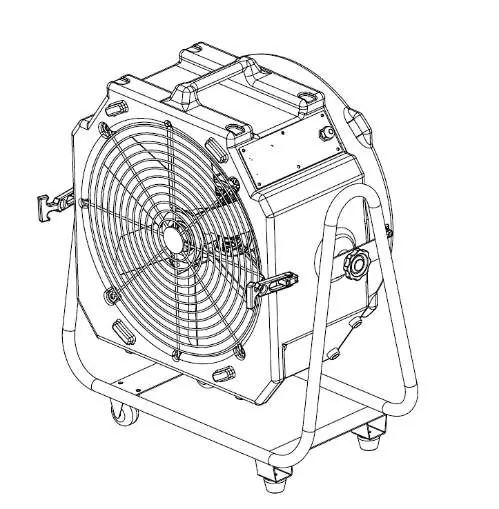
The air mover can be assembled on an optional bracket (item number 641766), which allows for 360-degree positioning. Use the provided screw and rubber gasket to fix the air mover to the bracket. Tighten by hand to secure, and loosen to adjust the blowing direction.
Practical help
Common problems
Blower does not turn on
Ensure the knob is in the correct position, check if the circuit breaker or GFCI has tripped (press reset button), and inspect the cord/wires for damage.
Blower starts and then turns off
Check for obstructed inlet/outlet and remove any blockages.
Blower vibrates
Check for excessive dirt on the fan blade, a bent fan blade, or a bent motor shaft.
Blower makes scraping noises
Inspect the housing for warps or dents that might cause it to rub against the blade.
Before use
- Inspect electrical cord and wiring for damage or discoloration.
- Ensure the unit is on a stable, level surface.
- Verify that air intake and outlet are free of obstructions.
- Check that safety screens are in place.
- Inspect for loose fasteners.
Images and diagrams
- The control panel features a 2-speed switch, a 12A circuit breaker reset button, and a GFCI outlet for daisy-chaining.
- The optional bracket (641766) attaches to the unit using a screw and rubber gasket for 360-degree adjustment.
Model compatibility
- Optional bracket (item 641766) is sold separately.
- Total max 12 amps can be connected to the GFCI outlet when the unit is OFF.

Manual page author
Michael Turner
Technical manual editor
Reviews PDF manuals for structure, safety notes, and practical product details so readers can find the right information quickly.