Home Appliances / Sewing Machines
User Manual for Global 1HP Air Mover 641764
Quick guide for the Global 1HP Air Mover 641764. Includes safety instructions, operating procedures, maintenance tips, and troubleshooting steps.
Quick answers from the manual
Quick answer
- The Global 1HP Air Mover 641764 is a commercial ventilator. To operate, place it on a level surface, plug it into a grounded outlet, and select the desired speed using the dial. p. 2
Key actions
- Operating the blower p. 2
- Cleaning the unit p. 3
First start
- Ensure the unit is on a stable, level surface, check for obstructions, plug into a grounded outlet, and set the speed dial before turning on. p. 2
Problems and fixes
Blower does not turn on
Check switch position, reset circuit breaker/GFCI, inspect cords, or contact distributor if switch is faulty.
p. 4Maintenance and reset
- The blower has sealed bearings and does not require lubrication. p. 3
Technical specifications
| Parameter | Value | Meaning | Pages |
|---|---|---|---|
| Power | 1hp | Motor power rating | p. 3 |
| Air Volume | 4000cfm | Airflow capacity | p. 3 |
Where to find it in the PDF
- Safety Instructions p. 2
- Operating Procedures p. 2
- Maintenance and Specifications p. 3
- Troubleshooting p. 4
Table of contents
Manual images
Click an image to enlargeQuick guide from the manual
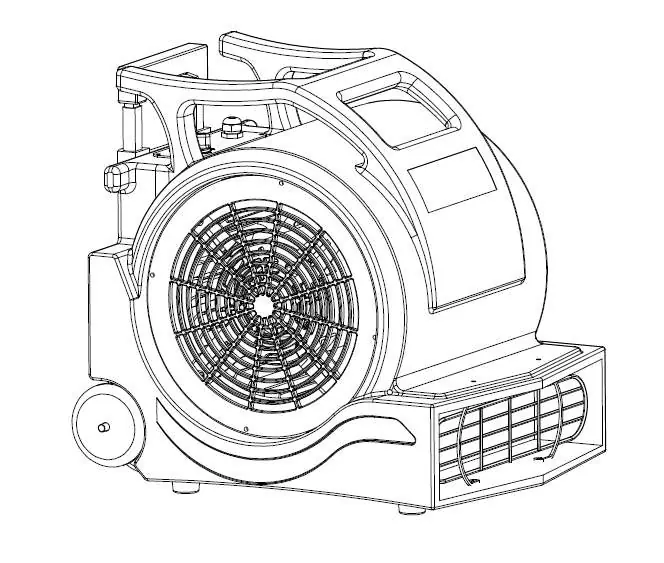
The Global 1HP Air Mover 641764 is a commercial ventilator designed to circulate, extract, and ventilate air. Before operating, ensure the unit is placed on a stable, level surface and that the air intake and outlet are free of obstructions. Always connect the unit to a grounded outlet with the correct voltage and amperage, preferably protected by a ground fault circuit interrupter (GFCI).
Safety Instructions
- Do not operate the fan if the cord or plug is damaged.
- Do not move or adjust the blower while it is in operation.
- Keep the unit out of the reach of children.
- Do not modify the blower; use only authorized replacement parts to avoid hazards and voiding the warranty.
- Store the unit in a clean, dry environment. If the motor gets wet, ensure it is thoroughly dried before use.
- Do not allow water near or inside the unit to prevent electric shock.
- Always operate on a flat, level surface to prevent slipping or falling.
- Never operate without the factory-installed safety screens.
- Do not use near combustible gas or flammable materials.
- Do not attempt to disassemble or repair the unit while it is plugged in.
Operating Procedures
- Ensure the unit is on a stable, level surface and remains stationary during use.
- Plug the blower into a grounded outlet that matches the unit's voltage and wattage specifications.
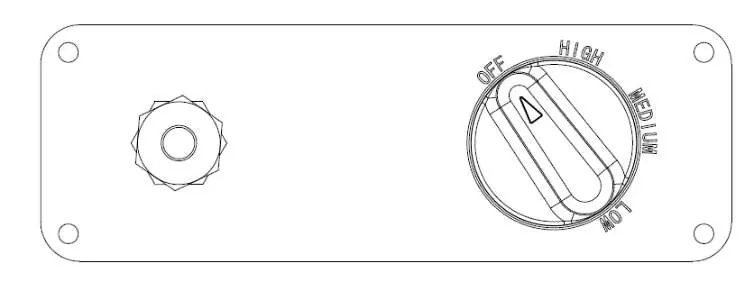
- Set the dial to your desired speed before turning the unit on.
Handle Operation
The blower features a handle with wheels for easy transport.
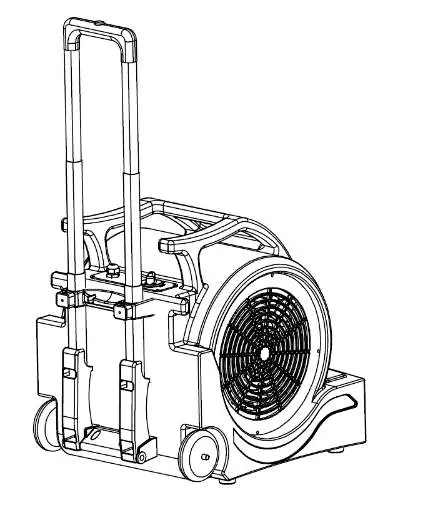
- To extend: Press the button on top of the handle and pull it out.
- To retract: Press the button on top of the handle and push it down.
Maintenance
- Inspect the electrical cord and wiring for damage or discoloration before every use.
- Check for loose fasteners.
- Clean the safety screens before each use.
- Listen for abnormal sounds and shut the unit off immediately if detected.
- Keep the unit clean and free of blockages.
- Use compressed air or a vacuum to remove lint and debris from the motor, inlet, or fan blade.
- Do not use a pressure washer, water hose, or other water sources to clean the unit.
- The blower has sealed bearings and does not require lubrication.
Troubleshooting
If the blower does not turn on, ensure the switch is in the correct position, check the circuit breaker or GFCI, and inspect the cord for damage. If the unit vibrates, check for a bent motor shaft or fan blade, or clean excessive dirt from the fan blade. If the unit makes scraping noises, inspect the housing for warps or dents.
Technical Specifications
- Model: 641764
- Power Input: 115Volt/60hz
- Power: 1hp
- Current: 11.5amps (Max)
- Motor Speed: 1600rpm
- Air Volume: 4000cfm
- Size: 20.3 x 17.7 x 18.7 inch
- Weight: 42lbs
Manufacturer information
Global Industrial Sewing Machines
Practical help
Common problems
Blower does not turn on
Ensure the knob is in the correct position, check if the circuit breaker or GFCI has tripped (press reset), and inspect cords/wires for damage.
Blower starts and then turns off
Remove obstructions from the inlet and outlet. If the issue persists, the motor may be faulty; contact your distributor.
Blower vibrates
Check for a bent motor shaft or fan blade. Clean excessive dirt build-up from the fan blade.
Blower makes scraping noises
Inspect the housing for warps or dents that might cause it to rub against the blade.
Before use
- Ensure the unit is on a stable, level surface.
- Check the electrical cord and plug for damage.
- Ensure air intake and outlet are free of obstructions.
- Verify the dial is set to the desired speed before turning on.
- Inspect for loose fasteners.
- Clean safety screens.
Images and diagrams
- The switch knob allows selection of speed settings (Off, Low, Medium, High).
- The handle control button on top of the handle allows for extending or retracting the handle for transport.
Model compatibility
- Requires a grounded outlet with correct voltage and amperage.
- Use a circuit protected by a ground fault circuit interrupter (GFCI) for maximum protection.

Manual page author
David Miller
Documentation analyst
Organizes user manual content into clear summaries, with attention to model details, product context, and everyday usability.