Documents / Terms Conditions
User Manual for Neo Tools 90-003 Workshop Floor Fan
Quick guide for the Neo Tools 90-003 Workshop Floor Fan. Includes assembly instructions, operating steps, safety warnings, maintenance tips, and technical specifications.
Table of contents
Manual images
Click an image to enlargeQuick guide from the manual
The Neo Tools 90-003 is a 45 cm floor fan designed for indoor use. Before operating, ensure the device is placed on a stable, even surface and is not near curtains or flammable materials. The fan features three speed settings and an oscillation function.
Description of components
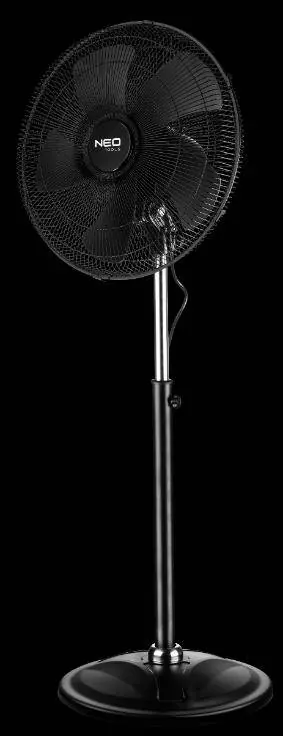
- Front grille
- Propeller
- Rear grille
- Engine
- Column
- Base
Installation instructions
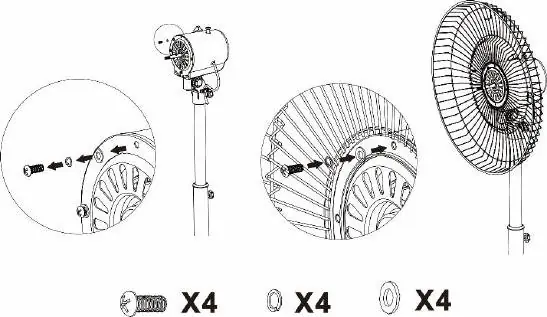
- Attach the column to the base.
- Mount the motor assembly on the column.
- Install the rear grille.
- Install the propeller.
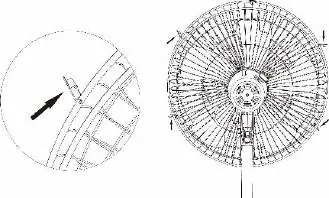
- Mount the front grille.
- Screw in the grille securing screw.
Operating instructions
Connect the fan to a power supply. Adjust the fan position to achieve the desired airflow. Use the switch on the side of the device to select the speed:
- 0: Device switched off
- 1: Low speed
- 2: Medium speed
- 3: High speed
To activate oscillation, press the button located at the rear of the device. To deactivate, pull the button upwards.
Maintenance and cleaning
Always disconnect the fan from the power supply before cleaning. Use a dry cloth to remove dust from external surfaces. For the grille and blades, use a damp cloth, but ensure it is not too wet to prevent dripping, which could damage the insulation. Do not use excessive force when cleaning the blades to avoid deformation and balance issues. Reassemble in reverse order of disassembly.
Safety warnings
- Children aged 8 and above may use the device under supervision.
- Do not insert fingers or objects behind the protective grille while the fan is running.
- If unusual noises or malfunctions occur, stop using the device immediately and contact an authorized service center.
- If the power cord is damaged, it must be replaced by a qualified professional.
- Do not attempt to disassemble or repair the fan yourself.
- If suspicious oscillation movements are visible, switch off the fan immediately.
Technical specifications
- Supply voltage: 220-240V
- Frequency: 50Hz
- Power: 100W
- Maximum airflow: 105.26 m³/min
- Sound power level: 53.6 dB(A)
- Maximum air velocity: 6.35 m/s
Practical help
Common problems
Unusual crackling noises or malfunctions
Immediately stop using the fan and return it to the manufacturer or an authorized service center.
Suspicious oscillation movements
Switch off the fan immediately and do not use it; contact the manufacturer or a qualified service representative.
Damaged power cord
Must be replaced by the manufacturer, service representative, or an equally qualified person to avoid hazards.
Before use
- Ensure the fan is placed on a stable, even surface.
- Check that the power supply matches the device requirements (220-240V).
- Verify that the propeller cover is securely fastened with mounting screws.
- Ensure the fan is not near curtains or window drapes.
- Confirm the device is disconnected from power before any assembly or maintenance.
Specs in practice
- 105.26 m³/min
- Maximum fan flow rate.
Images and diagrams
- Step 1: Attach the column to the base.
- Step 2: Mount the motor assembly onto the column.
- Step 3: Secure the rear grille and propeller using the provided screws and washers.
Model compatibility
- Intended for indoor use only.
- Not suitable for use in areas with gas or petrol.

Manual page author
Michael Turner
Technical manual editor
Reviews PDF manuals for structure, safety notes, and practical product details so readers can find the right information quickly.