Lighting / Decorative Lighting
User Manual for Goobay 77838 Electric Screwdriver
Quick guide and user manual for the Goobay 77838 Electric Screwdriver. Learn how to charge, operate, and maintain your precision screwdriver set.
Quick answers from the manual
Quick answer
- The Goobay 77838 is a cordless precision electric screwdriver. Charge it via the USB-C port, insert a bit into the magnetic holder, and use the rotation buttons to tighten or loosen screws. p. 4
Key actions
- Charge the screwdriver p. 4
- Insert a bit p. 4
- Tighten/Loosen screws p. 4
First start
- Fully charge the device before the first use. p. 4
Maintenance and reset
- The product is maintenance-free. Clean with a dry, soft cloth. p. 4
Technical specifications
| Parameter | Value | Meaning | Pages |
|---|---|---|---|
| Battery | 350 mAh | Rechargeable Lithium ion | p. 2 |
| Charging time | 1-1.5 h | Time to fully charge | p. 2 |
| Speed | 180 min^-1 | No-load speed | p. 2 |
Where to find it in the PDF
- Product Overview p. 1
- Technical Specifications p. 2
- Safety Instructions p. 3, 4
- Operation p. 4
Table of contents
Manual images
Click an image to enlargeQuick guide from the manual
The Goobay 77838 is a cordless precision electric screwdriver designed for delicate work such as repairing glasses, watches, or smartphones. Before first use, ensure the device is fully charged. To operate, insert the desired bit into the magnetic holder and use the rotation buttons to tighten or loosen screws.
Description and function
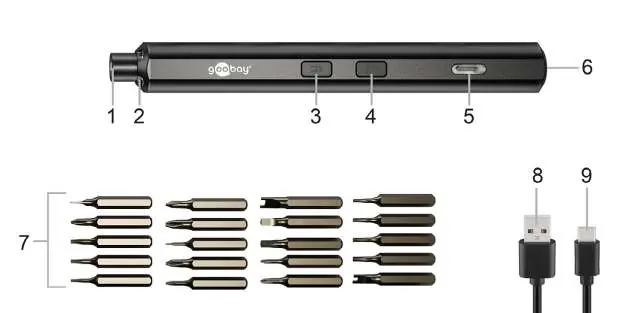
The product is a precision electric screwdriver for tightening, loosening, and illuminating screws on sensitive workpieces. It operates exclusively cordlessly and includes a USB charging cable and 20 precision bits.
Operation
- Charging: Connect the USB-C plug of the charging cable to the device and the USB-A plug to a power adapter (not included). The battery is fully charged in approximately 1 to 1.5 hours.
- Inserting bits: Insert the desired bit into the bit holder. A magnet inside the holder secures the bit in place.
- Tightening and loosening: Press the button for clockwise rotation to tighten a screw. Press the button for counterclockwise rotation to loosen a screw. You can also use the screwdriver manually.
Maintenance and care
The product is maintenance-free. For cleaning, use only a dry and soft cloth. Do not use detergents or chemicals. Store the product in a cool, dry, and dust-protected environment, out of the reach of children, when not in use.
Safety instructions
- Do not look directly into the LED light source.
- Do not point the light beam at the eyes of other persons, animals, or reflective surfaces.
- Do not swallow bits or screws.
- Do not overload the tool.
- Do not use the device if the switch is defective.
- Keep the device away from heat, moisture, and direct sunlight.
- The rechargeable battery is not replaceable.
Manufacturer information
Goobay
Practical help
Common problems
Device not charging
Ensure the USB-C cable is fully connected to the device and the power adapter is functional.
Bit slips during use
Ensure the bit is fully inserted into the holder and that the bit is not worn out.
Screw threads damaged
Do not overtighten screws; use manual mode for final tightening if necessary.
Before use
- Charge the device fully before the first use.
- Check the device and cable for any physical damage.
- Ensure the work area is well-lit.
- Select the correct bit for the screw type.
- Ensure the work surface is stable.
Specs in practice
- Battery Capacity
- 350 mAh Li-ion battery provides approximately 1 hour of working time.
- No-load speed
- 180 min^-1 rotation speed for efficient operation.
- Charging time
- 1 to 1.5 hours required for a full charge.
Images and diagrams
- Fig. 1 shows the screwdriver components: bit holder, LED lights, rotation buttons, status LED, and USB-C port.
- Fig. 2 illustrates the bit insertion process.
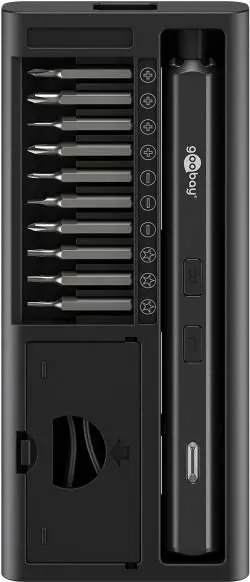
- Fig. 3 shows the storage case with the screwdriver and bits.
Model compatibility
- The device is intended for private use only, not for commercial purposes.
- Use only in dry interior rooms.

Manual page author
Michael Turner
Technical manual editor
Reviews PDF manuals for structure, safety notes, and practical product details so readers can find the right information quickly.