Power / Wireless Chargers
User Manual for Goobay 5V-15V Universal Power Supply
Quick guide for the Goobay 5V-15V Universal Power Supply (Item 53999). Includes instructions on setting output voltage, selecting adapter plugs, safety warnings, and maintenance.
Table of contents
Manual images
Click an image to enlargeImportant Information
Before connecting any device, you must set the correct output voltage using the provided adjustment tool. Incorrect voltage or polarity can permanently damage your connected equipment. This device does not have a power switch; disconnect by pulling the plug from the outlet. Always ensure the device is used in dry indoor environments.
Description and Function
The Goobay universal power supply is designed for charging and operating office equipment via a DC connection. It features interchangeable adapter plugs for compatibility with many common devices. The output voltage is variably adjustable.
Preparation
- Check the scope of delivery for completeness (Power supply, 8 adapter plugs, adjustment tool).
- Verify the required voltage and polarity of your target device.
- Ensure the power supply specifications match your device requirements.
Connection and Operation
Warning: Material damage due to incorrect output voltage or polarity. Do not operate your equipment until the correct output voltage has been set.
- Determine the required output voltage for your device.
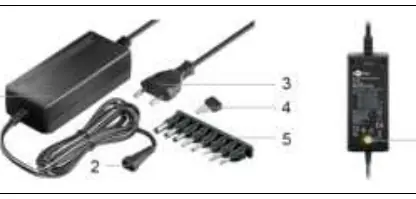
- Use the adjustment tool (4) to turn the voltage selector switch (6) until the arrowhead points to the required voltage (5V, 6V, 7.5V, 9V, 12V, 13.5V, or 15V).
- Connect the appropriate adapter plug to the DC socket (2) of the power supply. Ensure the correct polarity is selected (most devices use positive polarity, with the positive pole on the inner contact).
- Connect the adapter plug to your device.
- Insert the Euro plug (3) into a free and easily accessible socket. The operating LED (1) will light up.
- Disconnect all plug connections after use.
Maintenance and Care
The product is maintenance-free.
- Always disconnect the mains plug before cleaning.
- Use only a dry and soft cloth for cleaning.
- Do not use detergents or chemicals.
- Store in a cool, dry, and dust-protected place when not in use.
Safety Instructions
- Do not open the housing.
- Do not modify the product or accessories.
- Do not short-circuit connectors or circuits.
- Avoid extreme stresses such as heat, cold, moisture, direct sunlight, microwaves, vibrations, and mechanical pressure.
- Keep out of reach of children.
Manufacturer information
Goobay
Practical help
Common problems
Device does not power on
Verify that the correct output voltage is set on the power supply and that the adapter plug is securely connected with the correct polarity.
Adapter plug does not fit
The unit includes 8 different adapter plugs. Ensure you have selected the correct size for your device's DC input.
Operating LED is not lit
Ensure the Euro plug is fully inserted into a live, functional wall outlet.
Before use
- Check package contents for all 8 adapter plugs and the adjustment tool.
- Verify the required voltage and polarity of your target device.
- Ensure the power supply is set to the correct voltage before connecting to the device.
- Check that the power supply is in perfect condition.
Specs in practice
- Output Voltage
- Selectable between 5V, 6V, 7.5V, 9V, 12V, 13.5V, and 15V.
- Protection Class
- IP20 / Class II equipment.
Images and diagrams
- Fig 1 shows the power supply unit, the adjustment tool, and the 8 adapter plugs.
- The polarity diagram indicates how to connect the adapter to ensure the positive pole is on the inner contact.
Model compatibility
- For indoor use only.
- Not suitable for children.
- Ensure the power supply is used in easily accessible outlets for emergency disconnection.

Manual page author
Emily Carter
User documentation editor
Prepares concise manual descriptions and highlights the most useful setup, operation, and maintenance information for readers.