Electronics / USB Hubs & Docking
Goobay 77819 2-in-1 Cordless Electric Staple Gun User Manual
Quick guide for the Goobay 77819 2-in-1 Cordless Electric Staple Gun. Includes setup, charging, loading staples and nails, operation, and maintenance instructions.
Quick answers from the manual
Quick answer
- The Goobay 77819 is a cordless electric staple gun for craft work. It is charged via USB-C and uses Type 53/JT21 staples or Type 47 nails. p. 1, 4
Key actions
- Charging the device p. 3, 4
- Loading staples/nails p. 3, 4
First start
- Fully charge the device before first use. p. 3, 4
Problems and fixes
Staple/nail jam
Switch to O position and carefully remove.
p. 3, 4Technical specifications
| Parameter | Value | Meaning | Pages |
|---|---|---|---|
| Battery | 1500 mAh | Capacity | p. 1 |
Where to find it in the PDF
- Technical Data p. 1
- Safety Instructions p. 2, 3
- Operation p. 3, 4
Table of contents
Quick guide from the manual
The Goobay 77819 is a cordless electric staple gun designed for craft work. It is powered by an internal rechargeable battery and can be loaded with both staples and nails. Important: Always ensure the device is switched off (O position) before loading or performing maintenance. The device will not fire unless the safety contact is fully pressed against the workpiece.
Description and Function
The staple gun is a cordless tool for fastening materials. It features a USB-C charging port and an LED status indicator.
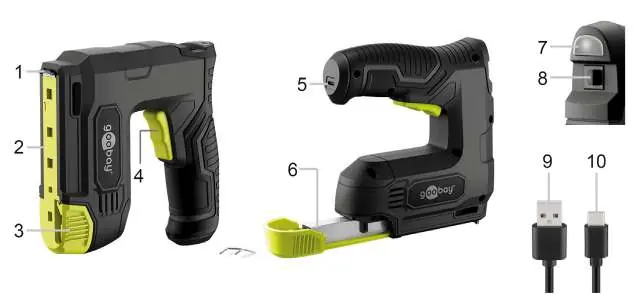
- Staples: Type 53 / JT21 (Length: 4-10 mm, Width: 11.4 mm)
- Nails: Type 47 (Length: 6-10 mm)
Preparation
Before using the device, check the scope of delivery for completeness and ensure the device is fully charged. Verify that the staples or nails you intend to use are compatible with the specifications listed above.
Charging
Charge the staple gun fully before the first use. Connect the USB-C plug of the charging cable to the staple gun and the USB-A plug to a power adapter (not included). The LED indicator will light up red during charging and turn green when charging is complete. The device cannot be used while charging.
Loading Staples and Nails
- Set the ON/OFF switch to the O position.
- Press the release button on both sides simultaneously and carefully slide out the magazine.
- Place the staples in the magazine slot or insert nails with the heads facing inwards (observe the nail symbol on the magazine).
- Push the magazine back until it clicks into place.
Operation
- Set the ON/OFF switch to the I position.
- Press the safety contact firmly into the workpiece.
- Press the trigger to drive the staple or nail.
- After use, set the switch back to the O position.
Maintenance and Storage
The product is maintenance-free. Clean only with a dry, soft cloth. Do not use detergents or chemicals. Store in a cool, dry, and dust-protected environment, out of reach of children. If not used for a long period, recharge the battery every 3 months.
Manufacturer information
Goobay
Practical help
Common problems
Staple or nail jammed
Set the ON/OFF switch to the O position, then carefully remove the jammed staple or nail.
Device does not fire
Ensure the safety contact is fully pressed into the workpiece. The device will not fire otherwise.
Before use
- Check scope of delivery for completeness
- Charge the device fully before first use
- Ensure compatibility of staples/nails (Type 53/JT21 or Type 47)
- Check that the device is switched off before loading
- Ensure the workpiece is suitable for stapling/nailing
Specs in practice
- Rotational speed
- Max. 30 min-1
Images and diagrams
- Fig 1: Overview of controls (Safety contact, Magazine, Trigger, USB-C port, LED indicator)
- Fig 2: Loading position
Model compatibility
- Only use Type 53/JT21 staples (4-10mm)
- Only use Type 47 nails (6-10mm)
- Do not use to fasten electrical cables

Manual page author
Emily Carter
User documentation editor
Prepares concise manual descriptions and highlights the most useful setup, operation, and maintenance information for readers.