Power / Power Supplies
User Manual for Goobay Wireless Quick-Charging Pad 15W
Quick guide for the Goobay Wireless Quick-Charging Pad 15W. Includes setup instructions, safety warnings, charging requirements, and maintenance tips.
Table of contents
Manual images
Click an image to enlargeQuick Guide
The Goobay Wireless Quick-Charging Pad 15W is designed for inductive charging of Qi-standard compatible devices. To achieve the maximum 15W fast charging speed, ensure you use a Quick Charge power adapter (9V/2A or 12V/2A). The pad also features a built-in smartphone holder for navigation mode.
- Important: Do not place metal objects (e.g., metal cases, magnetic plates) on the back of your device, as they can overheat and cause damage.
- Compatibility: Works with Qi-compatible devices. Protective covers must be non-metallic and under 6mm thick.
- Safety: Keep at least 20cm away from implanted medical devices.
Description and Function
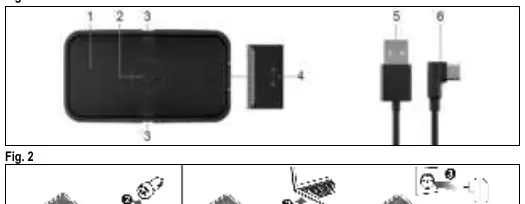
The product is an inductive charging mat that includes a charging cable. It supports wireless charging for smartphones and other Qi-standard devices with up to 15W of power. It is suitable for use in vehicles and supports Quick Charge technology.
Safety Instructions
Read these instructions carefully to ensure safe operation:
- Do not open the housing or modify the product.
- Do not short-circuit connectors.
- Use only in dry, indoor environments.
- Keep away from children; this is not a toy.
- Vehicle Safety: Place the product so it does not obstruct the driver. Do not operate the charging equipment while driving. Only use the charging mat when the engine is running to avoid draining the vehicle battery.
- Magnetism: Contains magnetic materials. Consult a doctor if you have implanted medical devices. Keep away from bank cards.
Preparation
- Check the scope of delivery for completeness and integrity.
- Compare the technical specifications of your devices to ensure compatibility.
Connection and Operation
- Place the charging mat on a dust-free, level, horizontal surface.
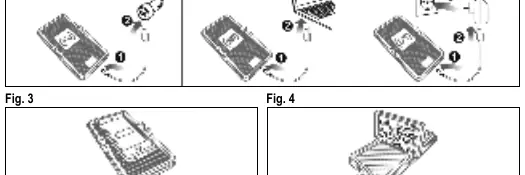
- Connect the USB-C socket of the charging mat to a USB power source using the provided cable.
- The power source must support at least 5V/2A. For 15W fast charging, use a Quick Charge adapter (9V/2A or 12V/2A).
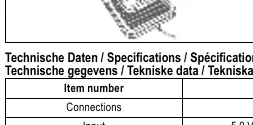
- Place your Qi-compatible device on the charging mat.
- Remove the device once fully charged and disconnect cables after use.
Smartphone Holder
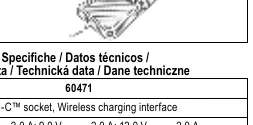
The charging mat includes a smartphone holder for use in navigation mode. Note that simultaneous wireless charging is not possible while the device is in the holder, as it will be outside the induction radius.
Maintenance and Care
The product is maintenance-free.
- Clean only with a dry, soft cloth.
- Do not use detergents or chemicals.
- Store in a cool, dry, and dust-protected place when not in use.
Disposal
According to the European WEEE directive, electrical and electronic equipment must not be disposed of with consumer waste. Components must be recycled or disposed of separately to prevent environmental damage. Consumers are legally obligated to return devices to public collection points or the manufacturer at the end of their service life.
Manufacturer information
Goobay
Practical help
Common problems
Device not charging
Ensure the device is Qi-compatible, remove any metal cases or objects from the back of the device, and ensure the device is centered on the pad.
Slow charging speed
Ensure you are using a Quick Charge power adapter (9V/2A or 12V/2A) instead of a standard 5V/2A source.
Before use
- Check package contents for completeness
- Verify device compatibility with Qi standard
- Ensure power source supports at least 5V/2A
- Remove metal objects from the back of the device
- Ensure protective cover is non-metallic and <6mm thick
Specs in practice
- Wireless Output
- Up to 15W max power depending on the adapter used.
- Charging Distance
- Max 6mm; works with non-metallic protective covers.
Images and diagrams
- Fig 1: Overview of charging pad and ports
- Fig 2: Connection to power source
- Fig 3: Correct placement of device
- Fig 4: Using the smartphone holder
Model compatibility
- Requires Qi-standard compatible device
- Not suitable for devices with metal cases or attachments
- Keep 20cm away from medical devices

Manual page author
David Miller
Documentation analyst
Organizes user manual content into clear summaries, with attention to model details, product context, and everyday usability.