Toys / RC Models & Drones
User Manual for Guangdong K3 Wireless Gaming Headset
Comprehensive user guide for the Guangdong K3 wireless gaming headset. Includes instructions for 2.4GHz and Bluetooth connection, button operations, technical specifications, and troubleshooting tips.
Quick answers from the manual
Quick answer
- The Guangdong K3 headset connects via a 2.4G wireless dongle or Bluetooth. To connect via 2.4G, plug the dongle into your device. To connect via Bluetooth, hold the power button for 5 seconds while in shutdown mode to enter pairing. p. 1
Key actions
- Power On/Off p. 1
- Pairing Mode p. 1
First start
- Charge the device fully (approx 2.5 hours) before first use. p. 1
Problems and fixes
Pairing failure
Check the distance between devices and ensure the headset is in pairing mode.
p. 1Technical specifications
| Parameter | Value | Meaning | Pages |
|---|---|---|---|
| Battery | 3.7V 1000mAh | Capacity | p. 1 |
| Play Time | >40H | With lights off | p. 1 |
Where to find it in the PDF
- Product Overview and Instructions p. 1
Table of contents
Quick Start Guide
To begin using your Guangdong K3 gaming headset, ensure it is fully charged. Connect the device using either the 2.4G wireless dongle or Bluetooth. The headset supports PC, PS4, PS5, Switch, and mobile devices.
Product Overview
The headset features the following components:
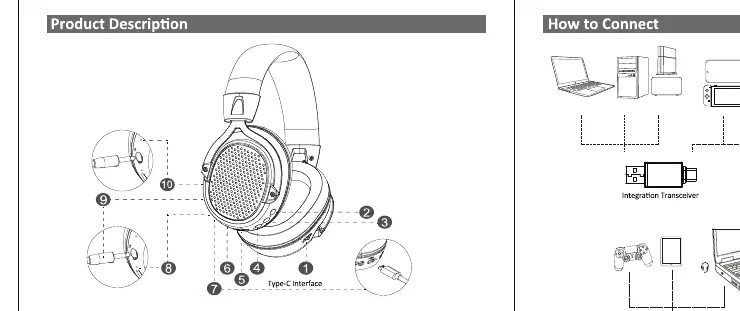
- 1. 2.4G/BT Switching Key
- 2. 7.1 Sound Effects/Effect Lights
- 3. Microphone Mute
- 4. On/Off Button
- 5. Volume/Volume-
- 6. LINE-IN Interface
- 7. Type-C Interface
- 8. Status Light
- 9. External Microphone
- 10. Built-in Microphone
Connection Instructions
2.4G Wireless Connection:
- Plug the 2.4G dongle into the USB port of your computer or console.
- The headset will automatically connect. The status light will remain green once connected.
- If using the Type-C transmitter, insert it into the phone/device; the headset will connect automatically.
Bluetooth Connection:
- In shutdown state, press and hold the power button for 5 seconds to enter pairing mode.
- The status light will flash, indicating it is ready to pair.
- Select the headset from your device's Bluetooth menu.
Operation Instructions
The headset controls are managed via the buttons on the earcups:
- 2.4G/BT Switching: Click to switch between 2.4G and Bluetooth modes.
- 7.1 Sound/Lights: Click to toggle 7.1 sound or effect lights.
- Power On/Off: Long press for 3 seconds.
- Play/Pause: Click the power button.
- Volume Control: Use the Volume+/Volume- buttons.
- Microphone: Use the dedicated mute button or the built-in/external microphone.
Specifications
- Wireless Version: V5.3
- Speaker Size: 50mm
- Frequency Response: 20Hz to 20kHz
- Battery Capacity: 3.7V 1000mAh
- Charging Time: About 2.5 hours
- Music Playing Time: >40 hours (Lights off)
- Charging Interface: USB-C
- Communication Distance: >10 meters
Troubleshooting
If you encounter issues, check the following:
- Pairing Failure: Ensure the headset is in pairing mode and within range.
- Audio Interference: Check for other wireless devices causing interference.
- Low Battery: If the headset shuts down or has a low battery warning, charge it immediately.
Safety and Battery
Use only the specified charging method. Do not dispose of the battery in fire or heat. Avoid using the headset at high volumes for long periods to prevent hearing damage.
Practical help
Common problems
Headset fails to pair
Ensure the headset is in pairing mode (flashing light) and within 10 meters of the source device.
Audio interference
Check for other wireless devices in the vicinity that may be causing signal interference.
Headset shuts down unexpectedly
The battery may be low. Charge the headset using the provided USB-C cable.
Before use
- Charge the headset fully for approximately 2.5 hours before first use.
- Identify the correct connection method (2.4G dongle or Bluetooth) for your device.
- Ensure the volume is set to a safe level before putting on the headset.
- Verify the microphone is not muted if you intend to use voice chat.
Specs in practice
- Battery Capacity
- 3.7V 1000mAh, providing over 40 hours of playback with lights off.
- Wireless Version
- V5.3, ensuring stable and efficient wireless connectivity.
- Speaker Size
- 50mm drivers designed for professional gaming audio quality.
Images and diagrams
- The product diagram identifies the location of all physical buttons and ports, including the Type-C charging port and microphone input.
- The connection diagram illustrates the use of the 2.4G dongle for wireless transmission.
Model compatibility
- Compatible with PC, PS4, PS5, Switch, and mobile devices.
- Supports various protocols including AAC, SBC, HSP1.2, HFP1.8, A2DP, and AVRCP.

Manual page author
David Miller
Documentation analyst
Organizes user manual content into clear summaries, with attention to model details, product context, and everyday usability.