Toys / RC Models & Drones
User Manual for Guangdong 1276A RC Car
Quick guide for the Guangdong 1276A remote control car. Learn how to install batteries, pair the controller, operate the vehicle, and perform maintenance.
Table of contents
Manual images
Click an image to enlargeQuick guide from the manual
This remote control car is designed for users over 6 years of age. The package includes a rechargeable battery for the car and requires AA batteries for the controller. Always keep the included screwdriver in a safe place away from children, as it is not a toy.
Battery installation
Before installing batteries, ensure both the car and the controller are switched to the OFF position.
- Car: Open the battery cover according to the arrow, insert the 1x 3.7V rechargeable battery (included), and close the compartment.
- Controller: Open the battery cover on the bottom of the controller and insert 2x 1.5V AA batteries (included).
Operating instructions
Follow these steps to operate the vehicle:
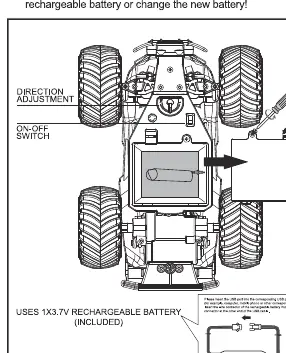
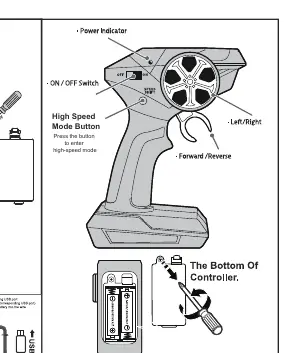
- Turn both the car and the controller switches to the ON position.
- The remote controller will pair with the car automatically; the red light will flash and then stop when pairing is successful.
- If pairing fails, approach the car with the controller and try again.
- Use the steering wheel on the controller to turn left or right.
- Use the forward/reverse lever on the controller to move the vehicle.
- If the car does not drive in a straight line, adjust the steering alignment lever located beneath the chassis.
- Press the High Speed Mode button on the controller to toggle high-speed performance.
Battery safety and maintenance
- Safety: Do not short-circuit terminals. Do not recharge non-rechargeable batteries. Rechargeable batteries should only be charged under adult supervision.
- Maintenance: Remove batteries if the vehicle will not be used for a long period. Wipe the toy gently with a clean, damp cloth. Keep the toy away from direct sunlight or heat sources. Do not submerge the toy in water.
- Performance: If the car loses performance or power, recharge the battery or replace it with a new one.
Practical help
Common problems
Car does not drive in a straight line
Adjust the steering alignment lever located beneath the chassis.
Pairing fails (red light keeps flashing)
Turn both the car and controller OFF and then ON again. Approach the car with the controller to establish a connection.
Car loses performance or power
Recharge the car's battery or replace the batteries in the controller.
Before use
- Ensure both the car and controller are switched to OFF before inserting batteries.
- Install 1x 3.7V rechargeable battery in the car.
- Install 2x 1.5V AA batteries in the controller.
- Keep the provided screwdriver in a safe place away from children.
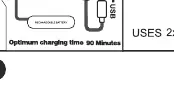
- Ensure the car battery is charged (optimum charging time is 90 minutes).
Specs in practice
- 3.7V Rechargeable Battery
- The power source for the car; requires approximately 90 minutes for an optimum charge.
- 1.5V AA Batteries
- The power source for the remote controller.
- High Speed Mode
- A feature activated by a button on the controller to increase the vehicle's speed.
Images and diagrams
- Steering Alignment Lever: Located under the chassis to correct the car's straight-line driving.
- High Speed Mode Button: Located on the controller to toggle high-speed performance.
- Power Indicator: Located on the controller to show pairing status.

Manual page author
Michael Turner
Technical manual editor
Reviews PDF manuals for structure, safety notes, and practical product details so readers can find the right information quickly.