Documents / Warranty Safety
Harbor Breeze Solar LED Color Changing Flood Light 10958-120-1BK
Comprehensive user guide for the Harbor Breeze Solar LED Color Changing Flood Light, covering installation, battery maintenance, and troubleshooting.
Table of contents
Product Overview
The Harbor Breeze Solar LED Color Changing Flood Light is an efficient, eco-friendly lighting solution designed for outdoor use. This fixture harnesses solar energy to provide illumination, automatically turning on at dusk and off at dawn. Its color-changing capability allows for versatile lighting effects, making it an ideal choice for enhancing garden paths, landscapes, or architectural features.
Installation and Setup
Installation is quick and simple, requiring no tools. Begin by ensuring all parts are present, including the light fixture and the ground stake. Select a location that receives full, direct sunlight throughout the day. Shady areas will prevent the battery from charging fully, which significantly reduces the light's operating time at night. Avoid placing the unit near other nighttime light sources, such as streetlights or porch lights, as these can interfere with the automatic light sensor and prevent the fixture from turning on.
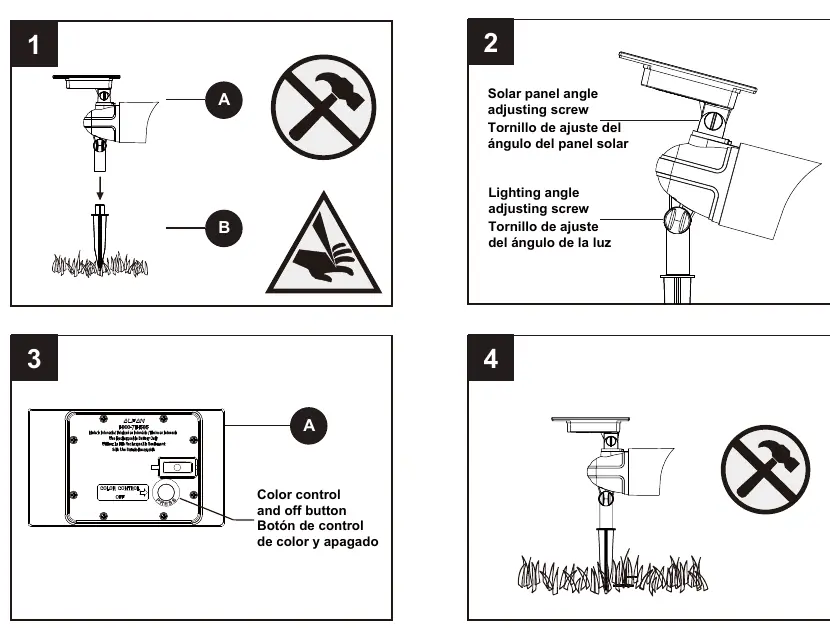
To install, carefully attach the solar light fixture to the ground stake. Be cautious when handling the stake, as it has a pointed edge. Once positioned, you can adjust the solar panel angle and the lighting angle using the provided adjustment screws to optimize sunlight exposure and light direction.
Operation and Maintenance
The unit features a color control and off button, allowing you to manage the lighting modes. For optimal performance, keep the solar panel clean and free of debris, snow, or dirt. Use only a damp cloth for cleaning; never use chemicals or abrasive materials. If you need to relocate the light, carefully detach it from the ground and ensure the new location meets the sunlight requirements.
Battery Safety and Replacement
The light requires specific 18500 1000mAh Lithium-Phosphate (LiFePO4) rechargeable batteries. Never use alkaline, standard carbon-zinc, or Ni-Cd batteries, as these can damage the unit. Always ensure batteries are installed with the correct polarity. If the light will not be used for an extended period, remove the batteries to prevent damage. When replacing batteries, ensure they are disposed of or recycled according to local regulations.
Troubleshooting
If the light stops working or operates for only a short duration, ensure the battery is adequately charged by placing the unit in direct sunlight for three full days. Verify that the solar panel is not obstructed and that the unit is not being triggered by external light sources during testing. If performance does not improve, the battery may need to be replaced.
Practical help
Common problems
Light stops working after a period of time.
Ensure the battery is charged by placing the unit in direct sunlight for three days or replace the battery.
Light only operates for a short duration in the evening.
Move the light to a sunnier location to ensure the battery charges fully.
Before use
- Verify all parts are present according to the package contents list.
- Ensure the chosen location receives full, direct sunlight.
- Check that the area is free from other nighttime light sources.
- Clean the solar panel with a damp cloth before initial use.
- Ensure batteries are installed with correct polarity.
Specs in practice
- Battery Type
- 18500 1000mAh Lithium-Phosphate (LiFePO4) rechargeable battery.
- Assembly Time
- Estimated 3-5 minutes, no tools required.
Images and diagrams
- The solar panel angle adjustment screw allows tilting the panel toward the sun.
- The lighting angle adjustment screw allows directing the beam of light.
- The color control button is located on the back of the solar housing.
- The ground stake is used to secure the fixture into the soil.
Model compatibility
- Only use 18500 1000mAh LiFePO4 rechargeable batteries.
- Do not mix battery types or use alkaline/Ni-Cd batteries.

Manual page author
David Miller
Documentation analyst
Organizes user manual content into clear summaries, with attention to model details, product context, and everyday usability.