Electronics / Headphones Earbuds
Havit Life 03T True Wireless Earbuds User Guide
Quick guide for Havit Life 03T True Wireless Earbuds. Learn how to pair, use touch controls, charge, and reset your earbuds with this easy-to-follow manual.
Table of contents
Manual images
Click an image to enlargeQuick guide from the manual
The Havit Life 03T earbuds are designed for wireless audio playback. Before using them for the first time, ensure you remove the protective film from the charging contacts on the earbuds. Use the provided Type-C cable to charge the charging case and the earbuds.
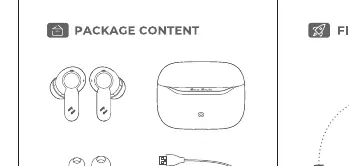
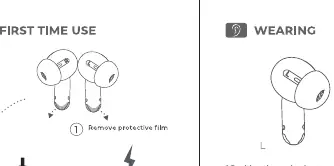
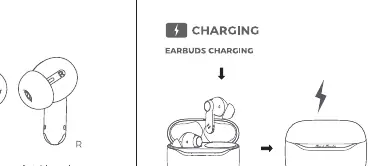
Power and Reset
The earbuds power on and off automatically when removed from or placed into the charging case. If you experience connectivity issues, you can reset the earbuds:
- Place both earbuds into the charging case.
- Press the reset button (or tap sequence as indicated) 5 times to reset the connection.
- The LED will flash to indicate a successful reset.
- After resetting, remove the earbuds from the case to reconnect.
Touch Controls
Use the touch-sensitive areas on the earbuds to manage your media and calls:
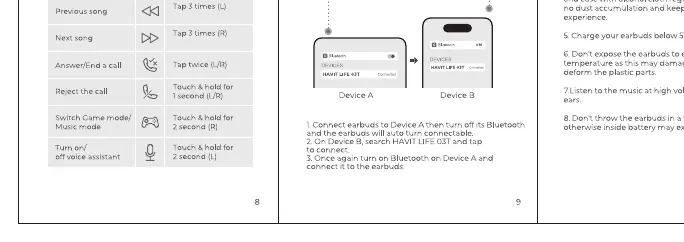
- Play/Pause: Tap either earbud once.
- Previous Song: Tap the left earbud 3 times.
- Next Song: Tap the right earbud 3 times.
- Answer/End Call: Tap either earbud once.
- Reject Call: Touch and hold either earbud for 2 seconds.
- Voice Assistant: Touch and hold either earbud for 2 seconds.
Multi-point Connection
You can connect the earbuds to two devices simultaneously:
- Connect the earbuds to Device A, then turn off Bluetooth on Device A.
- Connect the earbuds to Device B.
- Turn on Bluetooth on Device A and connect to the earbuds.
Safety Tips
- Do not expose the earbuds to liquids, moisture, or humidity.
- Avoid dropping or disassembling the earbuds.
- Keep the earbuds away from small children to prevent choking hazards.
- Do not expose the earbuds to extreme temperatures.
- Listening at high volume for extended periods may damage your hearing.
Manufacturer information
Havit
Practical help
Common problems
Earbuds not connecting to device
Place earbuds in the case and perform a reset by tapping 5 times.
Earbuds not charging
Ensure the protective film has been removed from the charging contacts on the earbuds.
Before use
- Remove protective film from the charging contacts
- Charge the case and earbuds fully using a Type-C cable
- Ensure Bluetooth is enabled on your source device
Images and diagrams
- Touch control layout shows specific tap sequences for L/R earbuds
- Multi-point connection diagram illustrates the sequence of connecting to two separate devices
Model compatibility
- Supports multi-point connection for two devices simultaneously

Manual page author
David Miller
Documentation analyst
Organizes user manual content into clear summaries, with attention to model details, product context, and everyday usability.