Electronics / Headphones Earbuds
User Manual for Havit OpenBuds 03A Open Ear Clip Headphones
Quick guide for Havit OpenBuds 03A headphones. Learn how to pair, use touch controls, charge, and reset your device with this easy-to-follow manual.
Table of contents
Manual images
Click an image to enlargeQuick guide from the manual
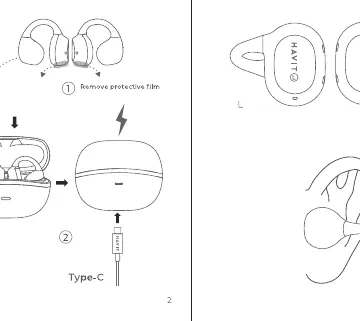
The Havit OpenBuds 03A are open-ear clip headphones designed for comfort and situational awareness. Before first use, ensure you remove the protective film from the charging contacts on the earbuds. The device connects automatically to your paired device when the charging case is opened.
Wearing and charging
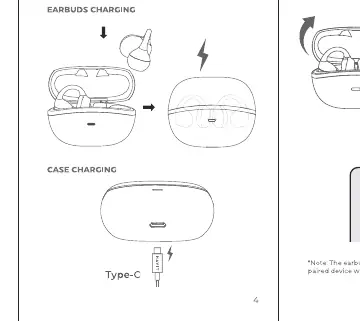
To wear, clip the earbuds onto your ears. To charge, place the earbuds into the charging case. The case itself is charged via the USB-C port located on the bottom of the case.
Power and connection
The earbuds power on and connect automatically when the case is opened. Ensure Bluetooth is enabled on your smartphone or audio device to complete the pairing process.
Touch controls
The earbuds feature touch-sensitive areas for controlling playback and calls:
- Play/Pause: Tap twice (L/R)
- Previous song: Touch and hold for 1s (L)
- Next song: Touch and hold for 1s (R)
- Answer/End call: Tap twice (L/R)
- Reject call: Touch and hold (L/R)
- Switch Game Mode/Music: Tap three times (R)
- Voice assistant: Tap three times (L)
Reset
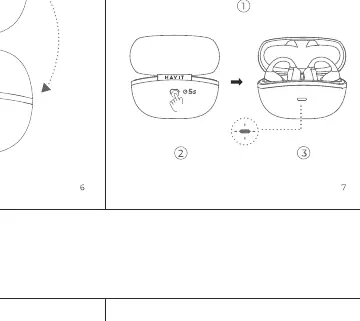
If you experience connectivity issues, you can reset the earbuds. Place the earbuds in the case, keep the case open, and follow the specific reset procedure indicated in the manual (typically involving holding the touch area or a specific sequence).
Safety and maintenance
Do not expose the earbuds to liquids, moisture, or extreme heat. Do not disassemble the earbuds as there are no user-serviceable parts inside. Keep the charging contacts clean to ensure proper charging.
Manufacturer information
Havit
Practical help
Common problems
Earbuds not connecting
Ensure the protective film has been removed from the charging contacts, the earbuds are charged, and Bluetooth is enabled on your device.
Controls not responding
Ensure you are tapping the correct touch-sensitive area on the earbud. If issues persist, try resetting the earbuds.
Before use
- Remove protective film from the charging contacts on the earbuds
- Charge the earbuds and the charging case fully
- Enable Bluetooth on your smartphone or audio source
Specs in practice
- Open Ear Clip
- Design that sits on the ear rather than inside the canal, allowing for ambient sound awareness.
Images and diagrams
- The manual includes diagrams illustrating the touch control gestures for both left and right earbuds.
- Visual guides show the correct placement of the earbuds on the ear.
- Diagrams indicate the location of the USB-C charging port.
Model compatibility
- Compatible with standard Bluetooth-enabled audio devices.

Manual page author
Michael Turner
Technical manual editor
Reviews PDF manuals for structure, safety notes, and practical product details so readers can find the right information quickly.