Electronics / Headphones Earbuds
Havit Life 02T True Wireless Stereo Earbuds
A quick guide for the Havit Life 02T earbuds, covering pairing, touch controls, charging, and factory reset procedures.
Table of contents
Manual images
Click an image to enlargeQuick guide from the manual
This guide provides essential instructions for operating your Havit Life 02T earbuds. Before first use, ensure you remove the protective film from the earbuds and charge them fully. If you experience connectivity issues, the factory reset procedure is the primary troubleshooting step.
Product overview
The earbuds feature a touch control surface, microphone, and LED indicator. The charging case includes a Type-C charging port and an internal battery to charge the earbuds on the go.
Wearing the earbuds
For optimal sound quality and comfort, select the appropriate eartip size (S, M, or L) provided in the package. Ensure the earbuds fit securely in your ears.
Power on and off
- Auto: The earbuds automatically power on when taken out of the case and power off when placed back inside.
- Manual: Touch and hold the touch control area for 3 seconds to power on or off.
Pairing
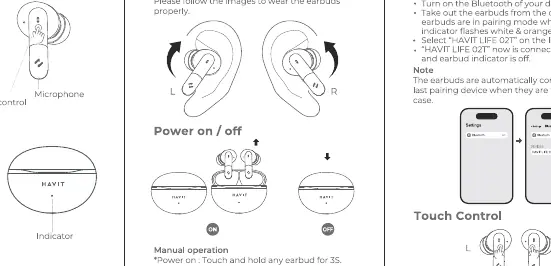
- Remove the protective film from the earbuds and charge them fully.
- Turn on Bluetooth on your device.
- Take the earbuds out of the case; the indicator will flash white and orange.
- Select HAVIT LIFE 02T from your device's Bluetooth list to connect.
Touch controls
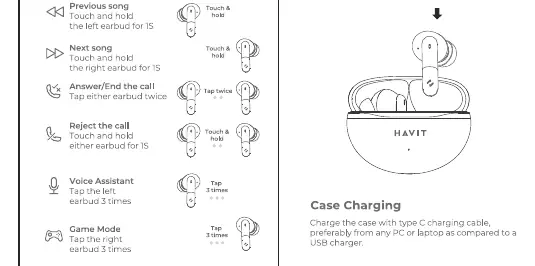
- Play/Pause: Tap either earbud twice.
- Previous song: Touch and hold the left earbud for 1.5 seconds.
- Next song: Touch and hold the right earbud for 1.5 seconds.
- Answer/End call: Tap either earbud twice.
- Reject call: Touch and hold either earbud.
- Voice Assistant: Tap either earbud 3 times.
- Game Mode: Tap either earbud 3 times.
Charging
- Earbuds: Place the earbuds into the charging case.
- Case: Use the provided Type-C cable to charge the case via a USB power source.
Reset procedure
If the earbuds fail to pair or connect properly, perform a reset:
- Take both earbuds out of the case.
- Touch and hold both earbuds for 35 seconds until the light breathes.
- Place both earbuds back into the case.
- Take them out again to initiate the pairing process.
Safety information
- Do not expose the earbuds to liquids, moisture, or humidity.
- Do not disassemble the earbuds.
- Clean the charging contacts regularly to ensure proper charging.
- Do not charge using power sources exceeding 5V/1A.
- Avoid listening at high volumes for extended periods to prevent hearing damage.
- Do not dispose of the device in fire.
Manufacturer information
Havit
Practical help
Common problems
Earbuds not pairing or connecting
Perform a factory reset: Take both earbuds out, touch and hold for 35 seconds until the light breathes, then return to the case and try pairing again.
Charging failure
Ensure the charging contacts on the earbuds and inside the case are clean. Use a 5V/1A power source.
Before use
- Remove the protective film from the earbuds.
- Select the correct eartip size (S, M, or L) for a secure fit.
- Charge the case and earbuds fully before first use.
Specs in practice
- Charging Input
- Use a 5V/1A power source. Do not exceed these specifications to avoid damaging the battery.
Images and diagrams
- The touch control area is located on the outer surface of each earbud.
- The charging case features a Type-C port on the bottom for power input.
Model compatibility
- Compatible with standard Bluetooth-enabled devices.

Manual page author
Michael Turner
Technical manual editor
Reviews PDF manuals for structure, safety notes, and practical product details so readers can find the right information quickly.