Electronics / Headphones Earbuds
User Manual for Havit Life 04T True Wireless Stereo Earbuds
Quick guide for Havit Life 04T True Wireless Stereo Earbuds. Learn how to pair, use touch controls, reset, and maintain your earbuds for optimal performance.
Table of contents
Manual images
Click an image to enlargeQuick guide from the manual
This guide provides essential instructions for operating your Havit Life 04T earbuds. Ensure you remove the protective film before the first use and charge the device fully.
First Time Use and Charging
- Protective Film: Remove the protective film from the earbuds before use.
- Charging: Place the earbuds in the charging case to charge. Keep the charging contacts clean to ensure a good connection.
Power and Connection
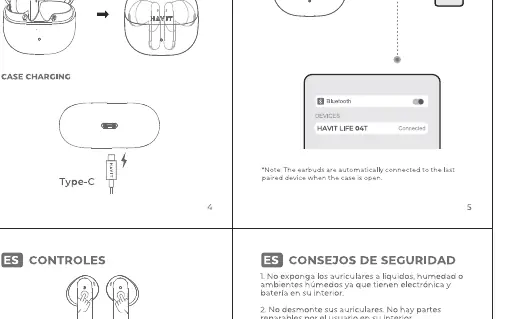
- Power On: Open the charging case to power on the earbuds.
- Connection: The earbuds will automatically enter pairing mode. Select "LIFE 04T" in your device's Bluetooth settings.
- Power Off: Place the earbuds back into the charging case and close the lid.
Touch Controls
The earbuds feature touch-sensitive areas on both the left (L) and right (R) units:
- Play/Pause: Tap twice (L/R).
- Previous Song: Touch and hold for 1 second (L).
- Next Song: Touch and hold for 1 second (R).
- Answer/End a call: Tap twice (L/R).
- Reject a call: Touch and hold for 1 second (L/R).
- Switch Game Mode/Music mode: Tap 3 times (R).
- Activate Voice Assistant: Tap 3 times (L).
Resetting the Earbuds
If you experience connectivity issues, follow these steps to reset the earbuds:
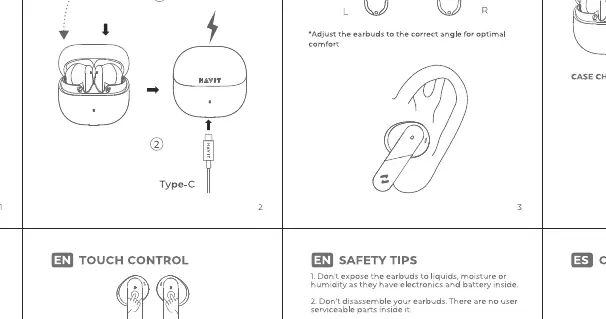
- Open the charging case.
- Take out both earbuds.
- Click the touch area 5 times. The orange light will flash 3 times.
- Put both earbuds back into the case and close the lid. The reset is complete.
Safety Guidelines
- Do not expose the earbuds to liquids, moisture, or humidity.
- Do not disassemble the earbuds; there are no user-serviceable parts inside.
- Keep away from sharp objects to avoid damage.
- Clean the charging contacts regularly with a dry cloth.
- Do not charge in extreme temperatures.
- Avoid listening at high volume for extended periods to prevent hearing damage.
Manufacturer information
Havit
Practical help
Common problems
Earbuds fail to pair or connect
Perform the reset procedure: take earbuds out, click 5 times, and return to the case.
Earbuds not charging
Clean the metal charging contacts on the earbuds and inside the case with a dry cloth.
Before use
- Remove protective film from the earbuds
- Charge the earbuds and case fully
- Ensure Bluetooth is enabled on your smartphone or device
Images and diagrams
- The touch control diagram illustrates the specific tap and hold gestures for each earbud (L/R).
- The reset diagram shows the 5-click sequence required to restore factory settings.
Model compatibility
- Compatible with standard Bluetooth-enabled devices.

Manual page author
Emily Carter
User documentation editor
Prepares concise manual descriptions and highlights the most useful setup, operation, and maintenance information for readers.