Tools / Drills
HiKOKI WH 14DBDL2 / WH 18DBDL2 Cordless Impact Driver
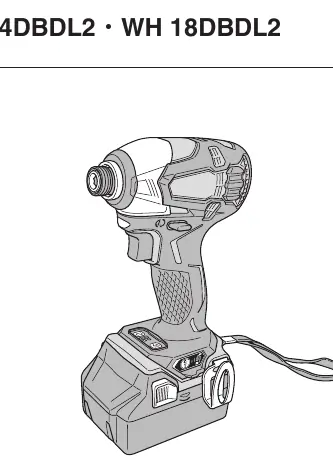
The HiKOKI WH 14DBDL2 and WH 18DBDL2 are high-performance cordless impact drivers designed for tightening and loosening screws, bolts, and nuts. These tools feature multiple tightening modes, IP56 dust and water resistance, and advanced...
Table of contents
Product Description
The HiKOKI WH 14DBDL2 and WH 18DBDL2 are professional-grade cordless impact drivers engineered for efficient fastening tasks. They are equipped with a variable tightening mode selector, allowing users to adjust torque for delicate, normal, heavy-load, or self-drilling screw applications. The tools are built with IP56-rated dust and water resistance, ensuring durability in challenging work environments.
Safety Warnings
- General Power Tool Safety: Always keep the work area clean and well-lit. Do not operate in explosive atmospheres. Keep children and bystanders away.
- Electrical Safety: Ensure plugs match outlets. Avoid body contact with earthed surfaces. Do not expose tools to rain or wet conditions.
- Personal Safety: Stay alert, use common sense, and wear appropriate personal protective equipment (eye protection, dust mask, etc.).
- Tool Use and Care: Do not force the tool. Use the correct tool for the application. Disconnect the battery before making adjustments or storing.
- Battery Tool Use: Recharge only with the manufacturer-specified charger. Use only designated battery packs.
Operation and Maintenance
Before use, ensure the battery is fully charged. The tool features a temperature protection circuit to prevent motor damage during continuous or heavy-load work. If the tool stops due to overload or overheating, release the switch and allow it to cool. Regularly inspect the driver bit and mounting screws for tightness. Clean the exterior with a soft, dry cloth or a cloth moistened with soapy water; avoid solvents that may damage plastic components.
Troubleshooting
- Tool doesn't run: Check battery charge or ensure the trigger wasn't held during battery insertion.
- Tool stops suddenly: Likely due to overload or overheating. Allow the tool to cool.
- Bit issues: Ensure the bit shape matches the tool's attachment portion (6.35 mm hex).
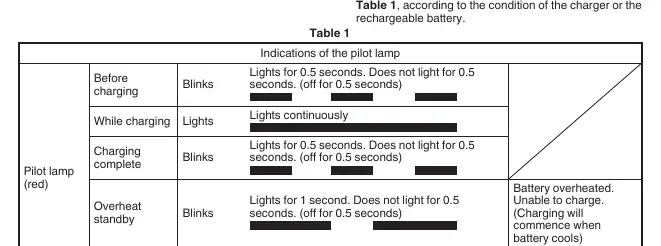
- Charging issues: Ensure the battery is fully inserted and the terminals are free of debris.
Disposal
In accordance with European Directive 2002/96/EC, electric tools that have reached the end of their life must be collected separately and returned to an environmentally compatible recycling facility.
Related manuals
Related manuals from the same brand or category.
Tools / Drills
HIKOKI DS 14DJL / DS 18DJL / DV 14DJL / DV 18DJL Cordless Driver Drill Instructions
HikokiTools / Drills
HiKOKI DS 14DBL2 / DS 18DBL2 / DV 14DBL2 / DV 18DBL2 Cordless Driver/Drill Instruction Manual
HikokiTools / Drills
HiKOKI D 13VL Drill
HikokiTools / Drills
HiKOKI DH 12DD Cordless Hammer Drill
HikokiTools / Power Tools
HIKOKI DH 14DSL / DH 18DSL Cordless Rotary Hammer
HikokiHome Appliances / Washing Machines
HiKOKI 14DSL Cordless Staple Gun
HikokiGeneral / Accessories