Electronics / Televisions
Hisense 100L5G-DLT100B 4K Smart Laser TV
Comprehensive guide for the Hisense 100L5G-DLT100B 4K Smart Laser TV, featuring ultra-short throw technology, cinematic sound, and smart home integration.
Table of contents
Manual images
Jump to the sectionProduct Overview
The Hisense 100L5G-DLT100B is an advanced 4K Smart Laser TV designed to provide a cinematic experience in your home. Utilizing ultra-short throw projection technology, this device can be placed just inches from the wall or screen, eliminating the need for complex ceiling mounts or long cable runs. It delivers a massive 100-inch display with 2700 ANSI lumens of brightness, ensuring a clear and vibrant picture even in various lighting conditions.
Key Features and Performance
The system is powered by the X-Fusion Laser Engine, which offers over 25,000 hours of entertainment. It supports HDR10 and Dolby Vision, providing exceptional detail in both shadows and highlights. For gamers and sports enthusiasts, the TV includes Smooth Motion and MEMC technology to reduce blur, along with Game Mode featuring Auto Low Latency Mode (ALLM) for optimized signal processing. The built-in 40W Dolby Atmos sound system provides immersive audio, with eARC support available for external sound systems.
Smart Functionality
Equipped with Google TV, the device aggregates movies, shows, and live TV from your favorite apps and subscriptions. It offers personalized recommendations based on your viewing habits. The system is also smart home ready, featuring built-in Wi-Fi, Bluetooth, and Google Assistant, allowing for seamless integration with your existing smart home ecosystem.
Installation and Setup
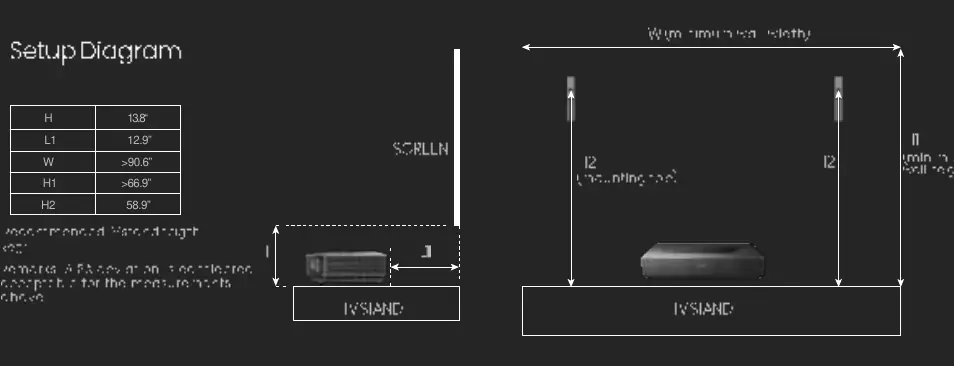
The Laser TV is designed for convenience, sitting on a standard media console. The included Ambient Light Rejecting (ALR) screen is essential for maintaining image quality by minimizing glare and preventing ambient light from washing out the picture. Proper placement is crucial; the projector requires specific distances from the wall and screen to achieve the optimal 100-inch image size. Users should refer to the provided setup diagrams to ensure the projector is positioned correctly relative to the screen height and distance.
Connectivity and Maintenance
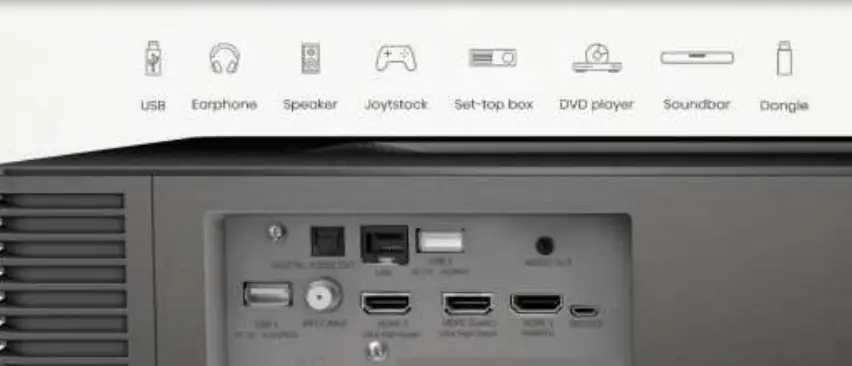
The rear panel features a variety of ports, including multiple HDMI inputs (with eARC support), USB ports, Ethernet, and digital/analog audio outputs, allowing for easy connection to set-top boxes, gaming consoles, and soundbars. Regular maintenance involves keeping the lens clean and ensuring the ventilation areas remain unobstructed to prevent overheating. The system is designed for long-term reliability, providing a high-quality alternative to traditional large-screen televisions.
Manufacturer information
Hisense
Practical help
Before use
- Ensure the media console is stable and level.
- Verify the distance from the wall matches the recommended setup diagram.
- Check that the Ambient Light Rejecting screen is properly mounted.
- Confirm all peripheral devices are connected to the correct HDMI ports.
- Ensure the power supply is connected to a grounded outlet.
Specs in practice
- Ultra Short Throw
- Allows the projector to be placed very close to the screen, saving space.
- 2700 ANSI Lumens
- The brightness level of the projector, ensuring visibility in lit rooms.
Images and diagrams
- The setup diagram illustrates the required distance from the wall (L1) and the recommended height for the screen (H1).
- It highlights the placement of the projector on a stand relative to the screen surface.
- The rear panel diagram identifies the location of USB, HDMI, and audio output ports for external device connectivity.
Model compatibility
- Supports Google Assistant and Amazon Alexa for voice control.
- Compatible with external sound systems via eARC/HDMI.
- Works with standard gaming consoles via high-speed HDMI ports.

Manual page author
David Miller
Documentation analyst
Organizes user manual content into clear summaries, with attention to model details, product context, and everyday usability.