Home Appliances / Washing Machines
Hitachi Job Management Partner 1/Base Function Reference
A comprehensive guide to the Hitachi Job Management Partner 1/Base Function Reference. Learn how to issue and acquire JP1 events using C/C++ APIs, configure event attributes, and integrate your applications with JP1/Base.
Table of contents
Manual images
Click an image to enlargeQuick guide from the manual
This document provides the function reference for Job Management Partner 1/Base (JP1/Base). It covers the procedures for issuing and acquiring JP1 events using C/C++ APIs, along with detailed function descriptions and attribute criteria.
Issuing JP1 Events
To issue user-defined JP1 events, follow these steps:
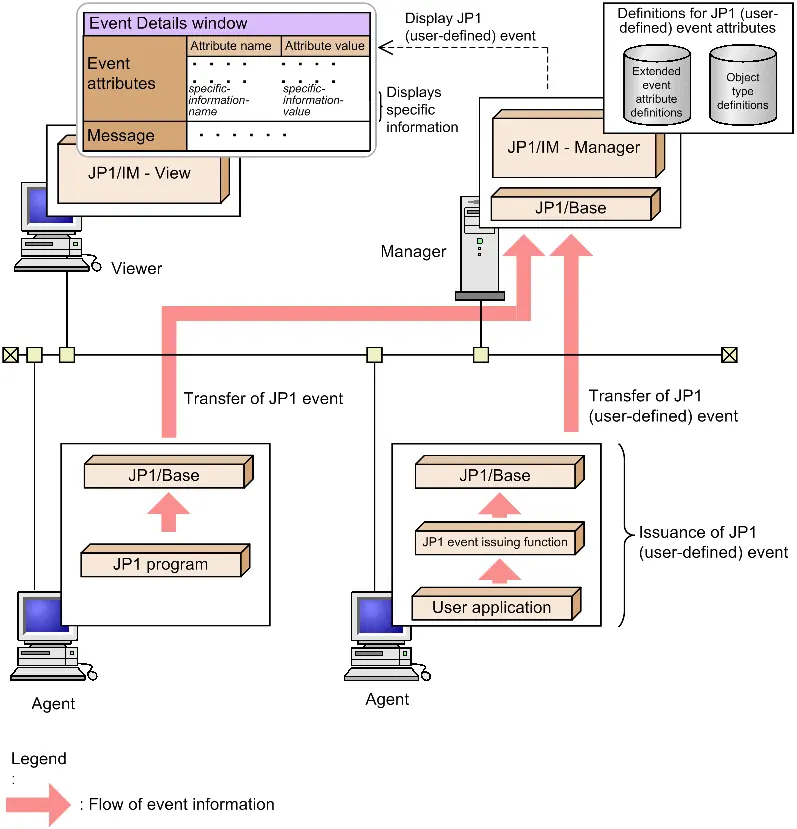
- Decide the types and attributes of the JP1 events you want to issue.
- Write code that uses the JP1 event issuing function (e.g., JevRegistEvent).
- Compile the source files using the appropriate libraries and header files.
Acquiring JP1 Events
To acquire JP1 events from the event database:
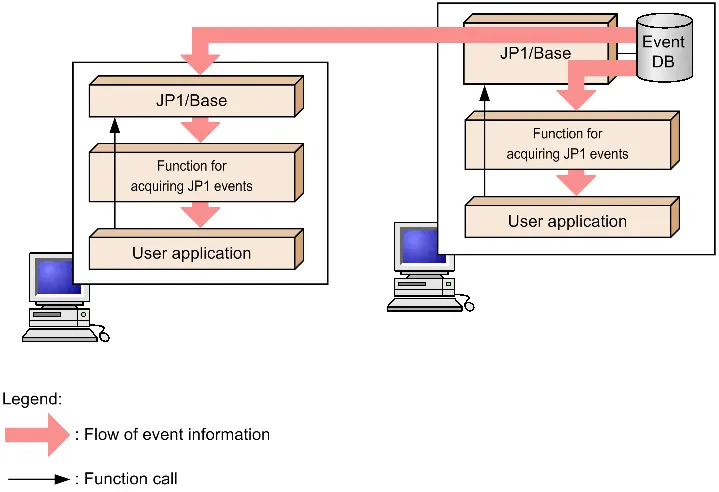
- Determine the types and attributes of the events to acquire.
- Define an event acquisition filter to specify the events.
- Write code using acquisition functions (e.g., JevGetOpen, JevGetEvent, JevGetClose).
- Compile the source files.
Compiling and Linking
Compiling requires the JP1/Base header file (JevApi.h) and specific libraries depending on your OS (Windows or UNIX). Ensure you use the correct compiler options as listed in the manual for your specific environment.
Event Attributes
JP1 events consist of basic attributes (e.g., Event ID, Message) and extended attributes (e.g., SEVERITY, PRODUCT_NAME). Extended attributes are crucial for filtering and monitoring events in JP1/IM.
Sample Source Files
The manual provides sample C source files (sender.c and receiver.c) located in the tools/event/ directory of your JP1/Base installation. These samples demonstrate how to implement the issuing and acquiring functions.
Manufacturer information
Hitachi, Ltd.
Practical help
Common problems
JEV_NO_LIBRARY error
Check if necessary files have been deleted or if incorrect compile options are specified. Reinstall JP1/Base if files are missing.
JEV_S_CONNECT_ERROR
Failed to connect to the event server. Verify the event server name and network connectivity.
JEV_S_NO_EVENT
No JP1 events satisfy the filter condition. Verify your filter syntax and event criteria.
JEV_S_PARAM_ERROR
An invalid parameter is specified in the function call. Check the function arguments.
Before use
- Install JP1/Base on the machine where you will perform compiling and execution.
- Install a supported compiler (e.g., Visual C++, gcc) for your OS.
- Ensure the user has Administrator permissions for the local PC.
- Decide on event types and attributes before writing code.
- Create definition files for extended event attributes and object types if viewing in JP1/IM.
Specs in practice
- JEVGET_NOWAIT
- Function returns an error immediately if no event is found.
Images and diagrams
- Overview of issuing a JP1 event: Shows the flow from user application to JP1/Base and JP1/IM.
- JP1 event acquisition: Shows the flow from Event DB to user application via acquisition functions.
Model compatibility
- JP1/Base supports various Windows, UNIX, and Linux operating systems.
- Requires specific compilers for each OS (e.g., Visual C++ for Windows, gcc for Linux).
- Binary compatibility is assured for user applications created in earlier versions of JP1/Base.

Manual page author
Emily Carter
User documentation editor
Prepares concise manual descriptions and highlights the most useful setup, operation, and maintenance information for readers.