Home / Seasonal Decorations
User Guide for Home Decorators Collection 22PG90098 LED Christmas Tree
Quick guide for the Home Decorators Collection 22PG90098 LED Christmas Tree. Includes assembly steps, light controller operation, demo mode settings, battery replacement, and maintenance instructions.
Quick answers from the manual
Quick answer
- The tree is preset to Demo Mode. To deactivate it, plug in the tree and press and hold the FUNCTION button on the in-line light controller for 5 seconds until the multi-light flashes 5 times. p. 3
Key actions
- Deactivate Demo Mode p. 3
- Replace Remote Battery p. 2
First start
- Assemble the stand and tree sections p. 1
Show 4 more answers Show less
Problems and fixes
The tree does not light
Ensure all tree sections are plugged into each other and the tree is plugged into the wall. Check for loose, broken, or missing bulbs.
p. 3Maintenance and reset
- Deactivate Demo Mode p. 3
Technical specifications
| Parameter | Value | Meaning | Pages |
|---|---|---|---|
| Battery Type | CR2032 | Required battery for remote control | p. 2, 3 |
Where to find it in the PDF
- Assembly and Safety p. 1
- Operation and Maintenance p. 2
- Demo Mode and Troubleshooting p. 3
Table of contents
Manual images
Click an image to enlargeImportant Information
This tree is equipped with the Quick Set feature for easy assembly in under 10 minutes. Note: The tree is preset to Demo Mode. You must deactivate this mode to access all light functions. The tree also includes a remote control and an in-line light controller.
Assembly
Follow these steps to assemble your tree:
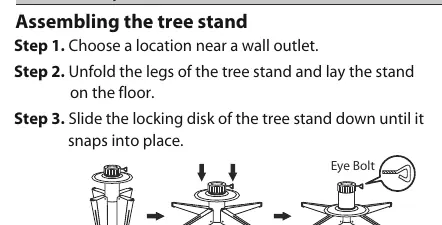
- Stand Setup: Unfold the legs of the tree stand and lay it on the floor. Slide the locking disk down until it snaps into place.
- Tree Assembly: Remove protective caps from the pole. Insert the bottom section into the stand, then stack the upper sections and the tree top. Ensure all wires are free of branches.
- Shaping: Start shaping branches from the bottom to the top. Fan out branches in a star shape. Once finished, slightly upsweep branch tips for a uniform look.
- Power: Insert the adapter into a wall outlet. If your tree includes a foot pedal, use it to turn the lights on/off.
Operation and Light Controller
The tree features a dual-color light controller and remote. You can cycle through 8 light functions by pressing the selector button:
- 1. Warm White - Multi: Fading
- 2. Warm White: Fading
- 3. Warm White - Multi: Alternating
- 4. Warm White: Steady
- 5. Warm White - Multi: Slow Fading
- 6. Multi: Steady
- 7. Multi: Fading
- 8. Combination
Demo Mode
The tree is preset to Demo Mode. To deactivate it:
- Plug in the tree.
- Press and hold the FUNCTION button on the in-line controller for 5 seconds.
- The multi-light will flash 5 times, indicating Demo Mode is off.
To activate Demo Mode, follow the same steps but wait for the lights to blink 3 times.
Maintenance and Care
- Lamp Replacement: Grasp the power adapter and unplug. Lift the lamp lock tab, pull the lamp and plastic base out, and replace with a new spare lamp provided with the product.
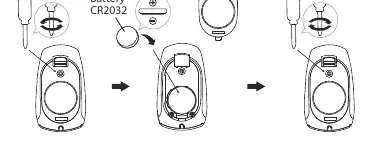
- Battery Replacement: Use a screwdriver to open the remote battery cover. Replace the used battery with a new CR2032 button cell battery, ensuring correct polarity (+ and -).
- Repairing Loose Hinges: Place the branch into the slot of the bracket, insert a new hinge pin through the holes, and secure with a washer.
- Storage: Unplug the tree, remove ornaments, and fold branches towards the pole. Store in a cool, dry location protected from sunlight.
Troubleshooting
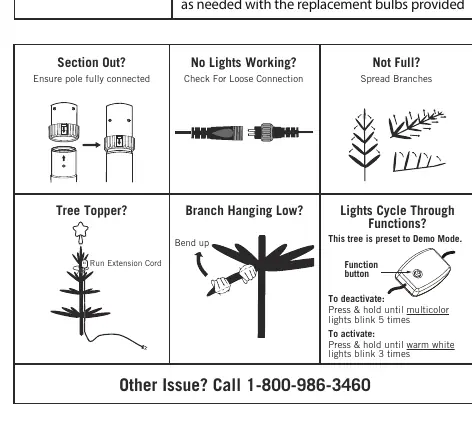
- Tree does not light: Ensure all sections are plugged into each other and the adapter is plugged into the wall. If equipped with a foot pedal, ensure it is switched on. Check for loose, broken, or missing bulbs.
- Lights cycle through functions: This indicates the tree is in Demo Mode. Follow the deactivation steps above.
Safety Warnings
- This product contains a lithium battery (CR2032). Keep away from children as ingestion can cause death.
- Do not expose the light set to moisture.
- Do not secure wiring with staples or nails.
- Use only the provided power adapter.
- Do not twist lamps; they are push-in type.
Manufacturer information
Home Decorators Collection
Practical help
Common problems
Tree does not light
Ensure all sections are connected, the adapter is plugged in, and the foot pedal (if applicable) is on. Check for loose or broken bulbs.
Tree is stuck in Demo Mode
Press and hold the FUNCTION button on the in-line controller for 5 seconds until the multi-light flashes 5 times.
Lights flickering
Check for loose, broken, or missing bulbs and replace them with the provided spares.
Before use
- Inspect product for damaged wire insulation or cracks.
- Remove the insulation tab from the remote control.
- Ensure all tree sections are fully connected.
- Deactivate Demo Mode if you wish to use custom light settings.
Show more Show less
Images and diagrams
- Assembly: Shows how to unfold the stand and insert the pole.
- Battery Replacement: Illustrates opening the remote cover and inserting the CR2032 battery.
- Troubleshooting: Visual guide for checking pole connections and spreading branches.
Model compatibility
- Use only the power adapter provided with this product.
- The controller and remote are designed specifically for this product.

Manual page author
David Miller
Documentation analyst