Home / Seasonal Decorations
User Manual for Home Decorators Collection 7.5ft Ashton Balsam Fir Christmas Tree 22LE31014
Quick guide for the Home Decorators Collection 7.5ft Ashton Balsam Fir Christmas Tree (22LE31014). Includes assembly instructions, remote and app setup, lighting functions, and troubleshooting.
Quick answers from the manual
Quick answer
- The 7.5ft Ashton Balsam Fir (22LE31014) is a pre-lit LED tree with 15 lighting functions controlled via remote or the 'Ledup' app. It uses Power Pole technology for automatic electrical connections between sections. p. 1
Key actions
- Activate Home Mode p. 1
- Set Timer p. 1
First start
- Assemble stand, insert sections A, B, and C, connect power, and use remote or app to control lights. p. 1
Show 4 more answers Show less
Problems and fixes
Tree fails to light
Check foot pedal, check coaxial connections, replace remote batteries.
p. 1Maintenance and reset
- Store in a cool, dry location. Remove batteries from remote before storage. p. 1
Technical specifications
| Parameter | Value | Meaning | Pages |
|---|---|---|---|
| Timer | 6h ON / 18h OFF | Automatic cycle | p. 1 |
| Lighting Functions | 15 | Total available lighting modes | p. 1 |
Where to find it in the PDF
- Assembly and Operation p. 1
Table of contents
Manual images
Click an image to enlargeQuick Guide
The 7.5ft Ashton Balsam Fir (22LE31014) is a pre-lit LED Christmas tree featuring Power Pole technology for automatic electrical connections between sections. It offers 15 lighting functions controlled via the included remote or the Ledup app. The tree is for indoor use only.
Assembly Instructions
Preparation: Unpack all components, including the stand, three tree sections (A, B, C), and the remote control. Wear appropriate clothing to avoid scratches.
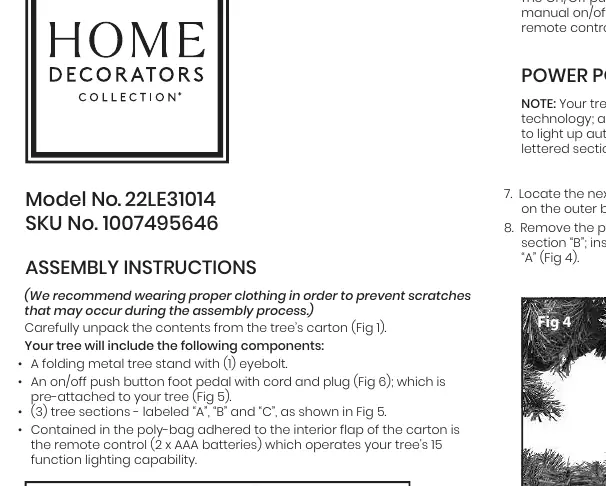
- Stand Assembly: Remove the stand from the bag, loosen the eyebolt, and open it to form an 'X'. Insert the eyebolt and thread it clockwise, leaving enough room for the tree pole.
- Section A: Locate the bottom section labeled 'A'. Remove the protective plastic cap from the pole and insert it into the stand. Tighten the eyebolt securely.
- Section B: Locate section 'B'. Remove the protective cap and insert the pole into the top of section 'A'.
- Section C: Locate the top section 'C'. Remove the protective cap and insert the pole into the top of section 'B'.
- Finishing: Untie the fabric strapping on the branches (do not cut). Gently guide branches downward. Connect the power cord to an electrical outlet.
Remote and App Operation
The tree's 15 lighting functions can be managed via the remote or the Ledup app.
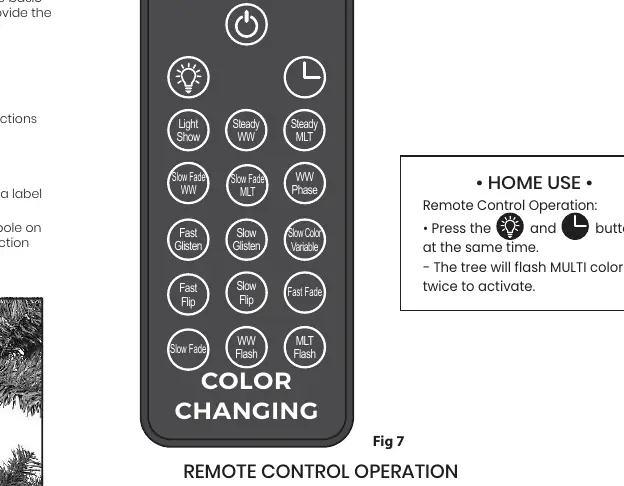
- Home Mode Activation: Press the specific buttons on the remote simultaneously (see Fig 8). The tree will flash MULTI color twice to confirm. This allows manual operation.
- Timer Feature: Press the 'Timer' button. The lights will flash WARM WHITE 3 times to indicate the 6-hour ON / 18-hour OFF timer is active. Press again to deactivate (lights flash MULTI 3 times).
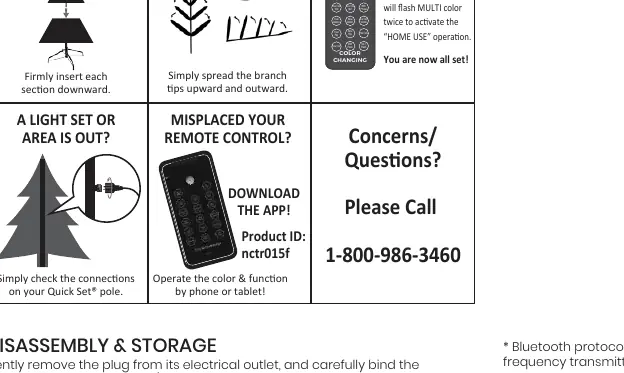
- App Setup: Download the 'Ledup' app. Scan the QR code or enter Product ID: nctr015f. Bluetooth must be enabled on your device.
Troubleshooting
- Tree does not light: Check the foot pedal switch, ensure the power cord is plugged in, and check that all coaxial connections between sections are secure.
- Remote not working: Replace the 2 x AAA batteries. Ensure 'Home Mode' is activated.
- Section not lighting: Remove the section and reinsert it firmly to ensure the Power Pole connection is made.
Disassembly and Storage
- Unplug the tree and bind the cord.
- Lift each section straight up, starting from the top.
- Loosen the eyebolt to remove the bottom section from the stand.
- Fold branches upward toward the center and secure with the provided fabric strapping.
- Replace protective plastic caps on poles before storing in a cool, dry location.
Manufacturer information
Home Decorators Collection
Practical help
Common problems
Tree does not illuminate
Check the foot pedal switch, ensure the power cord is plugged in, check coaxial connections between sections, or replace remote batteries.
Specific section does not light
Remove the section and reinsert it firmly to ensure the Power Pole connection is established.
Remote control not responding
Ensure 'Home Mode' is activated by pressing the designated buttons simultaneously until the tree flashes MULTI color twice.
Before use
- Check all components (stand, 3 sections, remote)
- Ensure electrical outlet is working
- Wear clothing to prevent scratches during assembly
- Do not cut fabric strapping on branches
- Ensure Bluetooth is enabled for App usage
Show more Show less
Specs in practice
- Power Pole Technology
- Automatic electrical connection between tree sections upon insertion.
Images and diagrams
- Fig 1-6: Assembly sequence and component identification
- Fig 7: Remote control functions
- Fig 8: Home Mode activation procedure
- Fig 9: Branch unfolding instructions
Model compatibility
- Indoor use only
- Bluetooth required for Ledup App
- Requires 2 x AAA batteries for remote

Manual page author
Michael Turner
Technical manual editor